


Game-based learning
Game-based learning without losing the learning
Students play quiz shows, escape rooms, board games, arcade challenges and team races, and every move is an answer to one of your questions, graded and saved in your reports.
- 27 game modes from one quiz
- Every game ends in a graded answer
- Free for teachers
What is game-based learning?
Game-based learning uses the motivation of games to drive practice of real lesson content. In Edform the game is a layer on top of your questions, not a separate activity to build. Run a live quiz game with a timer and a leaderboard, pick one of 27 modes, from word games like anagram and crossword to arcade games, escape rooms, quiz boards and board games, or play live in teams with a progress scene on the projector. Each move is an answer to one of your questions, so results land in the same reports as homework and you see what students actually learned.
Edform at a glance
- Price
- Free for teachers: Basic is free forever, with no credit card, and includes every feature.
- AI tools
- AI teacher tools with 5 AI points a month on Basic and 300 a month on Pro.
- Students
- Students join with a code. They need no email address and no account.
- Grading
- Quizzes and worksheets are graded automatically, with results per student and per question.
- Devices
- Runs in the browser on laptops, tablets, phones and interactive boards. Nothing to install.
- Languages
- Available in 32 languages.
- Works with
- Google Classroom, Microsoft Teams, ClassLink and learning platforms that support LTI 1.3.
- Library
- A free library of ready-made quizzes, worksheets and lessons that teachers can copy and edit.
How to bring game-based learning into your class
- 1
Start from your questions
The questions of any quiz, worksheet or video lesson can be played as a game. Let AI write them if you're short on time.
- 2
Pick a game
Choose a mode that suits your class; the picker shows the best ones for your students' age first.
- 3
Play, then look at the results
Play a live quiz game, a race, a team game or homework, and check the per-question report afterwards.
Try it yourself
Play a game made from a quiz
Same questions, different games. Pick one and play.
27 ways to play the same questions
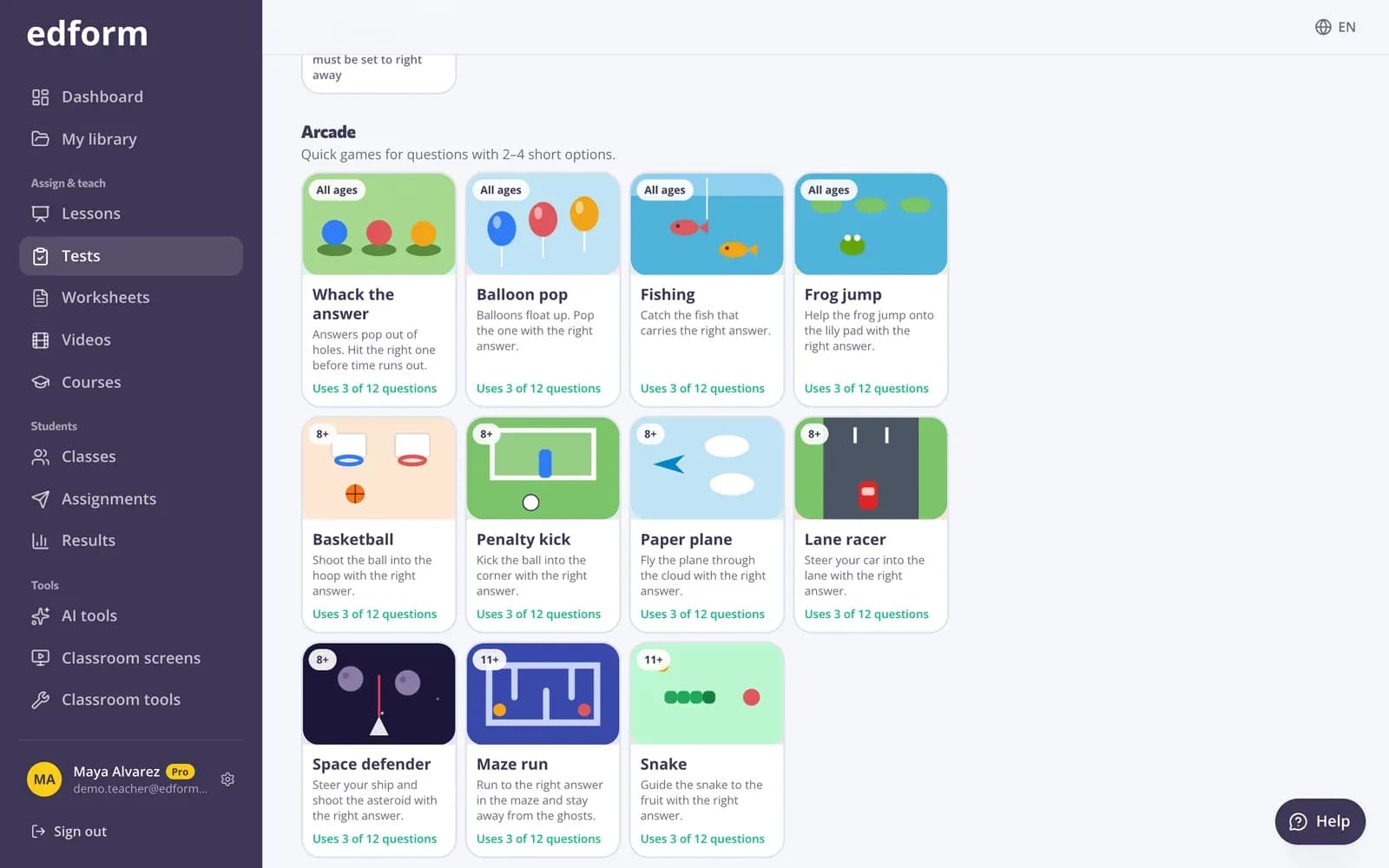
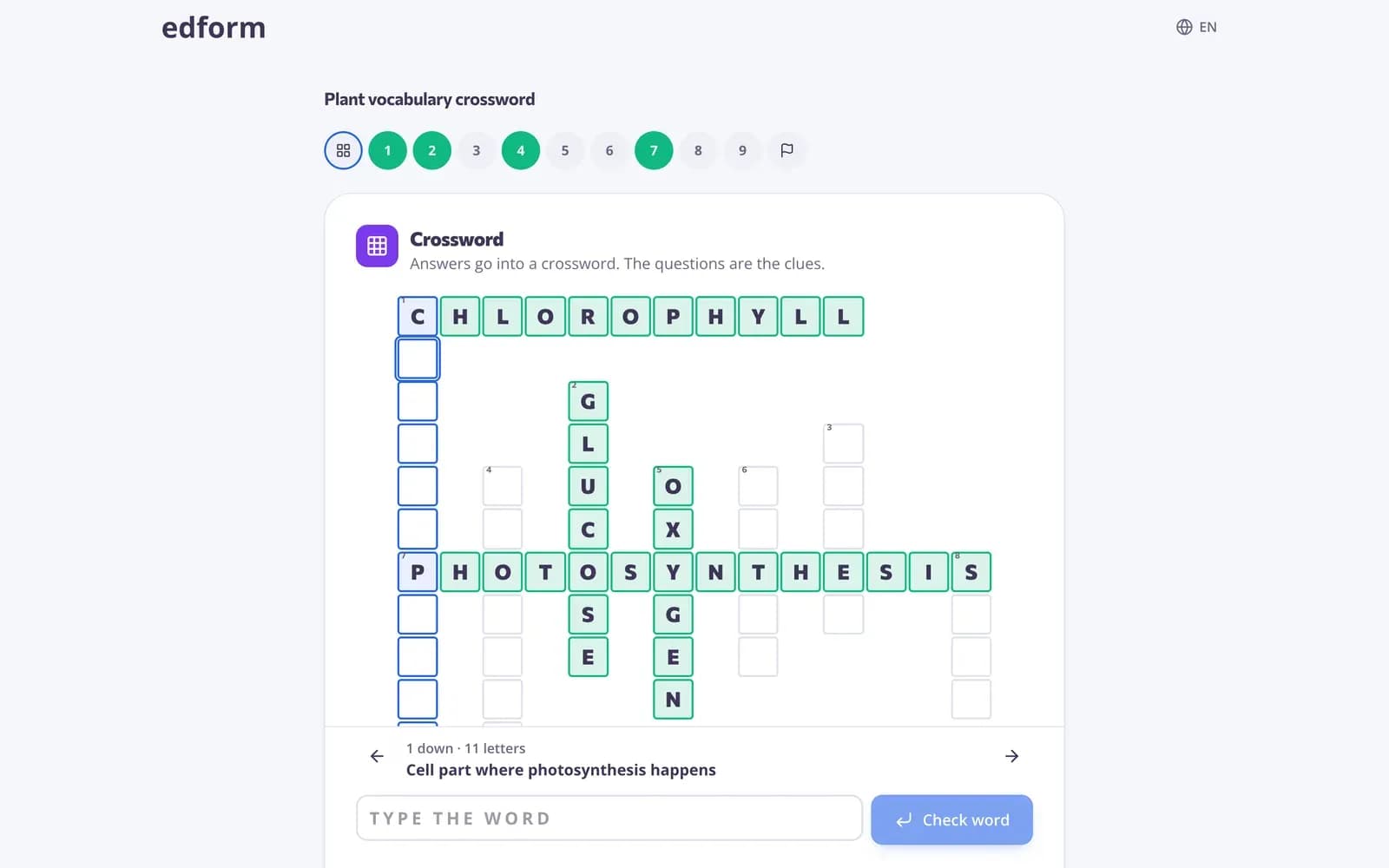
Word games, timed challenges, arcade games and adventures. The server keeps the answers hidden, and every game ends in a normal graded answer.
- Guess the word, anagram, crossword
- Arcade games like maze run and balloon pop
- Escape room, quiz board and board game
Team play on one screen
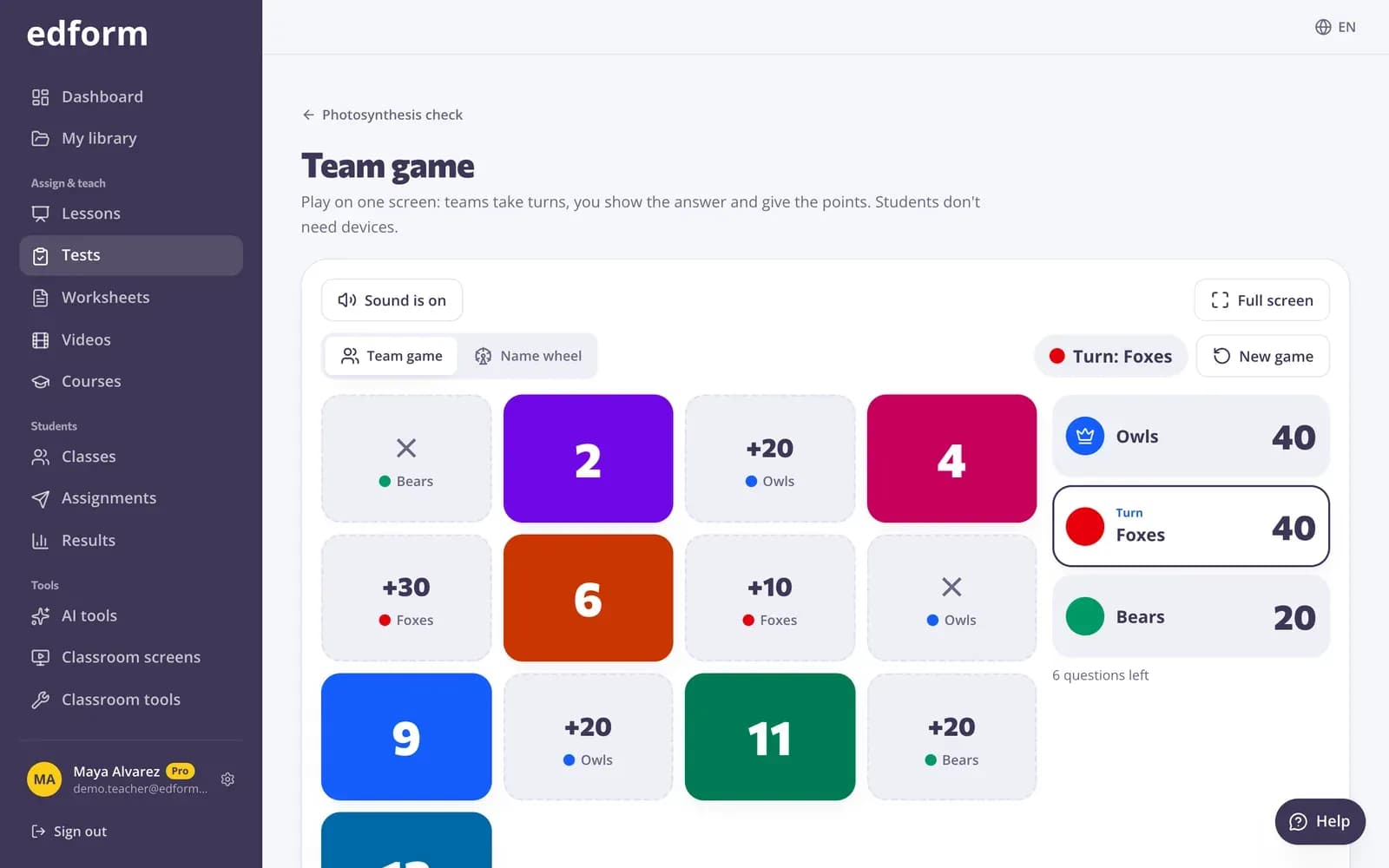
Split the class into 2–6 teams that take turns on a game board with tiles, chests, a wheel, Connect Four or tic-tac-toe, with surprises along the way.
- No student devices needed
- Surprises and a timer
- Name wheel from your class list
Results that count
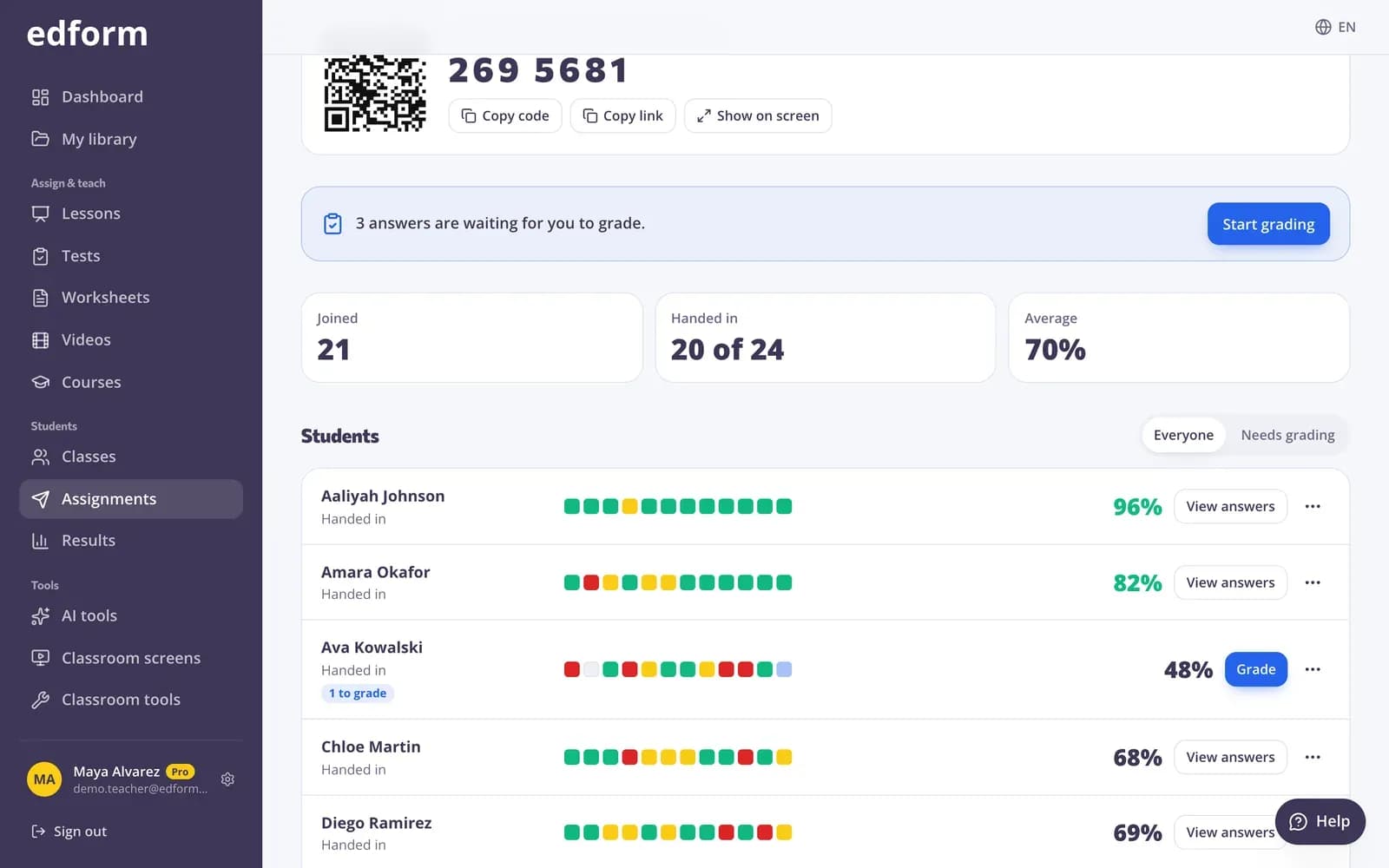
Because each game is built from your questions, you see every answer per student and per question, just like homework.
- Scores per student
- Results per question
- CSV export
Games with real learning inside
27 game modes
Word games, arcade games, boards and adventures from any quiz.
Live quiz game
A timer on every question, points for fast right answers, a leaderboard and a podium.
Teams
Live team races with 2–8 teams, balanced automatically or chosen by students.
Escape rooms
Students answer to collect code digits and open the locks, room by room.
One-screen team game
A board game for the whole class on your projector.
Results that count
Every game ends in a graded answer that appears in your reports.
Teachers use game-based learning for
- 01
Friday review
A live quiz game, a team race or a quiz board with the week's questions.
- 02
Vocabulary and spelling
Anagram, missing letters and crossword from a word list.
- 03
Homework students want to do
An arcade or adventure mode at home instead of a plain worksheet.
- 04
Rewarding effort
Progress scenes show every right answer as a step forward.
Explore more
- Classroom gamesLive quiz, race, team and arcade review games
- Escape room makerTurn a quiz into a digital escape room
- Quiz board gameA review board of questions and point values
- Team quiz gameOne screen, no student devices, 2–6 teams
- Jeopardy-style review gameA review game board with 5 categories and 25 questions worth 100 to 500 points.
- Test prepPractice tests, flashcards and review games before exams
Step-by-step guides
- Game modesTurn any test into an arcade, word game, board or escape room.
- Live quiz gamePlay questions with a timer, points, a leaderboard and a podium.
- Live raceRun a live race: students join with a code and race on your screen at their own pace.
- Team gamePlay a quiz on one screen with teams, a game board and no student devices.
Frequently asked questions
Is game-based learning the same as gamification?
Not quite. Gamification adds points or badges around ordinary tasks; game-based learning makes the game itself the practice. In Edform each move in a game is an answer to one of your questions.
Do the games work for any subject?
Yes. Adventures like the quiz board, escape room and board game work with every question type. Word games such as anagram and crossword need questions whose answers are words.
Are the games graded?
Yes. Every game mode ends in a normal graded answer, so results appear in the same report as homework.
Is there a live quiz game with points and a leaderboard?
Yes. Choose Live quiz game and everyone answers the same question against a timer. Fast right answers earn up to 1,000 points, answers in a row add a bonus, a leaderboard follows every question and the game ends on a podium. The report shows each student's answers and game points.
Can I play without student devices?
Yes. The team game runs on one screen: the class plays in 2–6 teams and you award the points.
Which games suit young students?
When you choose who the activity is for, the game picker shows the modes that suit that age first.
How do I start with game-based learning?
Start from one learning goal, not the game. Write or reuse a few questions on it, pick a mode that suits your students' age, tell the class what they're practising, then play. Afterwards, talk through the questions most students missed, or finish with a quick exit ticket.
Can I use game-based learning online or as homework?
Yes. Students join live games from home with a code, and any mode can be given as homework with a deadline. The results land in the same reports either way.
Does it work for students who need more support?
Yes. In team games students talk each answer through together, so nobody answers alone. For homework games you can allow retakes and give single students another attempt or a later deadline from the report.
Is it free?
Yes. Every game and mode is free for teachers.
Turn your next quiz into a game
Free for teachers. Students join with a code on any device.
- Free for teachers
- No credit card
- Works on any device