

Pentru școli
O singură platformă de predare pentru toată școala
Profesorii primesc quizuri, jocuri, lecții, AI și instrumente pentru clasă într-un singur loc. Tu îi inviți prin e-mail, gestionezi licențele dintr-o singură pagină și ajungi la familii prin pliante digitale.
- Plan pentru școală de la 5 profesori, cu licențe transferabile
- Conectare cu Google sau nume de utilizator fără e-mail
- Fiecare profesor poate începe gratuit chiar azi
Ce este Edform pentru școli?
Edform este o platformă de învățare pentru școli care adaugă un Plan școlar la instrumentele sale gratuite pentru profesori. O școală cumpără licențe pentru cinci sau mai mulți profesori, îi invită pe e-mail și îi gestionează pe toți dintr-o singură pagină: atribui o licență, o iei înapoi și o dai altui coleg. Profesorii continuă să folosească aceleași instrumente pentru quizuri, fișe de lucru, jocuri, lecții, video și AI. Elevii se conectează cu Google, Microsoft sau cu un nume de utilizator primit de la profesor, iar școala poate rula o tablă de pliante care trimite familiilor noutăți despre clasa copilului lor.
Edform pe scurt
- Preț
- Gratuit pentru profesori: Basic este gratuit pentru totdeauna, fără card bancar, și include toate funcționalitățile.
- Instrumente AI
- Instrumente AI pentru profesori, cu 5 puncte AI pe lună în Basic și 300 pe lună în Pro.
- Elevi
- Elevii intră cu un cod. Nu au nevoie nici de adresă de e-mail, nici de cont.
- Corectare
- Quizurile și fișele de lucru se corectează automat, cu rezultate pentru fiecare elev și fiecare întrebare.
- Dispozitive
- Funcționează în browser pe laptopuri, tablete, telefoane și table interactive. Nimic de instalat.
- Limbi
- Disponibil în 32 de limbi.
- Compatibil cu
- Google Classroom, Microsoft Teams, ClassLink și platformele de învățare care acceptă LTI 1.3.
- Bibliotecă
- O bibliotecă gratuită de quizuri, fișe de lucru și lecții gata făcute, pe care profesorii le pot copia și edita.
Cum configurezi Edform pentru școala ta
- 1
Creează-ți școala
Alege numărul de profesori (de la 5), plătește lunar sau anual, iar pagina școlii se deschide cu tine ca proprietar.
- 2
Invită-ți profesorii
Lipește o listă de adrese de e-mail. Fiecare profesor primește un link valabil 30 de zile, care îi rezervă o licență până se alătură.
- 3
Predați și ajungeți la familii
Profesorii creează imediat clase și activități. Configurează un panou de pliante, ca familiile să primească noutățile școlii prin e-mail.
Încearcă singur
Fără înregistrare — încearcă-l ca elev
Acesta este playerul Edform real. Răspunde la întrebări și vezi cum sunt verificate.
Invită-ți tot personalul dintr-odată
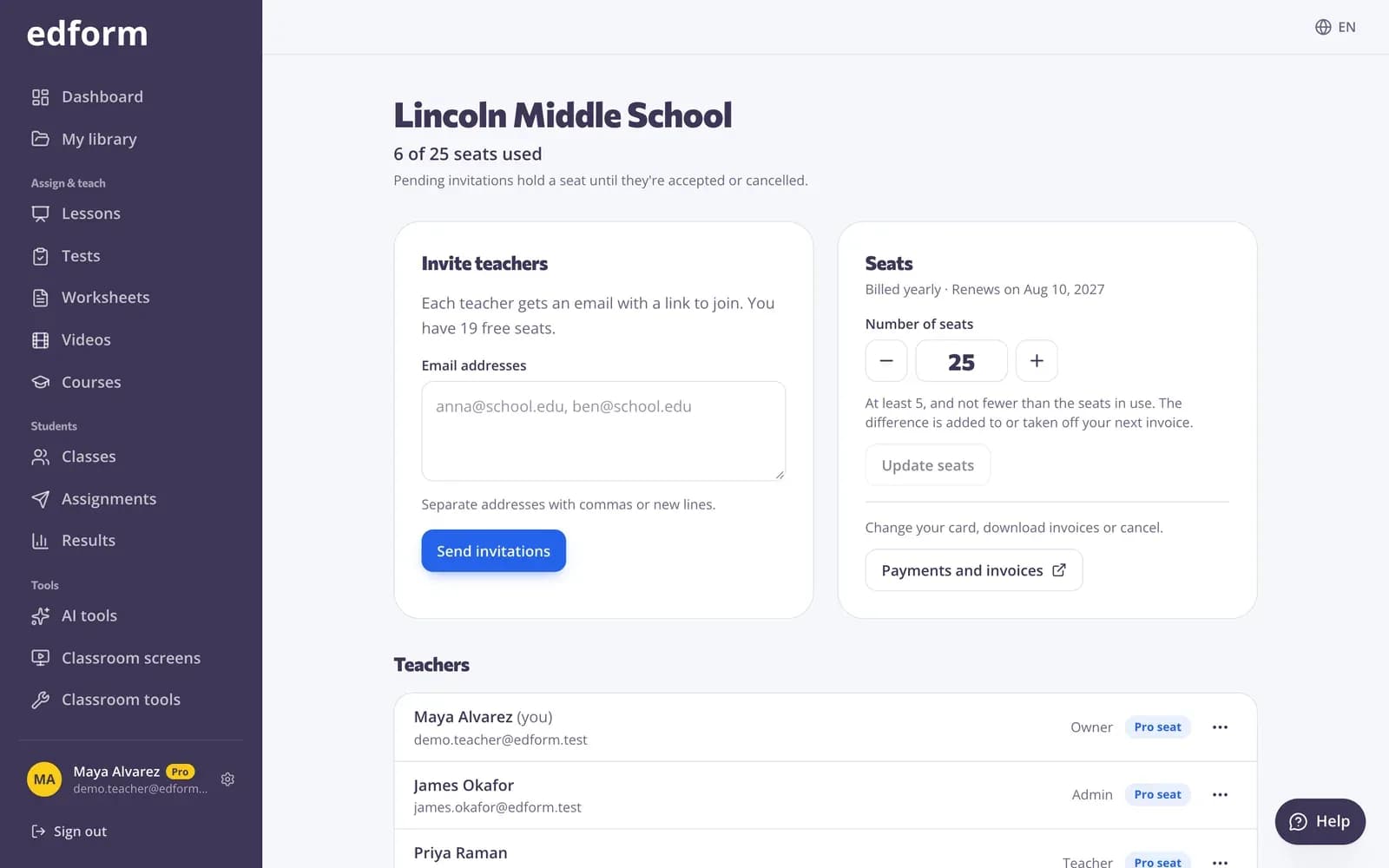
Lipește adresele de e-mail ale profesorilor și trimite invitațiile. Vezi cine s-a alăturat și cine e încă în așteptare și poți copia oricând un link de invitație sau anula o invitație.
- Invită mai mulți profesori deodată
- Fiecare invitație rezervă o licență timp de 30 de zile
- Proprietarii și administratorii gestionează școala
Pliante digitale pentru familii
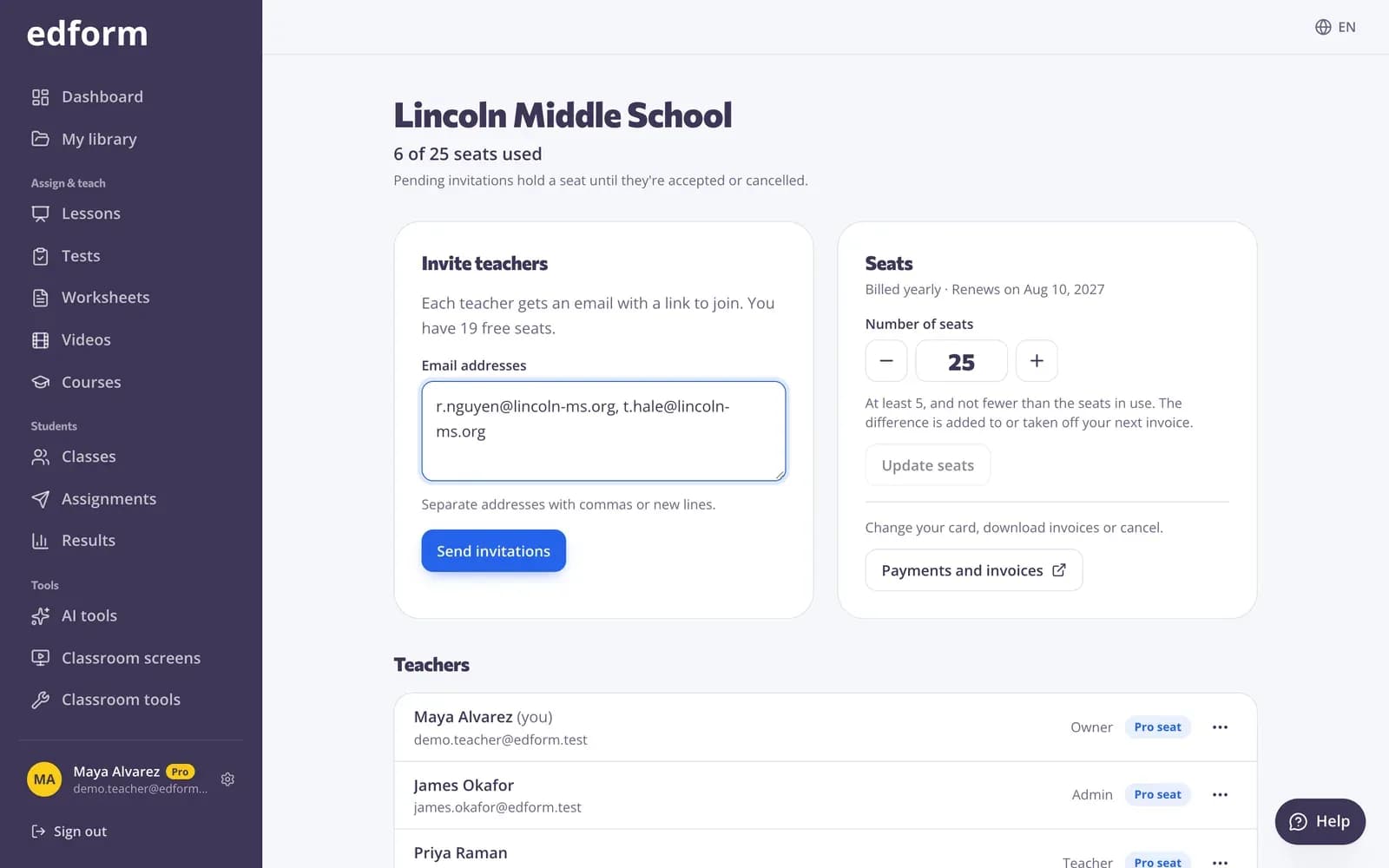
Oferă-i școlii tale un panou de pliante. Personalul postează pliante imediat, grupurile din comunitate așteaptă aprobarea ta, iar familiile primesc prin e-mail pliantele noi pentru clasele alese.
- Coadă de verificare pentru pliantele din comunitate
- E-mailuri pe clase la data de început
- Vizualizări și clicuri pentru fiecare pliant
Clase și liste de elevi fără muncă inutilă
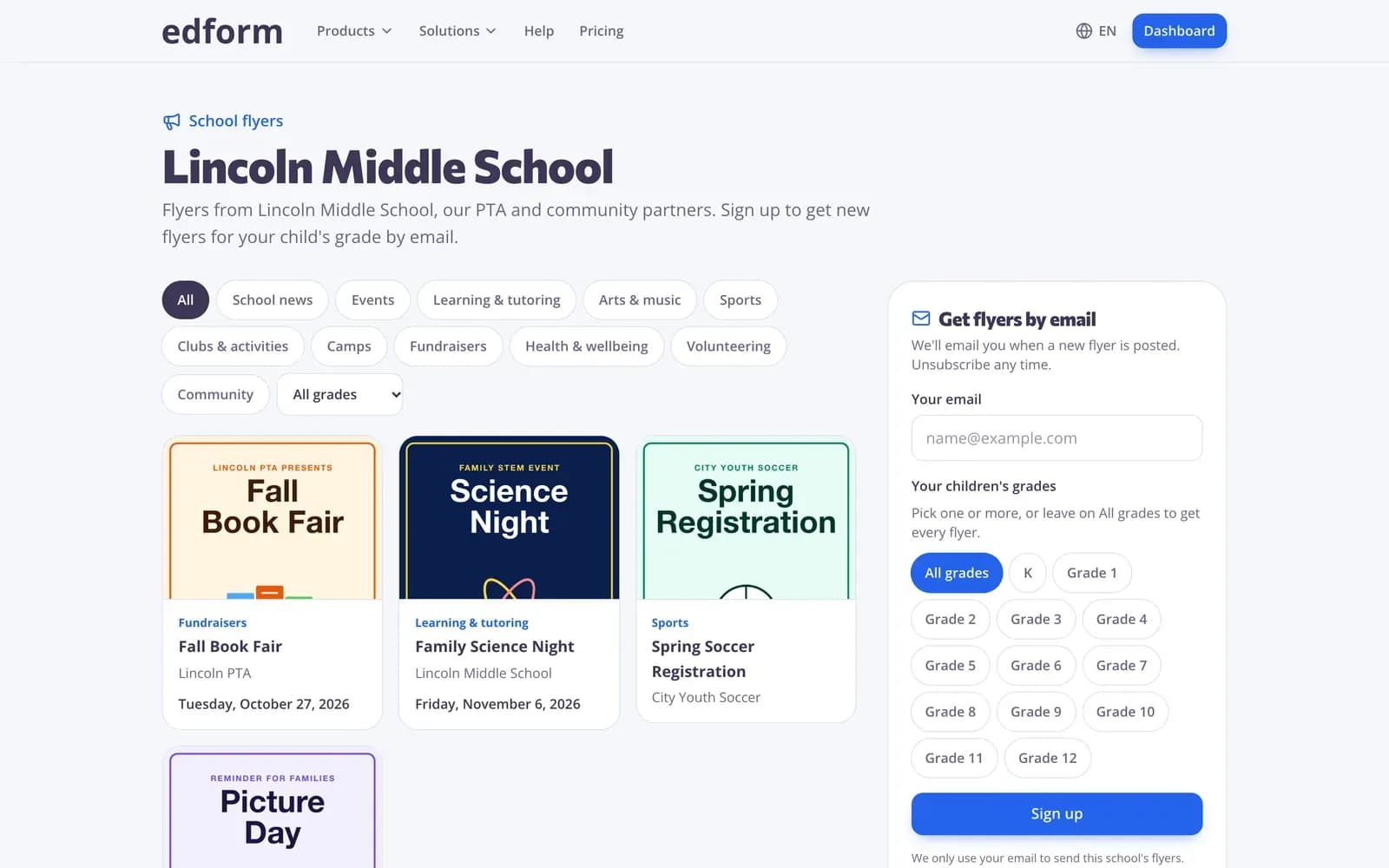
Profesorii lipesc o listă de nume sau încarcă un fișier CSV. Elevii fără adresă de e-mail primesc un nume de utilizator și o parolă pe care profesorul le poate tipări.
- Lipește numele ca să creezi o clasă
- Import și export CSV
- Profesorii resetează singuri parolele elevilor
Ce primesc școlile
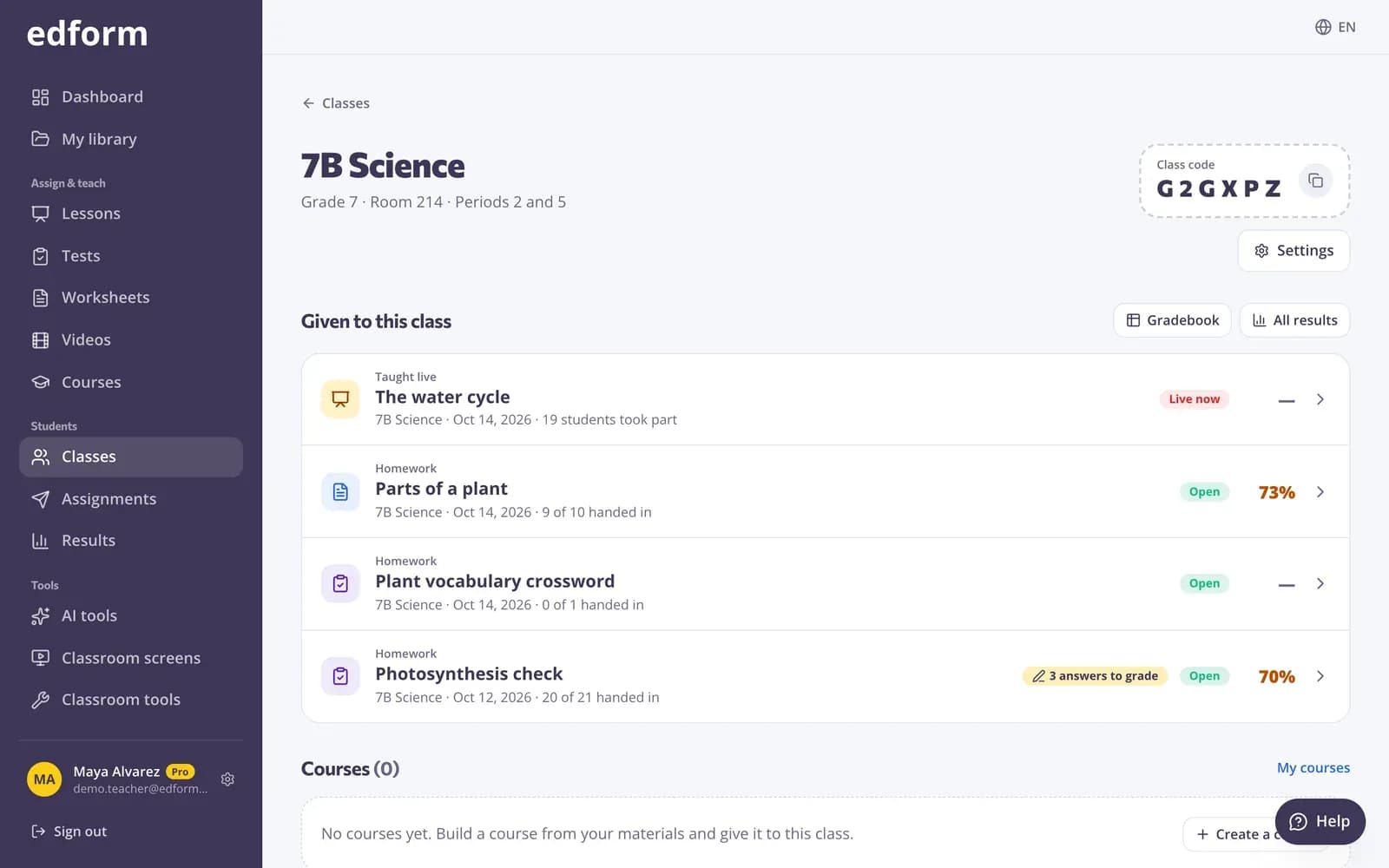
Licențe pe care le poți muta
Dă o licență unui profesor, ia-o înapoi când pleacă și ofer-o altcuiva. Adaugă licențe când ai nevoie.
Invitații prin e-mail
Invită mai mulți profesori odată. Fiecare invitație ține o licență blocată până este acceptată sau anulată.
Conectarea pe care o folosesc deja elevii
Conectare cu Google sau Microsoft, ori cu nume de utilizator fără e-mail.
Liste de clase în câteva secunde
Profesorii lipesc numele sau încarcă un CSV, apoi exportă oricând lista clasei.
Pliante școlare
O tablă publică de pliante, înscrierea familiilor pe clase, aprobări și un poster tipărit cu cod QR.
Biblioteca comunității
Profesorii publică cele mai bune activități și copiază activități gata făcute de la alți profesori.
Școlile folosesc Edform pentru
- 01
O singură trusă de instrumente pentru fiecare clasă
Profesorii folosesc o singură platformă pentru quizuri, jocuri, lecții și AI, în locul unor instrumente separate pentru fiecare.
- 02
Schimbări de personal
Când un profesor pleacă, mută-i licența la noul coleg din câteva clicuri.
- 03
Comunicarea cu familiile
Trimite familiilor pliante despre evenimente și noutăți, pe clase, cu abonarea și dezabonarea gestionate pentru tine.
- 04
Sprijin pentru profesori prin AI
Planuri de lecție, grile de evaluare și scrisori pentru părinți scrise pentru limba și sistemul tău de învățământ.
Descoperă mai multe
- IntegrăriGoogle Classroom, Microsoft Teams, LMS (LTI)
- Google ClassroomImportă clase și distribuie teme în Classroom
- Microsoft TeamsConectează-te cu Microsoft, importă clasele din Teams și atribuie în Teams
- PrețuriGratuit pentru profesori, planuri pentru școli
- Pliante pentru școalăPliante digitale pentru familii
- Conectări pentru elevi fără e-mailNume de utilizator și parole pentru elevii fără e-mail
Ghiduri pas cu pas
- Planul pentru școliCumpără licențe Pro pentru școala ta, invită profesori și mută licențele între ei.
- Invită profesoriDistribuie linkul tău de invitație colegilor și primiți amândoi o săptămână de Pro.
- Conturi pentru eleviCreează nume de utilizator și parole pentru elevii fără e-mail și ajută-i să se conecteze.
- Microsoft TeamsConectează-te cu Microsoft, importă clasele din Teams, păstrează-le sincronizate și atribuie în Teams.
Întrebări frecvente
Au nevoie profesorii de Planul școlar ca să folosească Edform?
Nu. Orice profesor se poate înregistra și poate folosi gratuit toate funcționalitățile. Planul școlar este pentru școlile care vor să plătească pentru profesorii lor într-un singur loc și să îi gestioneze împreună.
Cum funcționează licențele școlare?
Cumperi licențe pentru 5 sau mai mulți profesori, lunar sau anual, la același preț pe lună. Poți lua înapoi o licență, o poți da altui profesor sau poți adăuga licențe oricând. O invitație care nu a fost încă acceptată blochează o licență.
Ce opțiuni de conectare pot folosi elevii?
Conturi Google, conturi școlare Microsoft, un e-mail și o parolă sau un nume de utilizator și o parolă fără e-mail, create de profesorul lor.
Putem importa listele claselor?
Da. Profesorii importă clase din Google Classroom sau Microsoft Teams dintr-un singur click, ori lipesc numele sau încarcă un fișier CSV. Elevii fără e-mail primesc imediat un nume de utilizator și o parolă.
Ce sunt pliantele școlare?
Un panou gratuit de pliante pentru școala ta. Personalul și grupurile din comunitate publică pliante, tu le aprobi pe cele din comunitate, iar familiile care se înscriu primesc pliante noi pe e-mail pentru clasele copilului lor.
Cum protejează Edform datele elevilor?
Edform nu are reclame și nici cookie-uri de urmărire, iar datele elevilor nu sunt folosite niciodată pentru antrenarea AI. Elevii nu pot încărca fișiere, folosi instrumente AI, publica sau trimite mesaje nimănui, iar datele sunt stocate în Germania. Pagina noastră de confidențialitate pentru elevi explică modul în care gestionăm FERPA, COPPA și GDPR.
Pot profesorii să folosească AI fără a partaja lucrările elevilor?
Da. Instrumentele AI sunt doar pentru profesori și creează schițe pe baza a ceea ce tastează sau încarcă profesorul. Răspunsurile elevilor nu sunt trimise niciodată unui serviciu AI: întrebările închise sunt notate după reguli fixe, iar răspunsurile deschise sunt evaluate de profesor.
Pot profesorii să creeze cursuri online complete?
Da. Un curs pune la un loc quizurile, fișele de lucru, lecțiile, videoclipurile și textele unui profesor în unități. Oferă-l unei clase sau distribuie un cod, iar un tabel de progres arată rezultatele fiecărui elev bloc cu bloc.
Cum plătim?
Cu cardul, printr-un checkout securizat, lunar sau anual. Facturile sunt emise pe numele școlii tale, iar tu poți actualiza cardul sau descărca facturile din portalul de facturare.
Funcționează Edform cu Google Classroom și Microsoft Teams?
Da. Profesorii importă clasele lor din Google Classroom sau Microsoft Teams, distribuie teme în Classroom sau le atribuie în Teams, iar elevii se conectează cu conturile lor școlare Google sau Microsoft. Dacă școala ta permite doar aplicațiilor aprobate să citească listele claselor, administratorul tău Google Workspace sau Microsoft 365 aprobă Edform o singură dată.
Google Classroom este o marcă comercială a Google LLC. Microsoft și Microsoft Teams sunt mărci comerciale ale grupului de companii Microsoft.
Configurează Edform pentru școala ta
Începe cu 5 profesori și adaugă alții oricând. Profesorii pot începe și singuri, gratuit, chiar azi.
- Gratuit pentru profesori
- Fără card bancar
- Funcționează pe orice dispozitiv