

Fișe interactive
Fișele tale de lucru, acum interactive
Încarcă fișele de lucru care îți plac deja, plasează câmpuri de răspuns direct pe pagină și distribuie un link. Elevii le completează pe orice dispozitiv, iar Edform verifică răspunsurile pentru tine.
- Funcționează cu PDF-uri, scanări și fotografii
- 8 tipuri de câmpuri de răspuns
- Corectat automat
Ce este o fișă interactivă?
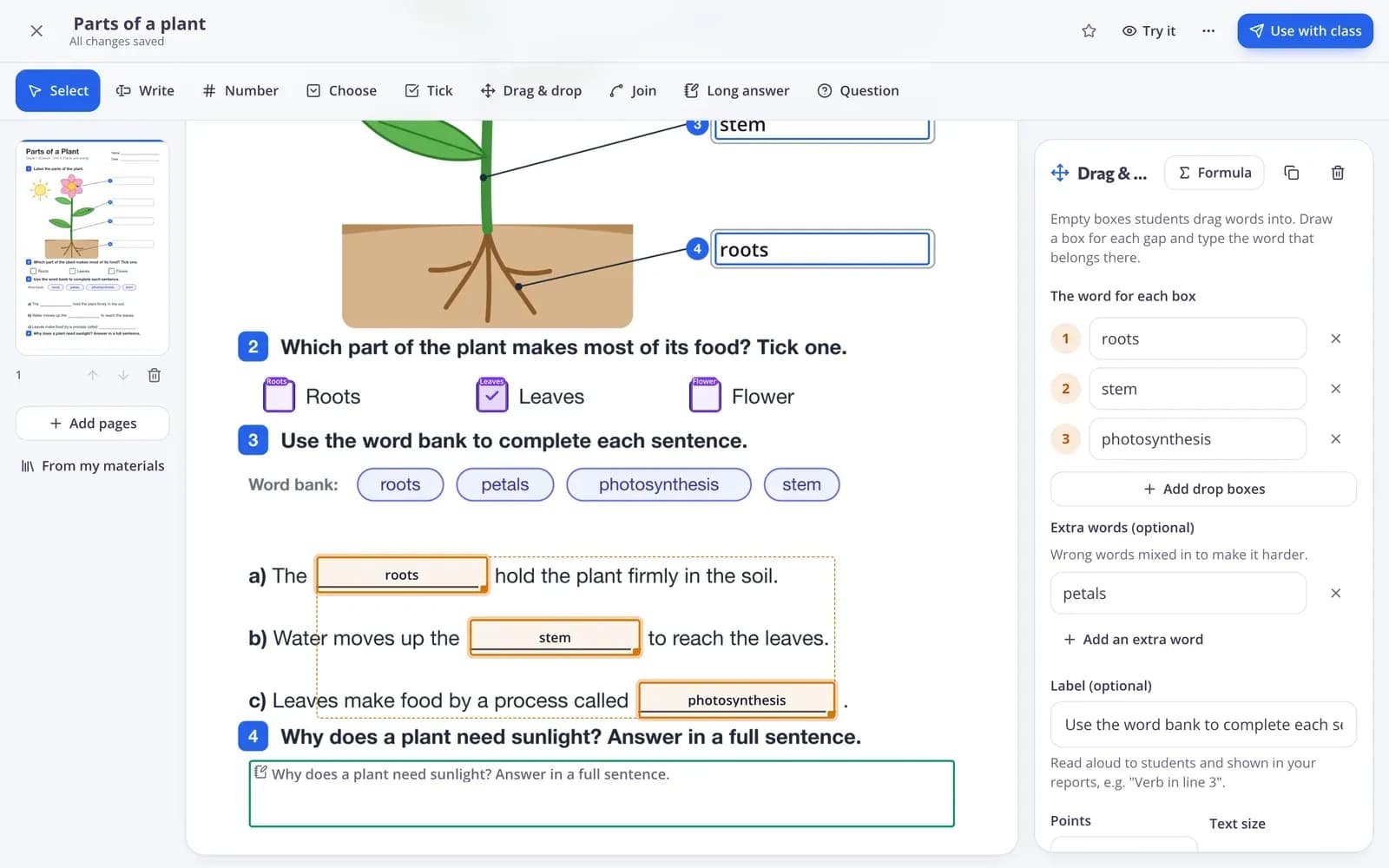
Fișele interactive sunt fișe de lucru obișnuite — un PDF, o scanare sau o fotografie — cu câmpuri de răspuns plasate deasupra, astfel încât elevii să le poată completa online. În loc să predea hârtia, elevii scriu, trag, bifează și unesc direct pe pagină și pot vedea pe loc ce au făcut corect. În Edform desenezi câmpurile acolo unde sunt spațiile libere sau lași AI-ul să găsească pentru tine căsuțele de răspuns: căsuțe pentru scris și pentru numere, căsuțe de bifat, bănci de cuvinte de tras și plasat, unire cu linii și răspunsuri lungi. Fiecare răspuns închis este verificat automat, iar aceeași fișă poate fi tipărită cu barem sau jucată ca joc.
Edform pe scurt
- Preț
- Gratuit pentru profesori: Basic este gratuit pentru totdeauna, fără card bancar, și include toate funcționalitățile.
- Instrumente AI
- Instrumente AI pentru profesori, cu 5 puncte AI pe lună în Basic și 300 pe lună în Pro.
- Elevi
- Elevii intră cu un cod. Nu au nevoie nici de adresă de e-mail, nici de cont.
- Corectare
- Quizurile și fișele de lucru se corectează automat, cu rezultate pentru fiecare elev și fiecare întrebare.
- Dispozitive
- Funcționează în browser pe laptopuri, tablete, telefoane și table interactive. Nimic de instalat.
- Limbi
- Disponibil în 32 de limbi.
- Compatibil cu
- Google Classroom, Microsoft Teams, ClassLink și platformele de învățare care acceptă LTI 1.3.
- Bibliotecă
- O bibliotecă gratuită de quizuri, fișe de lucru și lecții gata făcute, pe care profesorii le pot copia și edita.
Cum creezi o fișă interactivă
- 1
Încarcă paginile
Adaugă un PDF sau imagini ale fișei tale de lucru. Fiecare pagină apare în editor exact cum arată pe hârtie.
- 2
Desenează câmpurile de răspuns
Alege un instrument, trage o căsuță peste fiecare spațiu liber și scrie direct în ea răspunsul corect. Adaugă bănci de cuvinte, căsuțe de bifat sau linii de unit.
- 3
Distribuie și vezi rezultatele
Dă-o ca temă sau ca link de exersare. Răspunsurile sunt verificate instant și afișate pe pagină, în raportul tău.
Încearcă singur
Fără înregistrare — încearcă-l ca elev
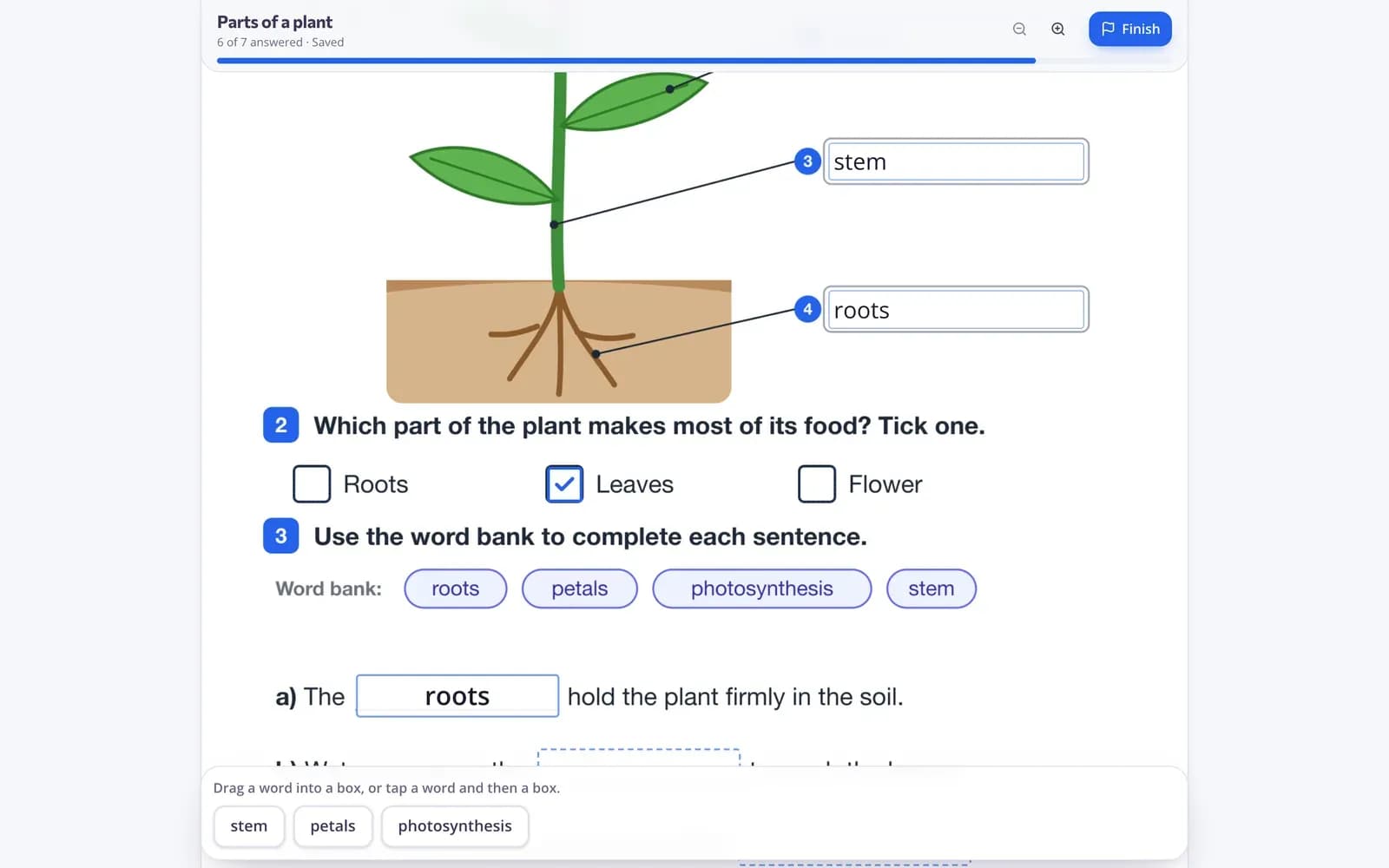
Acesta este playerul Edform real. Răspunde la întrebări și vezi cum sunt verificate.
Elevii scriu direct pe pagină
Elevii îți văd fișa exact așa cum ai creat-o, cu căsuțe în care pot scrie, cuvinte pe care le pot trage și variante pe care le pot bifa. Munca lor se salvează pe parcurs.
- Funcționează pe telefoane, tablete și laptopuri
- Modul de exersare arată pe loc ce e corect și ce e greșit
- Încercări nelimitate pe linkurile de exersare
Ai totuși nevoie de hârtie? Tipărește-o
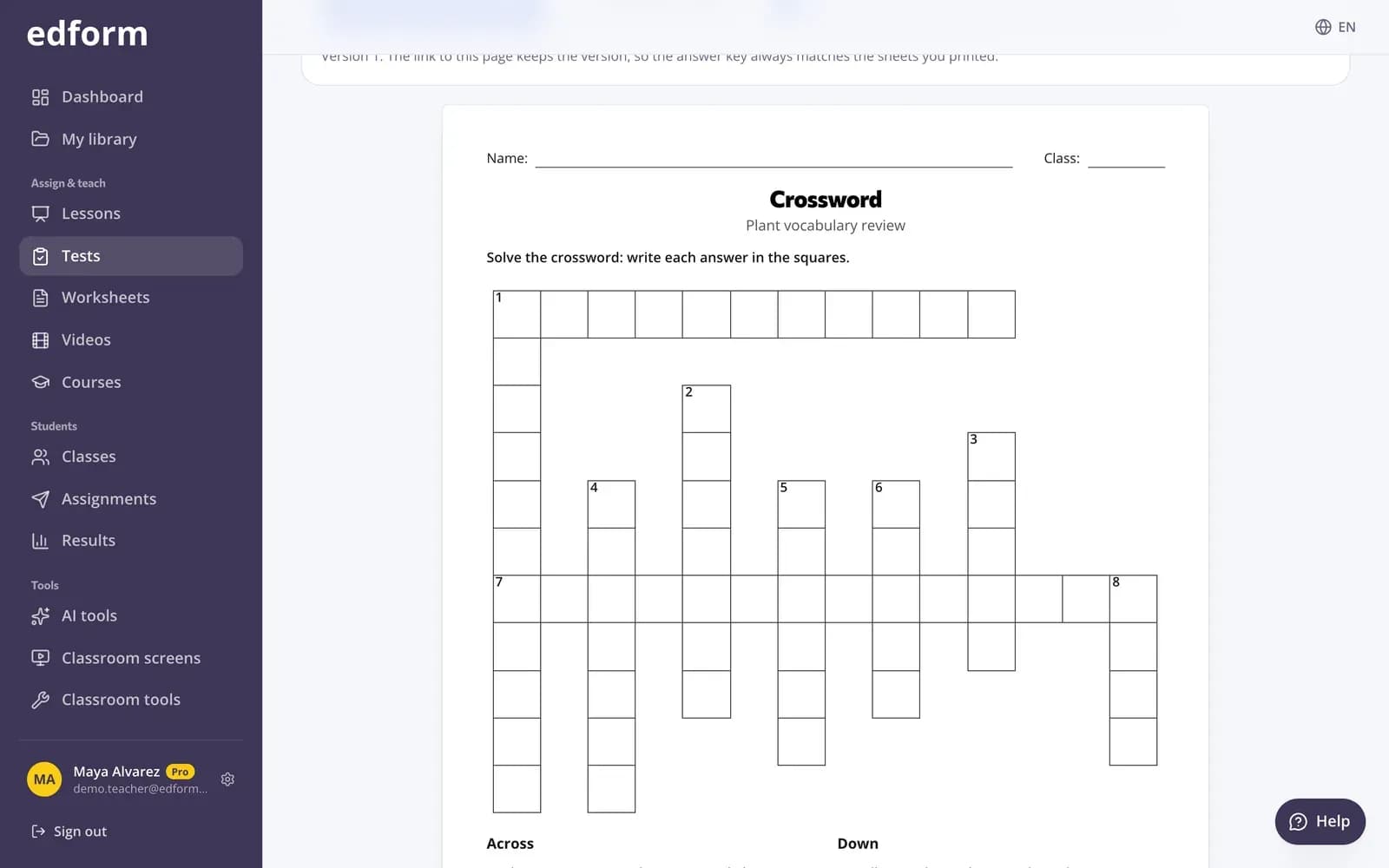
Tipărește din aceeași fișă un exemplar curat pentru elevi, cu bănci de cuvinte, și un barem potrivit — util pentru elevii fără dispozitiv sau pentru un test în liniște.
- Exemplarul elevului, cu bănci de cuvinte
- Barem dintr-un singur clic
- Aceleași întrebări online și pe hârtie
Fiecare răspuns, verificat și marcat pe pagină
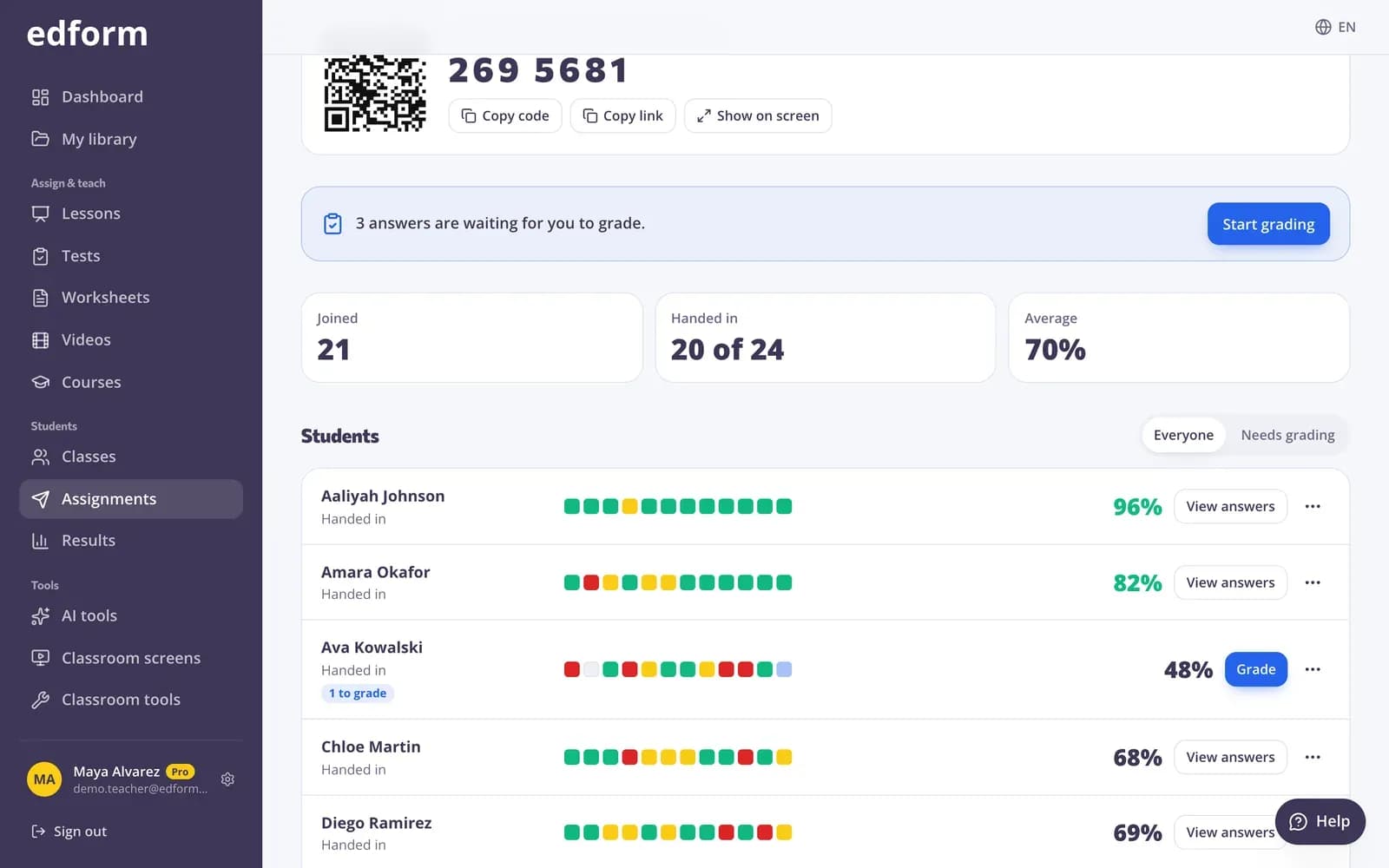
Rezultatele vin sub forma unui raport: scoruri pe elev, întrebările greșite cel mai des și fișa fiecărui elev, cu răspunsurile marcate corect sau greșit.
- Scoruri pe elev și pe întrebare
- Corectura marcată pe fișă
- Exportă rezultatele în CSV
Tot ce îți trebuie ca să aduci online fișele pe hârtie
Încarcă PDF-uri și imagini
Adu fișele pe care le ai deja — PDF-uri, scanări sau fotografii cu telefonul. Adaugă, reordonează sau șterge pagini oricând.
Căsuțe pentru scris și pentru numere
Răspunsuri scurte cu mai multe forme acceptate și răspunsuri numerice cu toleranță, scrise direct pe pagină.
Trage și plasează
Zone de plasare cu o bancă de cuvinte, inclusiv cuvinte în plus, ca elevii să nu poată ghici doar prin eliminare.
Unire cu linii
Elevii unesc punctele care se potrivesc — cuvinte cu imagini, termeni cu definiții.
Căsuțe de bifat și variante
Bifează, încercuiește sau evidențiază varianta corectă ori adaugă un cartonaș-întrebare complet cu oricare dintre cele 13 tipuri de întrebări.
Tipărește și joacă
Tipărește un exemplar pentru elevi și un barem sau joacă întrebările fișei ca joc live ori joc de recapitulare.
Profesorii folosesc fișele interactive pentru
- 01
Teme fără corectat
Dă online fișele de anul trecut și primește-le înapoi deja corectate.
- 02
Exersare cu feedback instant
Distribuie un link de exersare: elevii văd pe loc ce e corect și pot încerca din nou.
- 03
Clase mixte
Unii elevi online, alții pe hârtie — aceeași fișă funcționează pentru ambele situații.
- 04
Lectură și etichetare
Etichetează scheme, hărți și imagini cu cuvinte de tras și plasat sau cu căsuțe de scris.
Descoperă mai multe
- Din PDF în fișă interactivăÎncarcă un PDF, adaugă căsuțe de răspuns și fișa se corectează singură
- Quizuri de tipăritTipărește orice quiz, cu baremul potrivit
- Corectare automatăRăspunsurile închise sunt verificate în momentul în care elevii predau
- Generator de quizuriQuizuri, teste și teme corectate automat
- Fișă de lucruO fișă de lucru de tipărit, cu sarcini de mai multe tipuri și barem pentru tine.
- Generator de fișe de matematicăCâte fișe de calcul îți trebuie, în mai multe variante — cu răspunsuri.
- Completează spațiile libereLipește un text și obține o fișă de lucru imprimabilă de completat spațiile libere, cu bancă de cuvinte și cheie de răspuns.
- Diagrama VennCreează o diagramă Venn cu 2 sau 3 cercuri pentru tipărit: completată sau ca fișă goală de sortare, cu bancă de cuvinte și cheie de răspuns.
- Hârtie milimetricăHârtie milimetrică de tipărit la dimensiune reală: cu pătrățele, milimetrică, cu puncte, izometrică și cu plan de coordonate, în format A4 sau US Letter.
- Hârtie liniatăHârtie liniată de tipărit: foi ca de caiet sau linii pentru scris de mână cu linie punctată la mijloc, plus propriile tale cuvinte de trasat.
Ghiduri pas cu pas
- Fișe interactiveÎncarcă un PDF sau o fotografie, adaugă căsuțe de răspuns și lasă fișa să se corecteze singură.
- Atribuie o temăDă un test ca temă cu un cod, un link sau un cod QR și stabilește termenul.
- Rapoartele temelorVezi scorul fiecărui elev, fiecare răspuns și cum s-a descurcat clasa la fiecare întrebare.
Întrebări frecvente
Pot transforma un PDF într-o fișă interactivă?
Da. Încarcă PDF-ul și fiecare pagină apare în editor. Desenează câmpuri de răspuns peste spațiile libere și introdu răspunsurile corecte în ele.
Unde găsesc fișe interactive gata făcute?
În biblioteca comunității, unde profesorii își distribuie fișele de lucru, quizurile și lecțiile. Filtrează după materie și clasă, deschide o fișă ca să o previzualizezi și apasă Folosește-l ca să o copiezi în contul tău. Poți modifica paginile și câmpurile de răspuns înainte să o dai clasei tale.
Ce fel de răspunsuri pot da elevii?
Răspunsuri scrise, numere, căsuțe de bifat, alegere multiplă, cuvinte trase și plasate, unire cu linii și răspunsuri scrise lungi. Poți adăuga și oricare dintre cele 13 tipuri de întrebări ale Edform pe o pagină.
Pentru ce materii și clase sunt fișele interactive?
Pentru orice materie pe care o predai deja cu fișe de lucru: etichetezi o hartă sau o diagramă, răspunzi la întrebări de lectură, exersezi vocabularul cu cuvinte de mutat și plasat sau rezolvi exerciții de matematică cu răspunsuri numerice și formule. Elevii mai mici trag, bifează și îmbină; elevii mai mari scriu și răspunsuri mai lungi.
Se notează automat fișele interactive?
Da. Fiecare răspuns închis este verificat imediat ce elevii predau. Răspunsurile scrise mai lungi așteaptă să le notezi tu.
Pot elevii rezolva fișa fără cont?
Da. Distribuie un link sau un cod, iar elevii își scriu numele ca să înceapă. Poți, de asemenea, să limitezi accesul la elevii din clasa ta.
Pot să tipăresc în continuare fișa de lucru?
Da. Tipărește o copie pentru elevi cu bănci de cuvinte și cu un barem de răspunsuri corespunzător.
Este gratuit?
Da, fișele interactive sunt gratuite pentru profesori.
Pot distribui fișele interactive în Google Classroom?
Da. Dă fișa ca temă și apasă Distribuie în Classroom: se deschide fereastra de distribuire din Google Classroom, cu titlul, linkul și codul de acces completate, ca să alegi clasa și să postezi. Elevii o completează online, iar Edform verifică răspunsurile.
Google Classroom este o marcă comercială a Google LLC. Microsoft și Microsoft Teams sunt mărci comerciale ale grupului de companii Microsoft.
Adu-ți online prima fișă de lucru chiar azi
Încarcă un PDF, desenează căsuțele de răspuns și distribuie linkul — gratuit pentru profesori.
- Gratuit pentru profesori
- Fără card bancar
- Funcționează pe orice dispozitiv