


High school
Serious assessment, less grading
Give timed tests with shuffled questions, grade written answers with a rubric in one place and use per-question results to plan the next lesson.
- Timed tests with shuffled questions
- Rubric grading for written answers
- Free for teachers
What is Edform for high school teachers?
Edform is a free set of high school teacher tools for assessment and teaching. The high school setting gives students a focused player with fewer distractions, shuffled questions, flags to come back to questions and results only after handing in. You set a time limit that runs on the server, one attempt or several, and when answers are revealed. Closed questions are graded automatically with partial credit, while written answers wait for you with a checklist rubric, points and feedback. Reports show what each student and the whole class got wrong.
Edform at a glance
- Price
- Free for teachers: Basic is free forever, with no credit card, and includes every feature.
- AI tools
- AI teacher tools with 5 AI points a month on Basic and 300 a month on Pro.
- Students
- Students join with a code. They need no email address and no account.
- Grading
- Quizzes and worksheets are graded automatically, with results per student and per question.
- Devices
- Runs in the browser on laptops, tablets, phones and interactive boards. Nothing to install.
- Languages
- Available in 32 languages.
- Works with
- Google Classroom, Microsoft Teams, ClassLink and learning platforms that support LTI 1.3.
- Library
- A free library of ready-made quizzes, worksheets and lessons that teachers can copy and edit.
How to run a test in Edform
- 1
Build the test
Mix closed questions with open answers, add points and explanations, or let AI draft questions from your material.
- 2
Set the rules
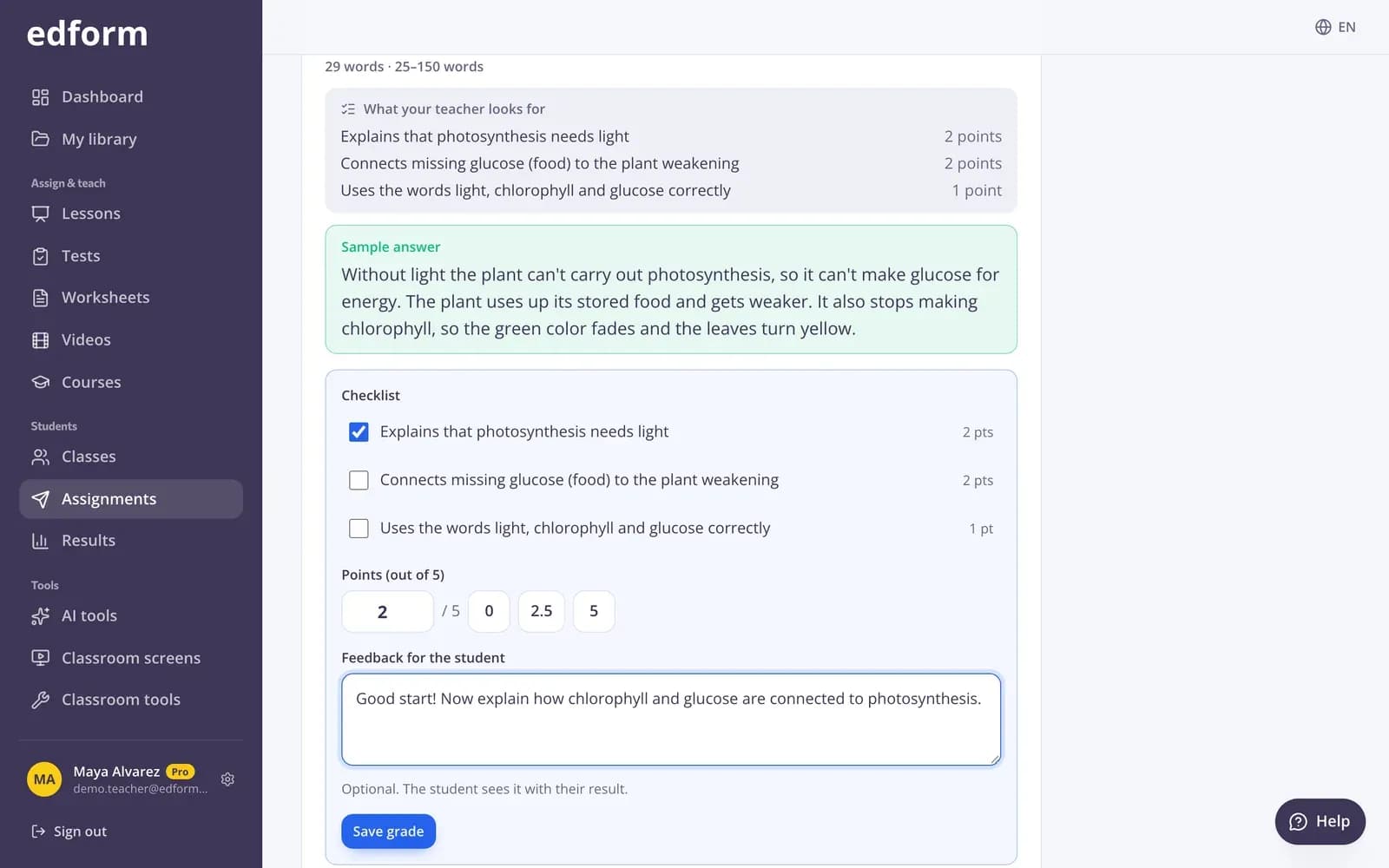
Choose the deadline, time limit, attempts, shuffling and when students see their results.
- 3
Grade and review
Closed questions are graded for you. Grade written answers with the rubric, then review the hardest questions with the class.
Try it yourself
No sign-up needed — try it as a student
This is the real Edform player. Answer the questions and see how they're checked.
Test settings you control
Time limit, deadline, late work, attempts, shuffling and when students see the answers. You can still change the deadline, attempts and results settings after giving the test.
- The timer runs on the server
- Extra time and personal deadlines per student
- An optional “work on your own” statement
Grade written answers faster
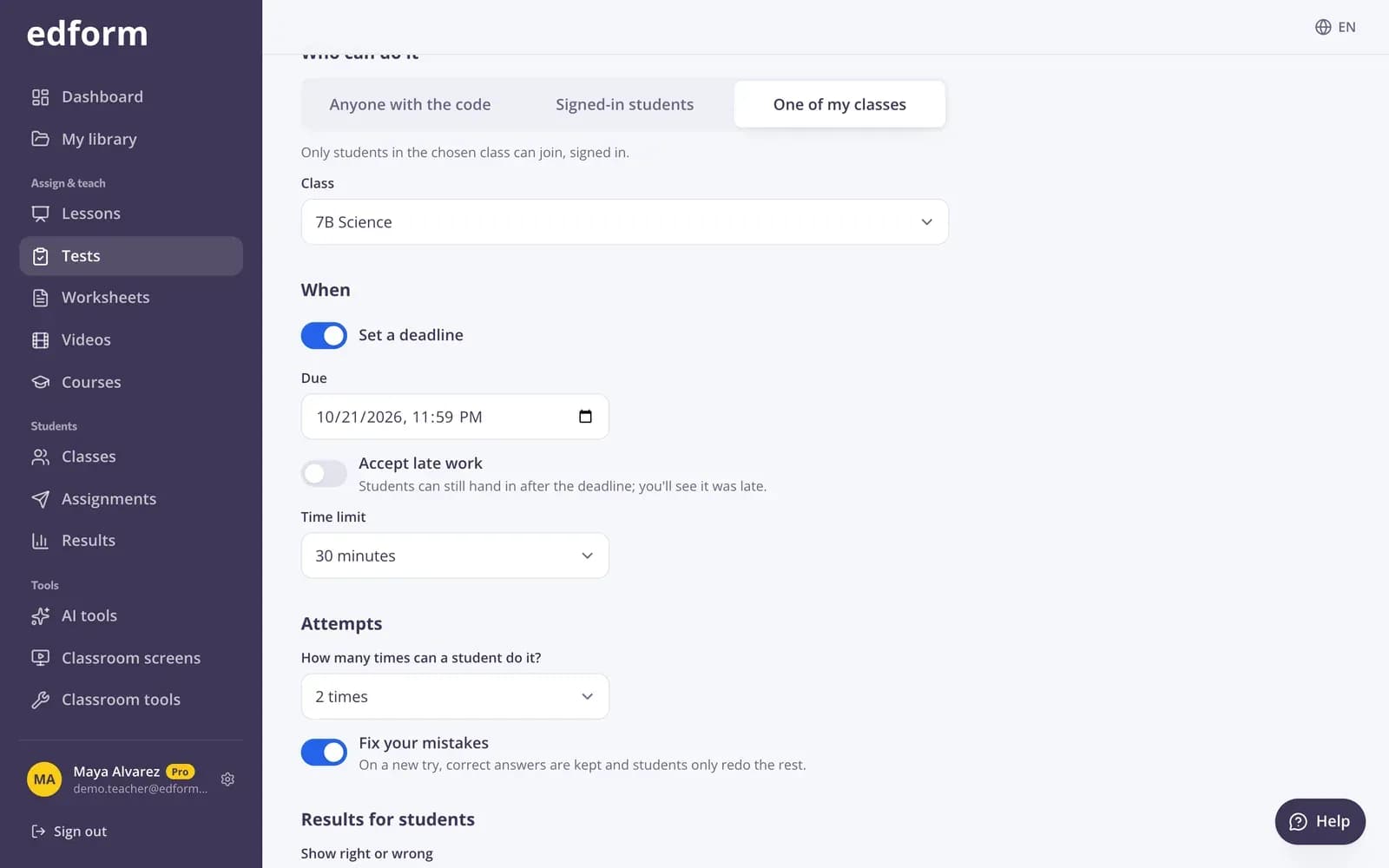
Open answers wait for you with the rubric you wrote. Tick criteria, give points in half steps, write feedback and jump to the next answer to grade.
- Checklist rubrics
- Half-point scoring
- “Next to grade” button
Video lessons for independent study
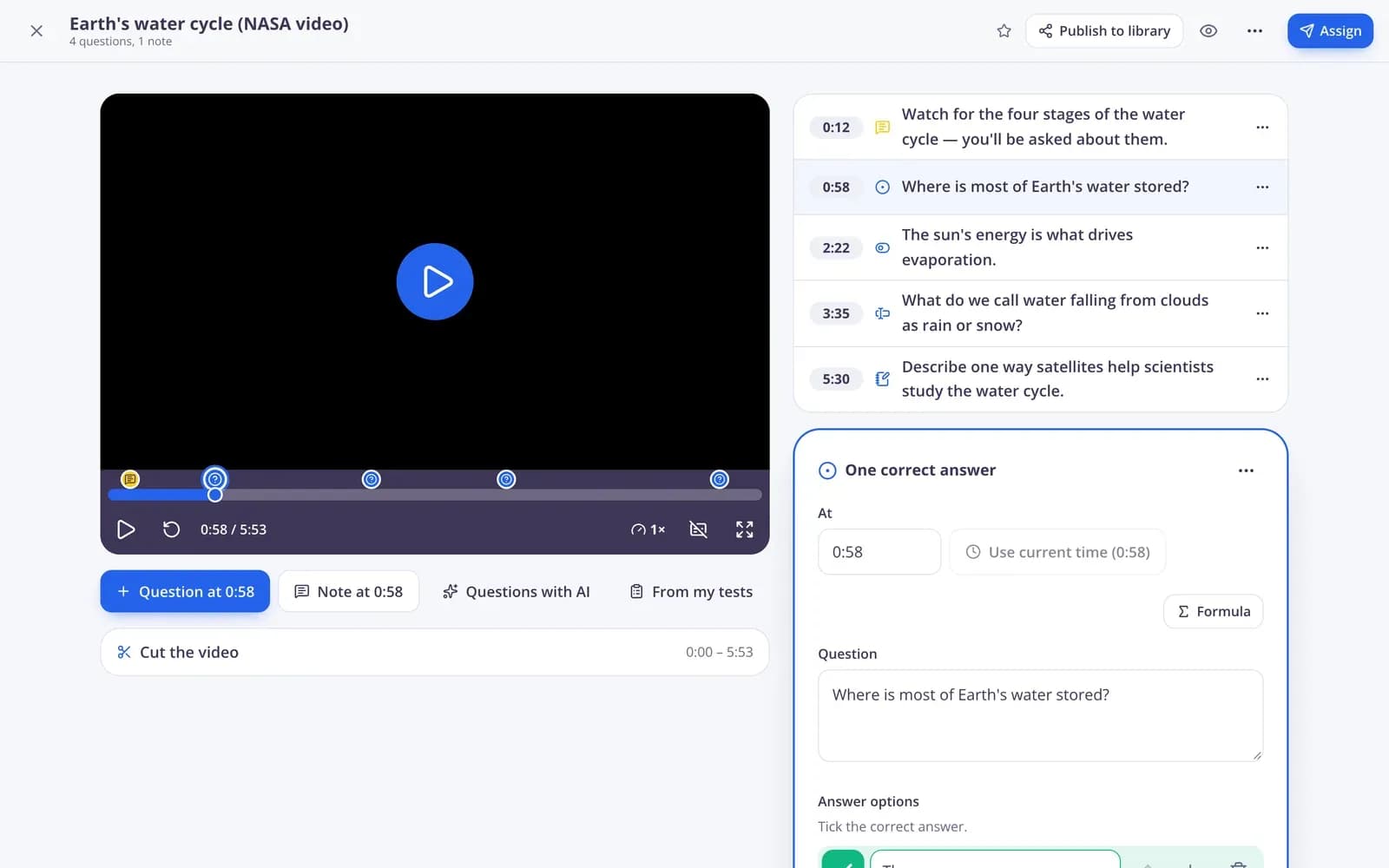
Pin questions to the key moments of a video lecture. The report shows how much each student watched and how they answered.
- No skipping ahead
- Captions and playback speed
- Watched % in the report
Made for grades 9–12
Timed online tests
A time limit enforced on the server, so it's the same for every student.
Shuffled questions
Questions and answer options in a different order for each student.
Flags and a review step
Students mark questions to come back to and check a summary before handing in.
Rubric grading
Checklist rubrics, half points and written feedback for open answers.
Printable tests
Print any test as a worksheet with a matching answer key.
AI for upper grades
DOK questions, essay feedback, unit plans and syllabi drafted in seconds.
High school teachers use Edform for
- 01
Unit tests
Timed, shuffled, one attempt, and results released when you choose.
- 02
Short answers and essays
Collect written answers online and grade them with your rubric.
- 03
Exam review
Practice tests with retakes, flashcards and a review game from the same questions.
- 04
Flipped lessons
A video with questions at home, discussion and practice in class.
Explore more
- Online examsTimed tests with shuffled questions and one attempt
- Rubric gradingGrade open answers with a checklist and feedback
- Auto-gradingClosed answers checked the moment students hand in
- Test prepPractice tests, flashcards and review games before exams
- Video lessonsQuestions inside any video
- DOK questionsQuestions and tasks for all four Depth of Knowledge levels, with expected answers.
Step-by-step guides
- Assign homeworkGive a test as homework with a code, link or QR code and set the deadline.
- Grade open answersGrade written answers with points, a checklist and feedback, or change an automatic score.
- Homework reportsSee every student's score, each answer and how the class did on each question.
- Question typesEvery question type in Edform, when to use it and how it is marked.
Frequently asked questions
How does Edform help with cheating?
No tool stops every kind of cheating, but Edform helps: shuffled questions and options, a server-side timer, a single attempt, results after the deadline, a count of how often a student left the tab and an optional statement that they will work on their own.
Can I grade essays and written answers?
Yes. Add an open-answer question with a word limit and a checklist rubric. Answers wait for you in the report, where you tick criteria, give points and write feedback.
Can I give one student extra time?
Yes. From the results, give a student extra time on their next attempt, a later deadline or one more attempt, without changing anything for the class.
Can students see their mistakes afterwards?
You decide: right after each question, after handing in, after the deadline or never. You can show only right or wrong, or the correct answers too.
Can I export grades?
Yes. Download the results as a CSV file with every student's score and answers.
Can I make SAT, ACT and AP practice questions?
Yes, when your school system is set to the United States. AI tools write SAT-, ACT- and AP-style practice questions and state test prep items, each with an answer key and explanations. Edit the result, export it to Word or print it.
Can AI help me plan units and lessons?
Yes. AI tools draft lesson plans, unit plans, a course syllabus and DOK questions, and the standards unpacker breaks a standard into learning targets and success criteria. Every draft is yours to edit.
Is it free?
Yes. Every feature is free for teachers.
Give your next test online
Free for teachers. Closed questions grade themselves, and you grade the rest in one place.
- Free for teachers
- No credit card
- Works on any device