


Quizzes & tests
The quiz maker that grades for you
Build a quiz in minutes with 13 question types, share it with a code, and see every student's results the moment they hand in. One quiz becomes homework, a live game, a printout or flashcards.
- 13 question types, graded automatically
- Students join with a code — no email needed
- Free for teachers
What is the Edform quiz maker?
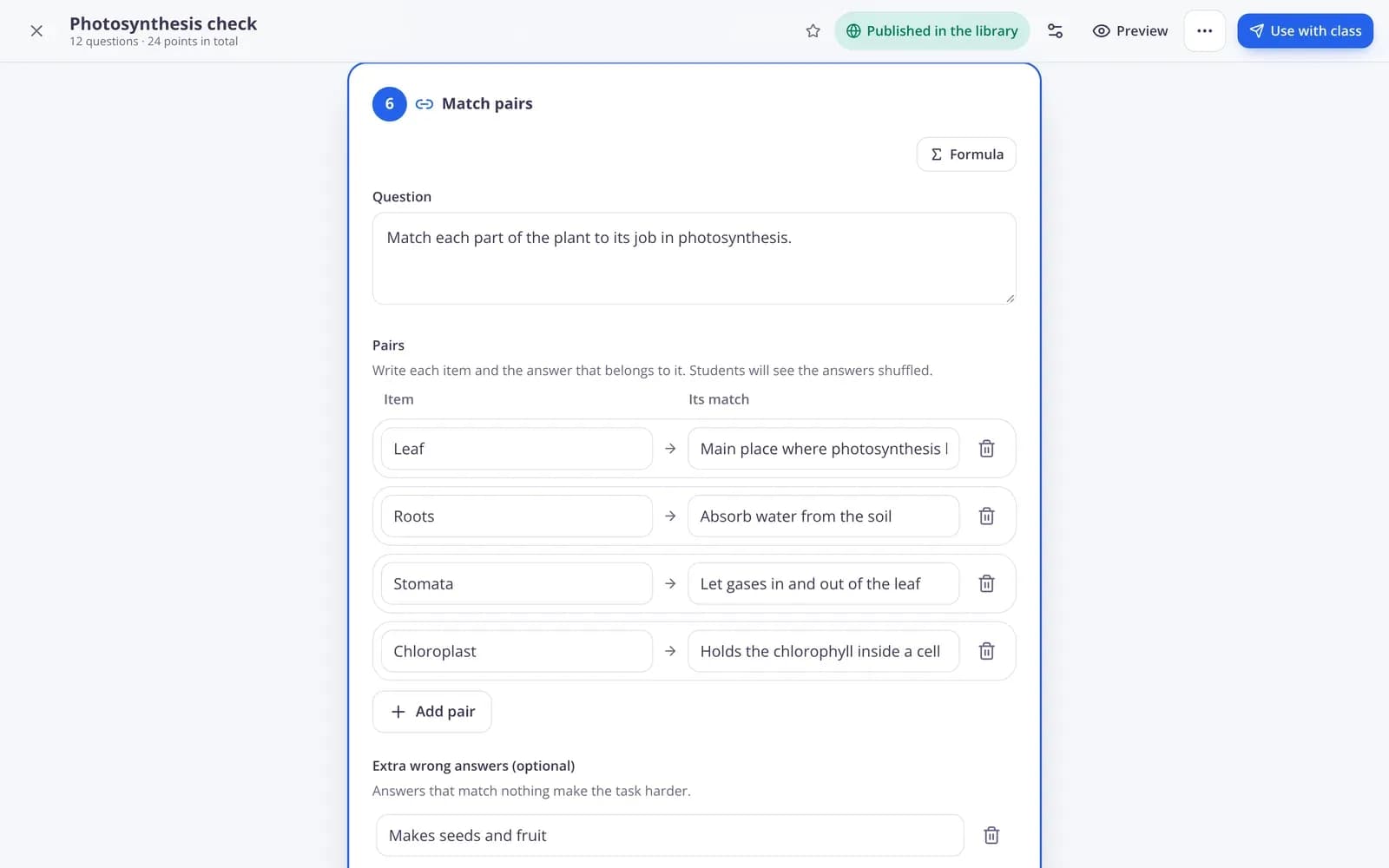
Edform is a free online quiz maker for teachers. Write your own questions, let AI draft them from a topic or a text, or start from a ready-made quiz in the community library. Mix multiple choice, fill in the blanks, matching, ordering, open answers and more — Edform checks the answers, gives partial credit and builds the report. Students take the quiz on any phone, tablet or laptop by typing a short code. Because the questions live in one place, the same quiz can also be played as a live quiz game with a timer and a leaderboard, used in other classroom games, printed with an answer key or studied as flashcards.
Edform at a glance
- Price
- Free for teachers: Basic is free forever, with no credit card, and includes every feature.
- AI tools
- AI teacher tools with 5 AI points a month on Basic and 300 a month on Pro.
- Students
- Students join with a code. They need no email address and no account.
- Grading
- Quizzes and worksheets are graded automatically, with results per student and per question.
- Devices
- Runs in the browser on laptops, tablets, phones and interactive boards. Nothing to install.
- Languages
- Available in 32 languages.
- Works with
- Google Classroom, Microsoft Teams, ClassLink and learning platforms that support LTI 1.3.
- Library
- A free library of ready-made quizzes, worksheets and lessons that teachers can copy and edit.
How to make a quiz in Edform
- 1
Write your questions
Pick a question type, type the question and mark the right answer. Add points, a hint or an explanation if you like — or let AI draft the questions for you.
- 2
Share it with your class
Give it as homework with a deadline. Students open it with a 7-digit code, a link or a QR code, or find it in their class.
- 3
See the results right away
Answers are graded as soon as students hand in. Open the report to see who needs help and which questions were hardest.
Try it yourself
No sign-up needed — try it as a student
This is the real Edform player. Answer the questions and see how they're checked.
One quiz, every way to use it
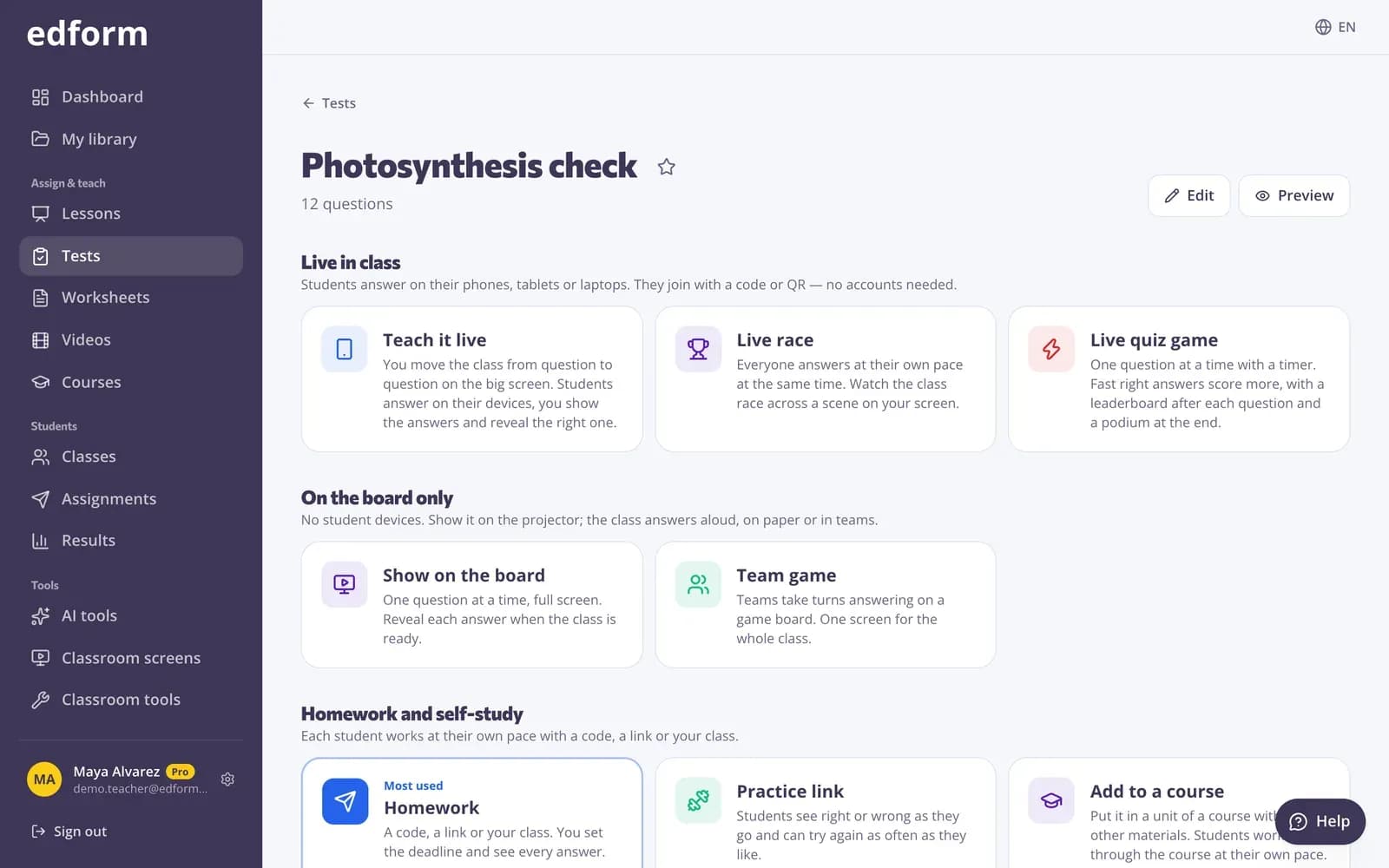
Everything you can do with a quiz is on one page: give it as homework, teach it live, play it as a live quiz game with a timer and a leaderboard, run a race or a team game on one screen, print it or turn it into flashcards. You never copy the questions again.
- Homework, live quiz game, race or team game
- 27 game modes from the same questions
- Printable test and answer key
Made for students on any device
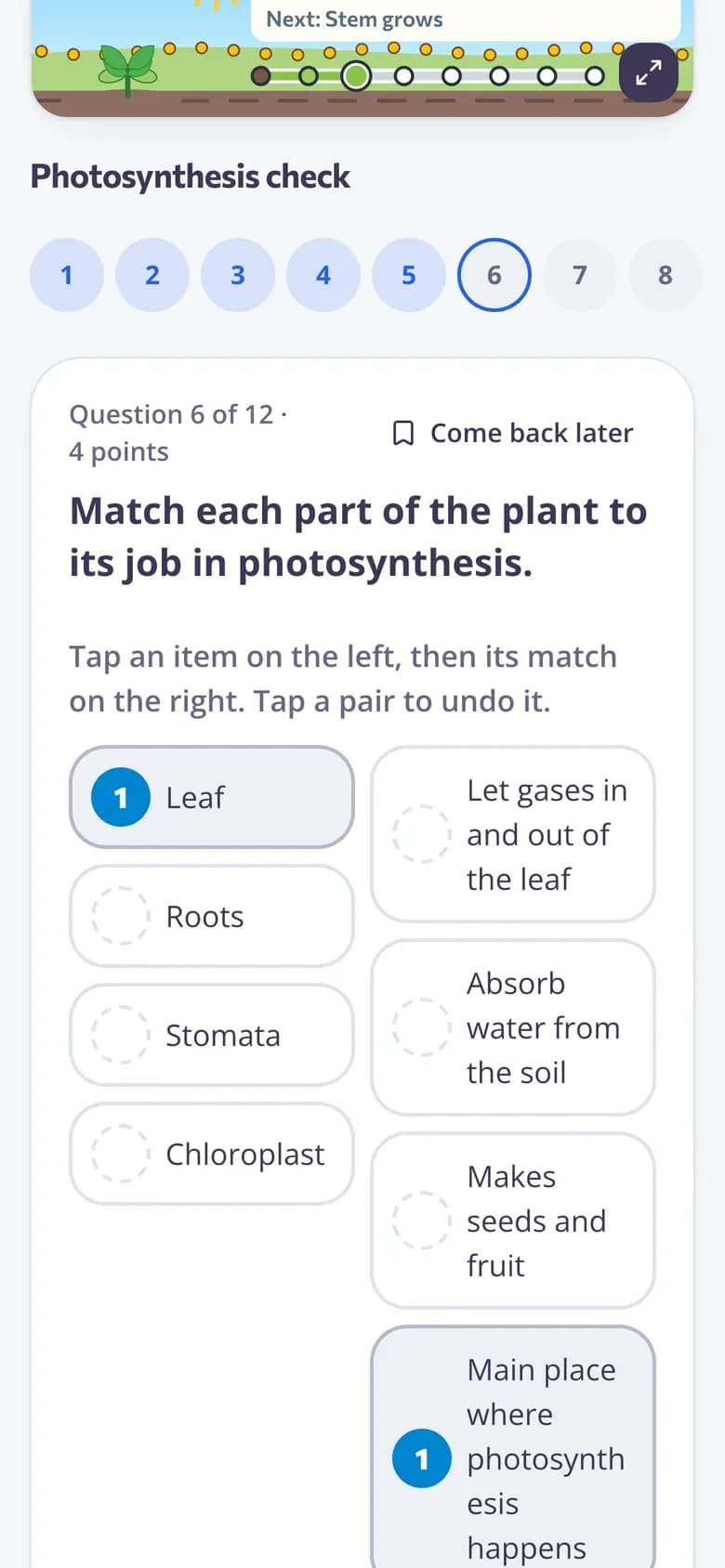
Students see one question at a time with big, friendly buttons. Their answers save as they go, so a dropped connection or a flat battery doesn't lose any work.
- Works on phones, tablets and laptops
- Answers save automatically
- Hints and instant feedback if you allow them
Reports that tell you what to teach next
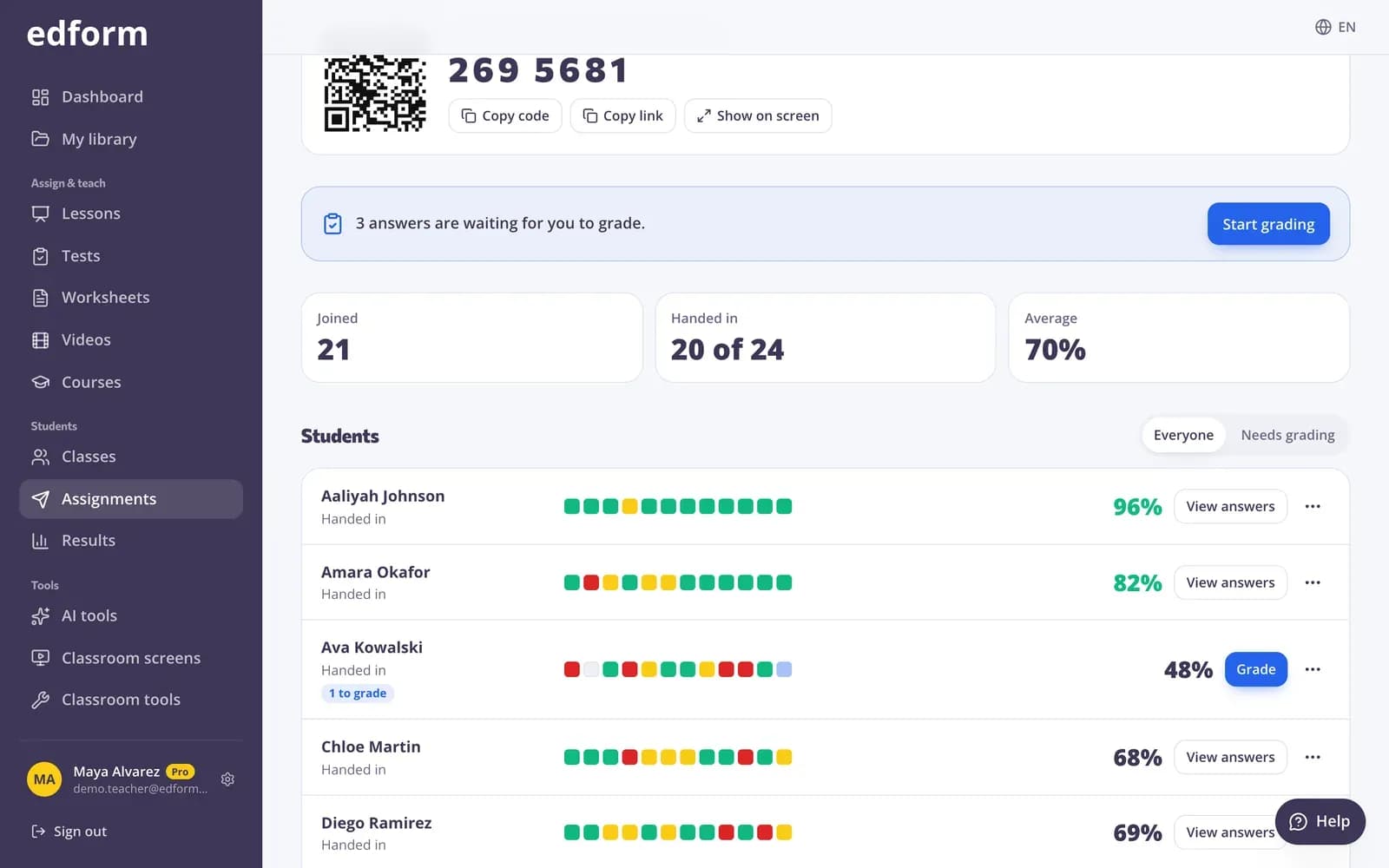
See every student's score and every answer in one table. Edform shows the percentage correct for each question and the most common wrong answers, so you know exactly what to review tomorrow.
- Scores per student and per question
- Most common wrong answers
- Export to CSV for your gradebook
Everything a teacher needs in a quiz
Automatic grading
Closed questions are graded instantly with partial credit — per blank, per pair, per row. You only grade open answers, with a rubric.
AI question writer
Describe a topic, paste a text or upload a file, and get ready-to-edit questions with answers in seconds.
Timers and deadlines
Set a time limit, a due date and whether late work is accepted. The timer runs on the server, so it's fair for everyone.
Shuffle and fair play
Shuffle questions and answer options for each student and see when someone leaves the quiz tab.
Join with a code
Students join with a 7-digit code, a link or a QR code. Young students don't need an email address.
Print when you need paper
Print the quiz as a worksheet with a matching answer key, or as a crossword or word search.
Teachers use it for
- 01
Exit tickets
Three quick questions at the end of a lesson tell you who's ready to move on.
- 02
Homework
Set it once, let Edform grade it, and spend your evening on feedback instead of marking.
- 03
Unit tests
Timed tests with shuffled questions, one attempt and results released when you choose.
- 04
Review before exams
Let students retake and fix their mistakes, or play the same questions as a game.
Explore more
- Auto-gradingClosed answers checked the moment students hand in
- Question types13 ways to ask, from matching to open answers
- Online examsTimed tests with shuffled questions and one attempt
- Quiz reportsScores per student, per question and common wrong answers
- QuizA multiple-choice test on any topic, text, file or video, with an answer key.
- Formative assessmentCheck understanding during the lesson, not after the test
Step-by-step guides
- Create a quizMake a test with any mix of question types, preview it and use it with your class.
- Question typesEvery question type in Edform, when to use it and how it is marked.
- Assign homeworkGive a test as homework with a code, link or QR code and set the deadline.
- Live quiz gamePlay questions with a timer, points, a leaderboard and a podium.
- Homework reportsSee every student's score, each answer and how the class did on each question.
Frequently asked questions
Is the Edform quiz maker free?
Yes. Teachers can create quizzes, give them to classes and see reports for free.
Are there ready-made quiz templates?
Yes. The community library has quizzes, worksheets and lessons shared by other teachers. Search by subject and grade, preview one and press Use this to copy it into your account, then change anything you like.
Which question types can I use?
Multiple choice, multiple answers, true or false, short answer, number answers with a tolerance, fill in the blanks, drop-down blanks, true/false grids, ordering, matching, sorting into categories, open answers with a rubric, polls and word clouds.
Can AI make a quiz for me?
Yes. Open the AI quiz tool and give it a topic, your own text, a file, a photo, a web link or a YouTube video. AI drafts the questions with the right answers; press Save as activity and edit them like any quiz before you give it.
Can I play the quiz live with a timer?
Yes. Choose Live quiz game on the quiz's Use with class page and pick 10 to 120 seconds per question. Students join with a code, fast right answers score more, a leaderboard follows every question and the report shows each student's answers and game points.
Do students need an account?
No. You can let anyone with the code join by typing their name, or limit the quiz to students in your class. Young students can sign in with a username instead of an email.
Can I grade open-ended answers?
Yes. Open answers wait for you in the report. Tick rubric criteria, give points and write feedback; the student sees it once you're done.
Can students see the right answers?
You decide: right after each question, after handing in, after the deadline or never.
Can students sign in with Google?
Yes. Students can sign in with their Google accounts, join with a code as guests, or use a username from their teacher.
Does the quiz maker work with Google Classroom?
Yes. Import your Google Classroom classes with their students in one click. Give a quiz as homework and press Share to Classroom: Google Classroom's share window opens with the title, the link and the join code filled in, so you pick the class and post. Scores stay in Edform's report and gradebook.
Google Classroom is a trademark of Google LLC. Microsoft and Microsoft Teams are trademarks of the Microsoft group of companies.
Make your first quiz in five minutes
Free for teachers. Your students join with a code — no emails, no installs.
- Free for teachers
- No credit card
- Works on any device