


Moodle integration
Edform in Moodle
Add Edform quizzes, interactive worksheets, lessons and video lessons to your Moodle courses. Students open them from the course without another password, Edform grades them and the scores land in the Moodle gradebook.
- Works inside Moodle courses
- No extra passwords for students
- Scores in the Moodle gradebook
How does Edform work with Moodle?
Edform connects to Moodle with LTI 1.3, the standard Moodle uses for external tools. Your Moodle administrator adds Edform once by pasting one registration URL. After that, you add Edform activities to your courses with Add an activity or resource → External tool → Select content: a picker with your Edform library opens inside Moodle, you pick an activity, and Moodle places it in the course with a gradebook column. Students click it and land in Edform, signed in. Edform grades their answers and sends each student's best score to the Moodle gradebook. No Moodle plugin to install: Edform uses Moodle's built-in External tool activity.
Edform at a glance
- Price
- Free for teachers: Basic is free forever, with no credit card, and includes every feature.
- AI tools
- AI teacher tools with 5 AI points a month on Basic and 300 a month on Pro.
- Students
- Students join with a code. They need no email address and no account.
- Grading
- Quizzes and worksheets are graded automatically, with results per student and per question.
- Devices
- Runs in the browser on laptops, tablets, phones and interactive boards. Nothing to install.
- Languages
- Available in 32 languages.
- Works with
- Google Classroom, Microsoft Teams, ClassLink and learning platforms that support LTI 1.3.
- Library
- A free library of ready-made quizzes, worksheets and lessons that teachers can copy and edit.
How to use Edform in Moodle
- 1
Your Moodle admin adds Edform
In Moodle, the admin opens Site administration → Plugins → Activity modules → External tool → Manage tools, pastes https://edform.com/api/lti/register into Tool URL, presses Add LTI Advantage and activates Edform.
- 2
Add an Edform activity to your course
With Add an activity or resource → External tool → Select content, choose Edform and pick one of your quizzes, worksheets, lessons or video lessons.
- 3
Students open it from the course
Students click the activity, work in Edform and hand in. Their score goes to the Moodle gradebook.
Try it yourself
No sign-up needed — try it as a student
This is the real Edform player. Answer the questions and see how they're checked.
Your Edform library inside Moodle
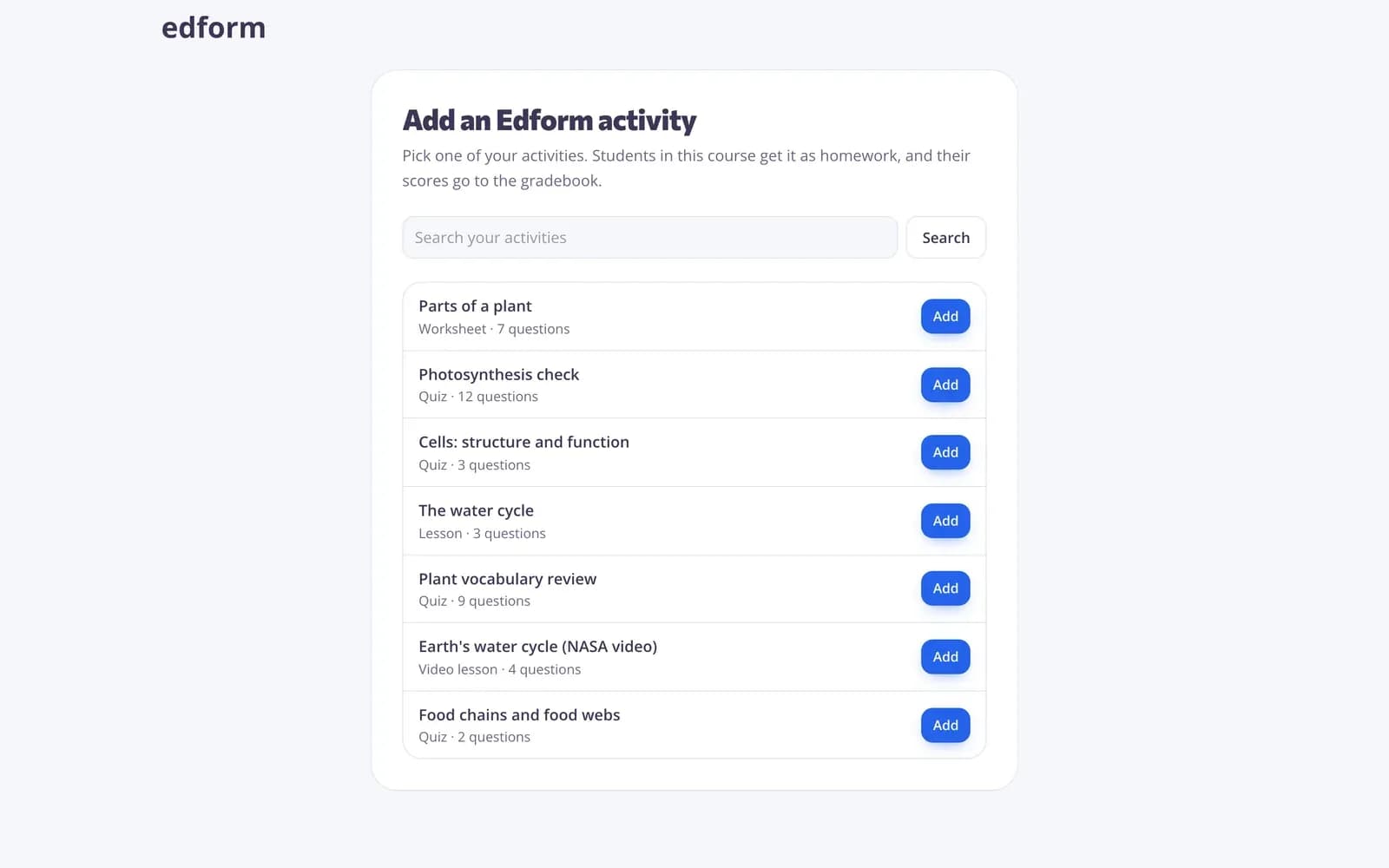
When you add Edform to a course, your Edform activities open right inside Moodle. Search, pick one and press Add: Edform creates homework for this course and Moodle adds the link with a gradebook column out of 100.
- Quizzes, worksheets, lessons, video lessons
- Homework only for this course
- Gradebook column out of 100
One click for students
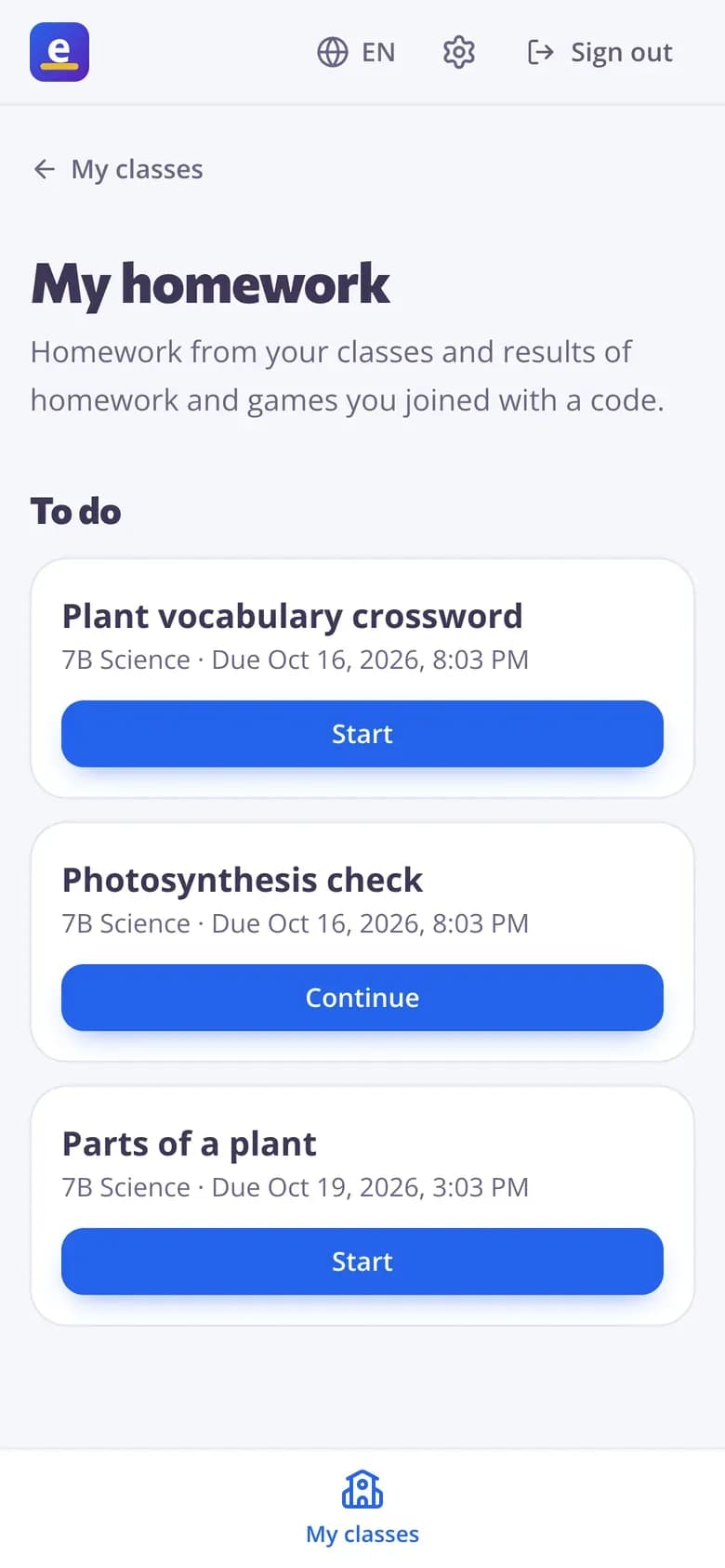
Moodle signs students in to Edform: no codes, no new passwords. The first time, Edform creates their account and puts them in the course's class. Edform also reads the course's student list, so the class is complete before anyone opens a link.
- Single sign-on from Moodle
- Class matches the course
- No join codes
Grades go to Moodle by themselves
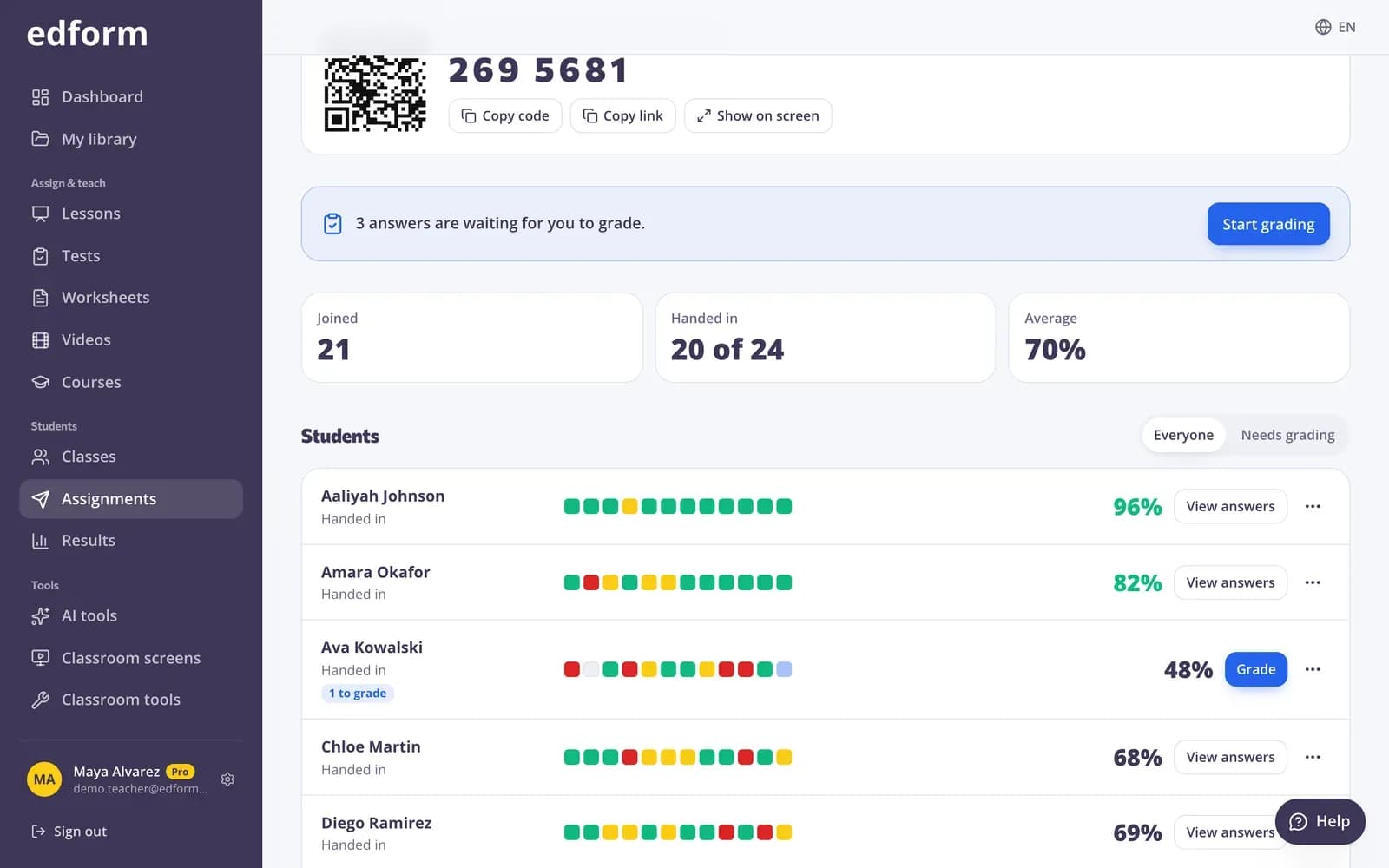
Each student's best score goes to the Moodle gradebook as soon as they hand in, and again after you grade open answers. The full report with every answer stays in Edform.
- Sent after each hand-in
- Updated after your grading
- Full answer report in Edform
What you get in Moodle
Single sign-on
Students and teachers open Edform from Moodle without another password.
Activity picker
Add Edform activities from inside Moodle with Deep Linking.
Gradebook sync
Best scores go to the Moodle gradebook, retried until Moodle accepts them.
Course roster
Edform reads the course's students, so its class matches the course.
One-URL setup
Your Moodle admin registers Edform by pasting one URL.
Your existing account
Already use Edform? Connect it the first time and keep all your activities.
Teachers use it to
- 01
Assign auto-graded homework
Quizzes and worksheets graded by Edform, scores in Moodle.
- 02
Add interactive lessons and video
Lessons with questions and videos that stop for questions, all inside the course.
- 03
Stop copying marks
No exporting and importing grades: Edform sends them to Moodle.
- 04
Keep students in one place
Students find Edform work next to the rest of the Moodle course.
Explore more
- CanvasEdform quizzes and worksheets in your Canvas courses, grades in the Canvas gradebook
- D2L BrightspaceEdform quizzes and worksheets in your Brightspace courses, grades in the Brightspace gradebook
- Other LMSs (LTI 1.3)Canvas, Moodle, Brightspace and more: activities in your course, scores in the gradebook
- IntegrationsGoogle Classroom, Microsoft Teams, LMS (LTI)
- Auto-gradingClosed answers checked the moment students hand in
- Online homeworkGive homework with a code and a deadline
Step-by-step guides
- LMS (LTI 1.3)Add Edform to Canvas, Moodle, Blackboard, Brightspace, Sakai, Open edX, itslearning or Blackbaud, add activities to a course and get scores in the gradebook.
- Assign homeworkGive a test as homework with a code, link or QR code and set the deadline.
- Homework reportsSee every student's score, each answer and how the class did on each question.
Frequently asked questions
Is Edform free in Moodle?
Yes. Adding Edform to Moodle, opening activities and sending grades are free for teachers and schools, like every Edform feature.
Which standard does Edform use?
LTI 1.3 with LTI Advantage, the 1EdTech standard Moodle uses for learning tools: single sign-on, Deep Linking to add activities, Names and Role Provisioning for the course roster, and Assignment and Grade Services for grades.
How does our Moodle admin add Edform?
In Moodle, the admin opens Site administration → Plugins → Activity modules → External tool → Manage tools, pastes https://edform.com/api/lti/register into Tool URL, presses Add LTI Advantage and activates Edform. Our LMS guide has the details.
Do we need to install a Moodle plugin?
No. Edform uses Moodle's built-in External tool activity with LTI 1.3 (LTI Advantage), available in current Moodle versions.
Where do I find Edform in Moodle?
Turn editing on, choose Add an activity or resource → External tool, select Edform as the preconfigured tool and press Select content to pick your activity.
Do students need an Edform account?
No. Edform creates their account the first time they open an activity from Moodle and puts them in the course's class.
What data does Edform get?
The person's Moodle user id, name, role in the course and, if Moodle shares it, their email, plus the course name and its student list. Edform writes only scores back to Moodle.
Moodle is a registered trademark of Moodle Pty Ltd. Edform is not affiliated with Moodle Pty Ltd.
Bring Edform to your Moodle courses
Create your free teacher account, make an activity, then add it to your course. Free for teachers.
- Free for teachers
- No credit card
- Works on any device