


Formative assessment
Formative assessment that shows who understood before the bell
Ask a question in the middle of your lesson, see every answer come in, and use the most common wrong answers to decide what to reteach today, not after the test.
- Answers from every student, as they arrive
- Most common wrong answers per question
- Free for teachers
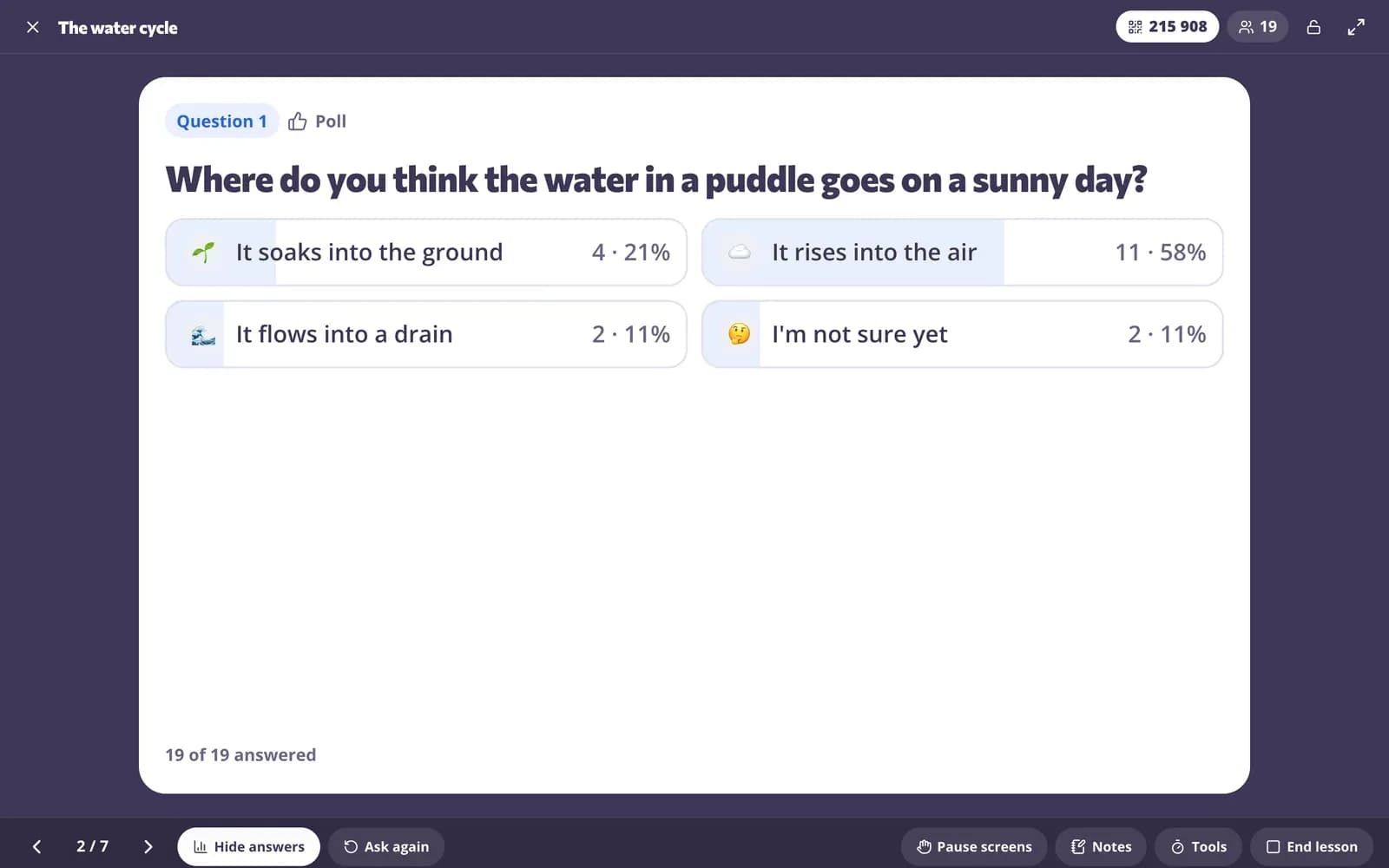
What is formative assessment?
Formative assessment tools help you check what students understand while you are still teaching, so you can adjust the next step instead of waiting for the test. Edform gives you several quick ways to do it: questions inside a live lesson that every student answers on a device, polls and word clouds on the classroom screen, exit tickets at the end of class and short quizzes as homework. Answers are graded as they arrive, and reports show the percentage correct for each question and the most common wrong answers, so you know exactly what to revisit and who needs help.
Edform at a glance
- Price
- Free for teachers: Basic is free forever, with no credit card, and includes every feature.
- AI tools
- AI teacher tools with 5 AI points a month on Basic and 300 a month on Pro.
- Students
- Students join with a code. They need no email address and no account.
- Grading
- Quizzes and worksheets are graded automatically, with results per student and per question.
- Devices
- Runs in the browser on laptops, tablets, phones and interactive boards. Nothing to install.
- Languages
- Available in 32 languages.
- Works with
- Google Classroom, Microsoft Teams, ClassLink and learning platforms that support LTI 1.3.
- Library
- A free library of ready-made quizzes, worksheets and lessons that teachers can copy and edit.
How to run formative assessment with Edform
- 1
Plan your checkpoints
Add two or three questions between your lesson slides, or put a poll or exit ticket on your classroom screen.
- 2
Ask during the lesson
Students join with a code. You see responses as they arrive, then reveal the answer or ask again.
- 3
Adjust what comes next
Use the per-question results and the common wrong answers to regroup, reteach or move on.
Try it yourself
No sign-up needed — try it as a student
This is the real Edform player. Answer the questions and see how they're checked.
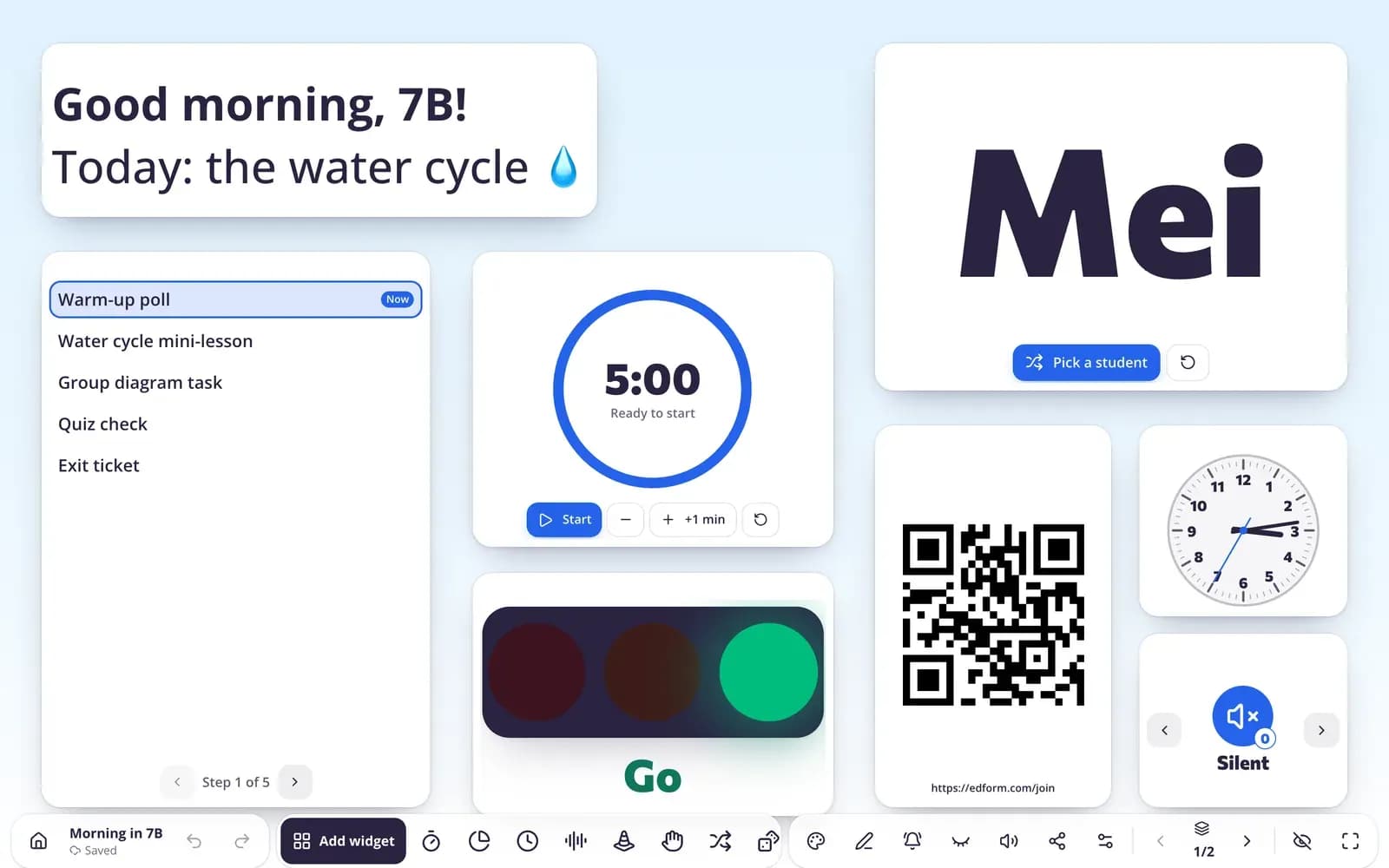
Polls, word clouds and exit tickets from the board
Add a poll, an exit ticket or a word cloud to your classroom screen. Count raised hands in the room, or show a QR code so students answer on their own devices.
- In the room or on students' devices
- Results on the projector
- No student accounts needed
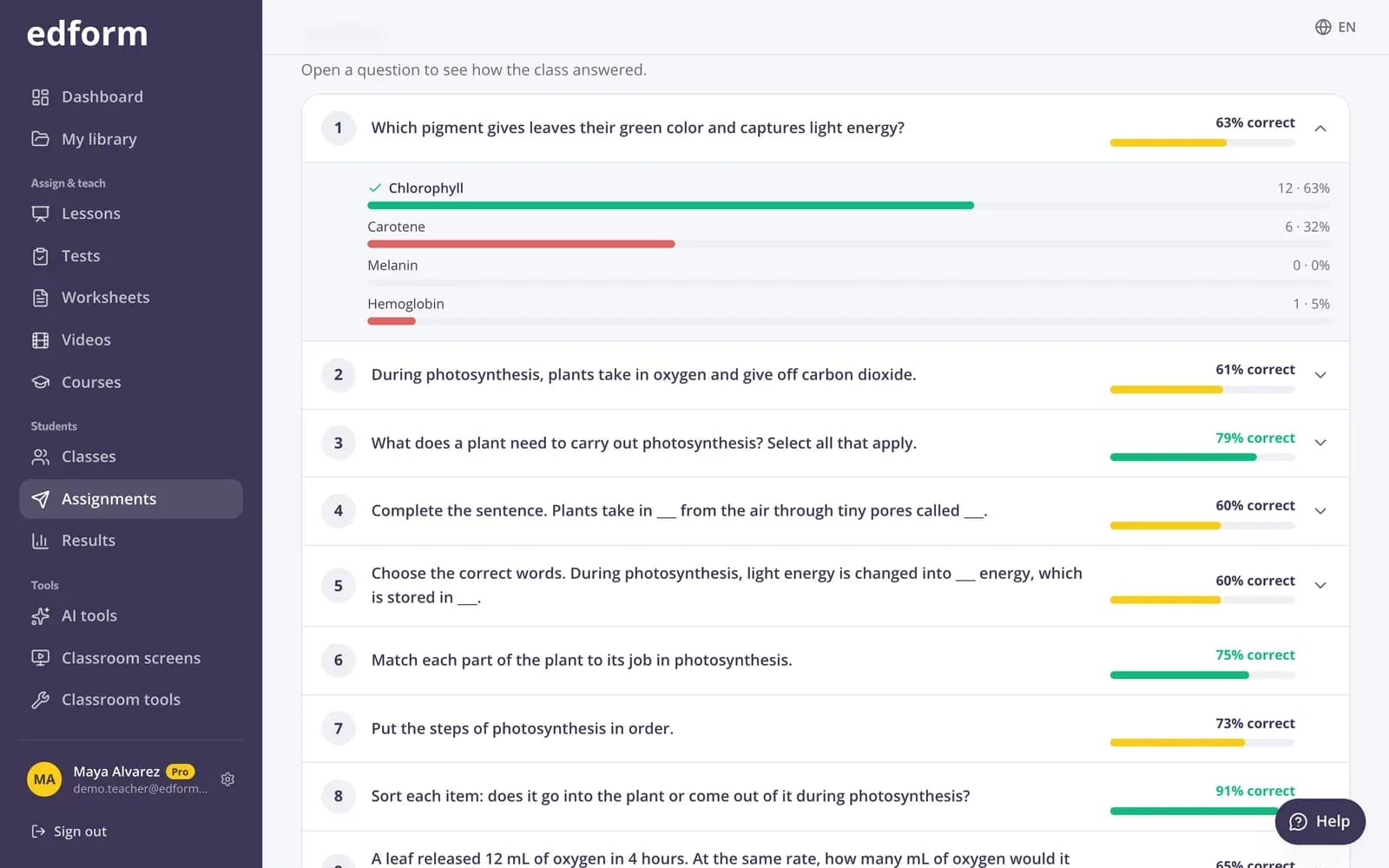
See the misconception, not just the score
Answer analysis shows how many students chose each option and the wrong answers given most often for every question.
- How many chose each option
- Most common wrong answers
- Percentage correct per question
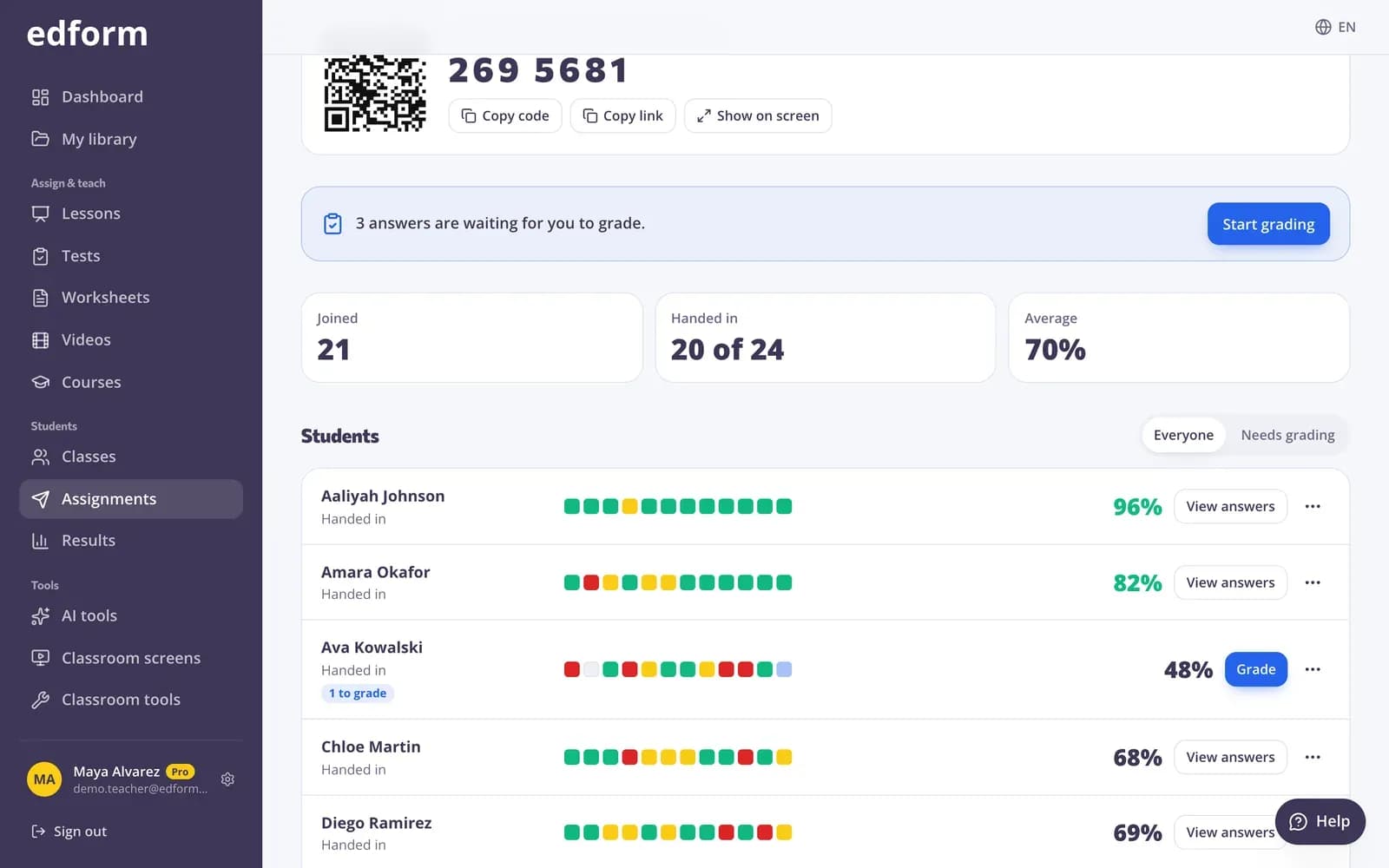
A report for planning the next lesson
Scores per student and per question in one table, with the students from your class who haven't started yet.
- Who hasn't started
- Each student's answers
- CSV export
Quick checks for every moment of the lesson
Polls and word clouds
Ask an opinion or a one-word answer and show the result on the board.
Exit tickets
A quick end-of-lesson check students answer by QR code.
Live responses
In a live lesson you see answers as they come in, then reveal the answer or ask again.
Answer analysis
Option distribution and the most common wrong answers for every question.
Retakes to fix mistakes
Students redo only what they got wrong, so feedback turns into learning.
AI question ideas
DOK questions, exit tickets and open questions written for your topic.
Teachers use formative assessment for
- 01
Hinge questions
One well-chosen question mid-lesson tells you whether to move on.
- 02
Pre-assessment
A short quiz before a unit shows what students already know.
- 03
Peer discussion
Ask, let pairs discuss, then ask again and see whether the answers change.
- 04
End-of-lesson checks
Exit tickets that show who needs a hand tomorrow.
Explore more
- Exit ticketsDigital exit tickets students answer in a minute
- Live polls & word cloudsStudents answer on their devices, results on your screen
- Quiz reportsScores per student, per question and common wrong answers
- Interactive lessonsSlides with live questions and polls
- Quiz makerAuto-graded quizzes, tests and homework
- DOK questionsQuestions and tasks for all four Depth of Knowledge levels, with expected answers.
Step-by-step guides
Frequently asked questions
What's the difference between formative and summative assessment?
Formative assessment happens during learning and guides your next teaching step; it's usually low-stakes or ungraded. Summative assessment, like a unit test, measures what students learned at the end.
Do students need devices?
Not always. Polls and exit tickets on the classroom screen can count raised hands in the room, and lessons can be shown on the board with the answers revealed together. With devices, every student answers individually.
Can I check understanding without giving grades?
Yes. Polls and word clouds aren't graded, and a short quiz can be practice: show right and wrong after each question and allow as many attempts as students like.
How quickly do I see the answers?
As students answer. In a live lesson or game the responses update on your screen within seconds, and homework results appear as soon as a student hands in.
Which question types can I use?
All of them: multiple choice, true or false, short answers, number answers, fill in the blanks, matching, ordering, sorting, open answers, polls and word clouds.
What are some examples of formative assessment?
A hinge question in the middle of a live lesson, a poll on a tricky idea, a one-word word cloud, a thumbs-up exit ticket, three warm-up questions on yesterday's lesson, a pre-assessment quiz before a new unit, or ask, let pairs discuss and ask again. You can run all of them in Edform.
How do students get feedback?
Show right or wrong straight after each question, allow retakes where students fix only their mistakes, and write feedback on open answers that students see in their results. In a live lesson you reveal the answer to the class and talk it through.
Which formative assessment tool should I use when?
A poll or word cloud for a quick read of the room, a live lesson question when you need every student's answer, an exit ticket at the end of class, and a short quiz when you want results saved for each student. Students join all of them with a code.
Is it free?
Yes. Every feature is free for teachers.
Add a quick check to your next lesson
Free for teachers. Students answer with a code, with no accounts or installs.
- Free for teachers
- No credit card
- Works on any device