


Test prep
Test prep that shows what still needs work
Build one set of review questions and use it as a timed practice test, flashcards, a review game and a printout. Retakes let students fix mistakes, and reports show what to teach again.
- Timed practice tests with retakes
- Flashcards and games from the same questions
- Free for teachers
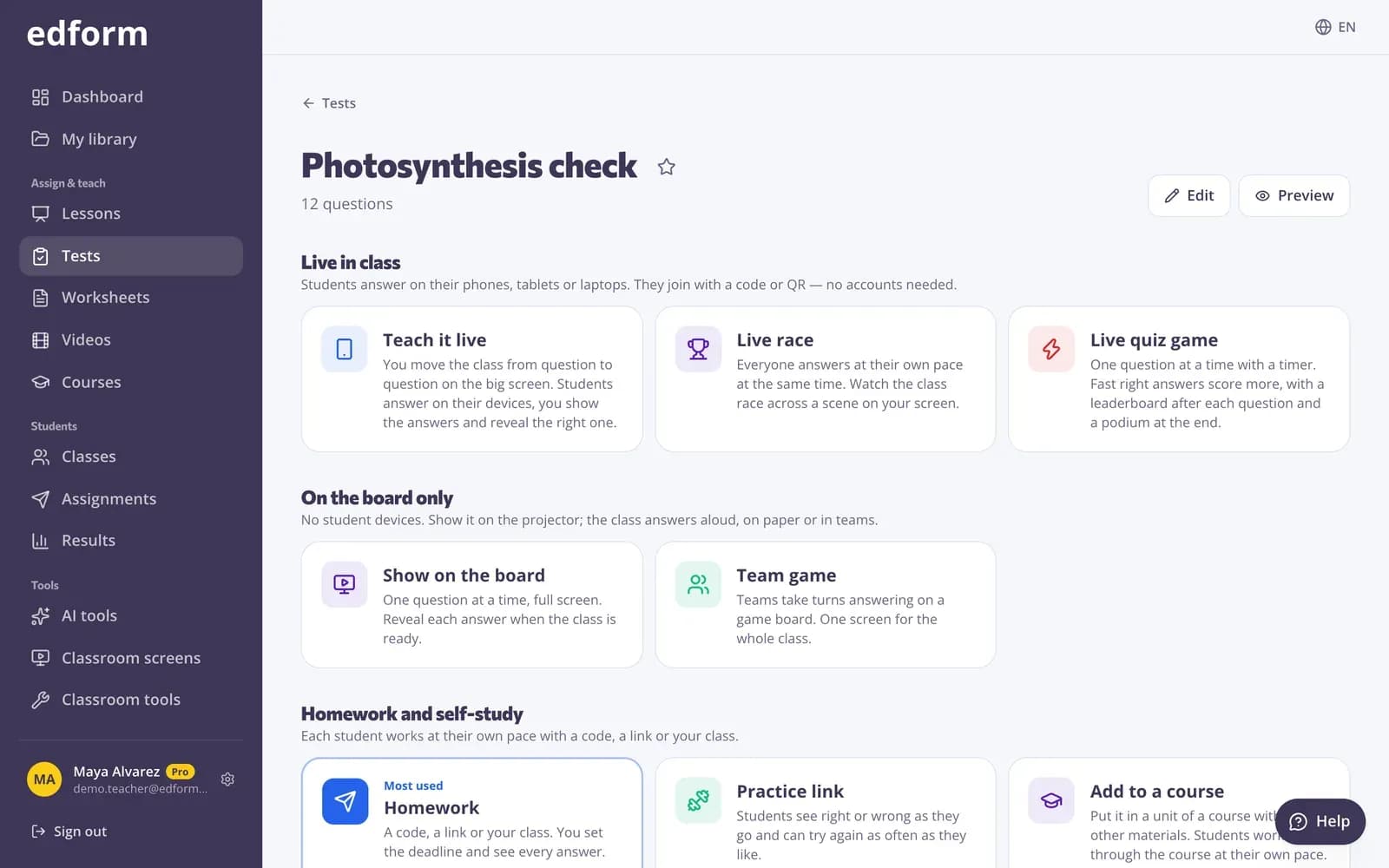
What is test prep in Edform?
Test prep is the review and practice that gets students ready for an exam. In Edform it starts with one set of review questions, written by you, copied from the community library or drafted by AI from your notes. Students take it as a timed practice test that feels like the real exam, study it as flashcards, play it as a review game and fix their mistakes in a retake. Every attempt is graded automatically, and the report shows which questions the class still gets wrong, so the last lessons before the exam go where they're needed most.
Edform at a glance
- Price
- Free for teachers: Basic is free forever, with no credit card, and includes every feature.
- AI tools
- AI teacher tools with 5 AI points a month on Basic and 300 a month on Pro.
- Students
- Students join with a code. They need no email address and no account.
- Grading
- Quizzes and worksheets are graded automatically, with results per student and per question.
- Devices
- Runs in the browser on laptops, tablets, phones and interactive boards. Nothing to install.
- Languages
- Available in 32 languages.
- Works with
- Google Classroom, Microsoft Teams, ClassLink and learning platforms that support LTI 1.3.
- Library
- A free library of ready-made quizzes, worksheets and lessons that teachers can copy and edit.
How to prepare students for a test
- 1
Collect review questions
Write them, generate them with AI from a topic, text, file or photo, or copy a quiz from the community library.
- 2
Practise in different ways
Give a timed practice test, open flashcards for self-study and play a review game in class.
- 3
Target the weak spots
Use per-question results to reteach, then give a retake where students fix only their mistakes.
Try it yourself
No sign-up needed — try it as a student
This is the real Edform player. Answer the questions and see how they're checked.
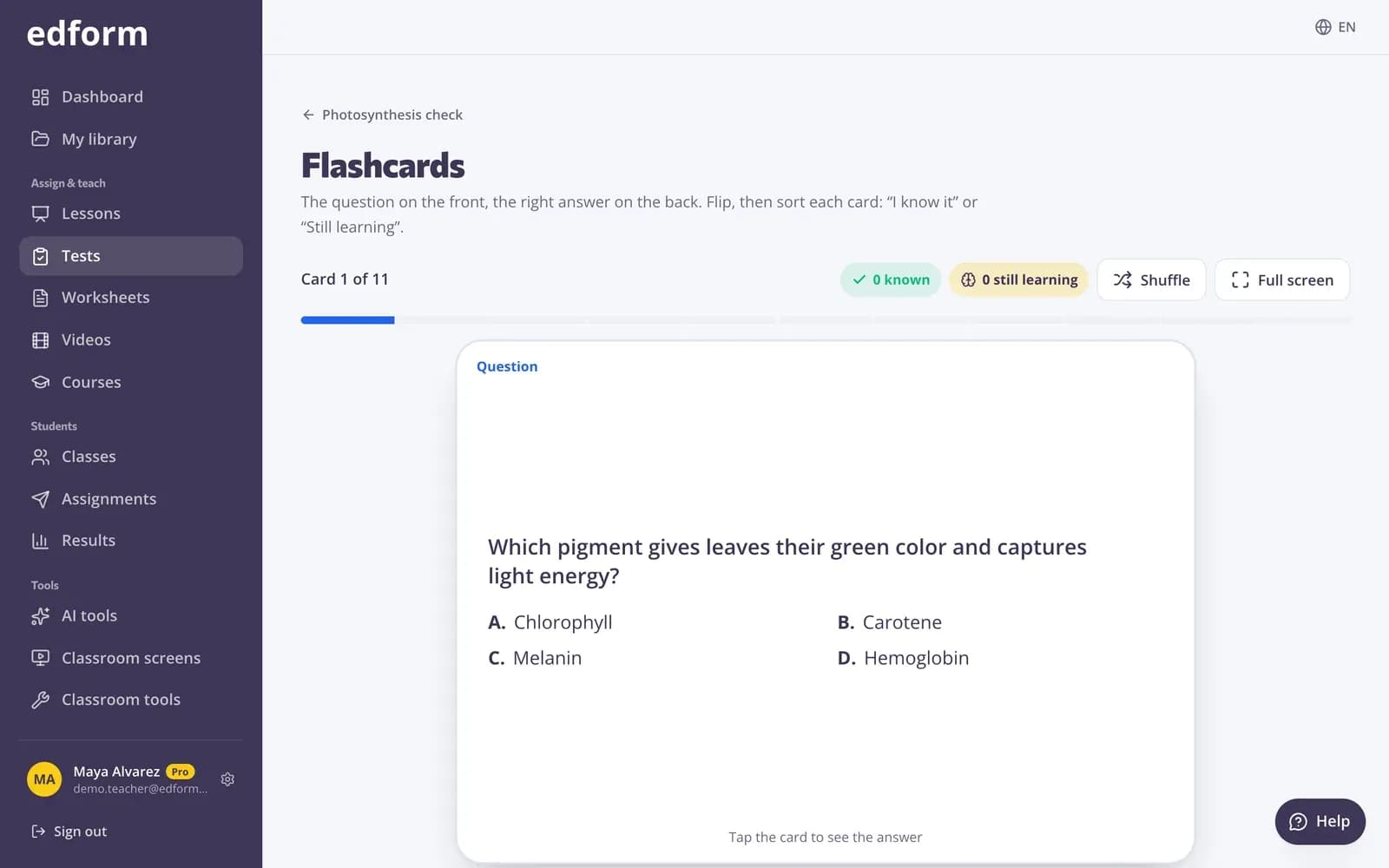
Flashcards and pairs for self-study
Turn the review quiz into flashcards students flip through, or a pairs race where they match questions and answers against the clock.
- Flashcards from any quiz
- Pairs race against the clock
- No extra preparation
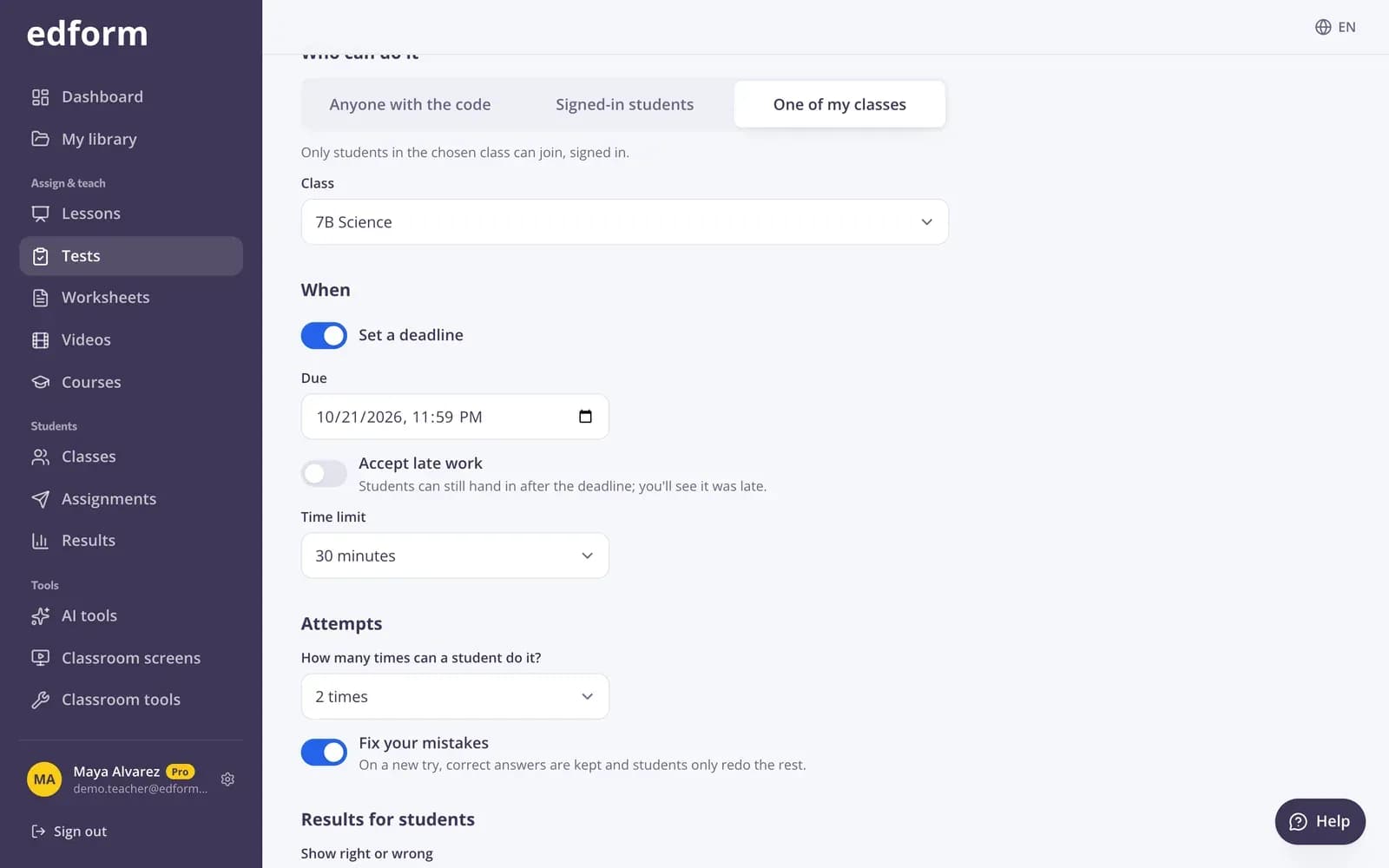
Practice tests that feel like the real thing
Set a time limit, one question per screen, shuffled questions, flags and a review page before handing in. Results can wait until after the deadline.
- Timer enforced on the server
- Flags and a review page
- Results after handing in or the deadline
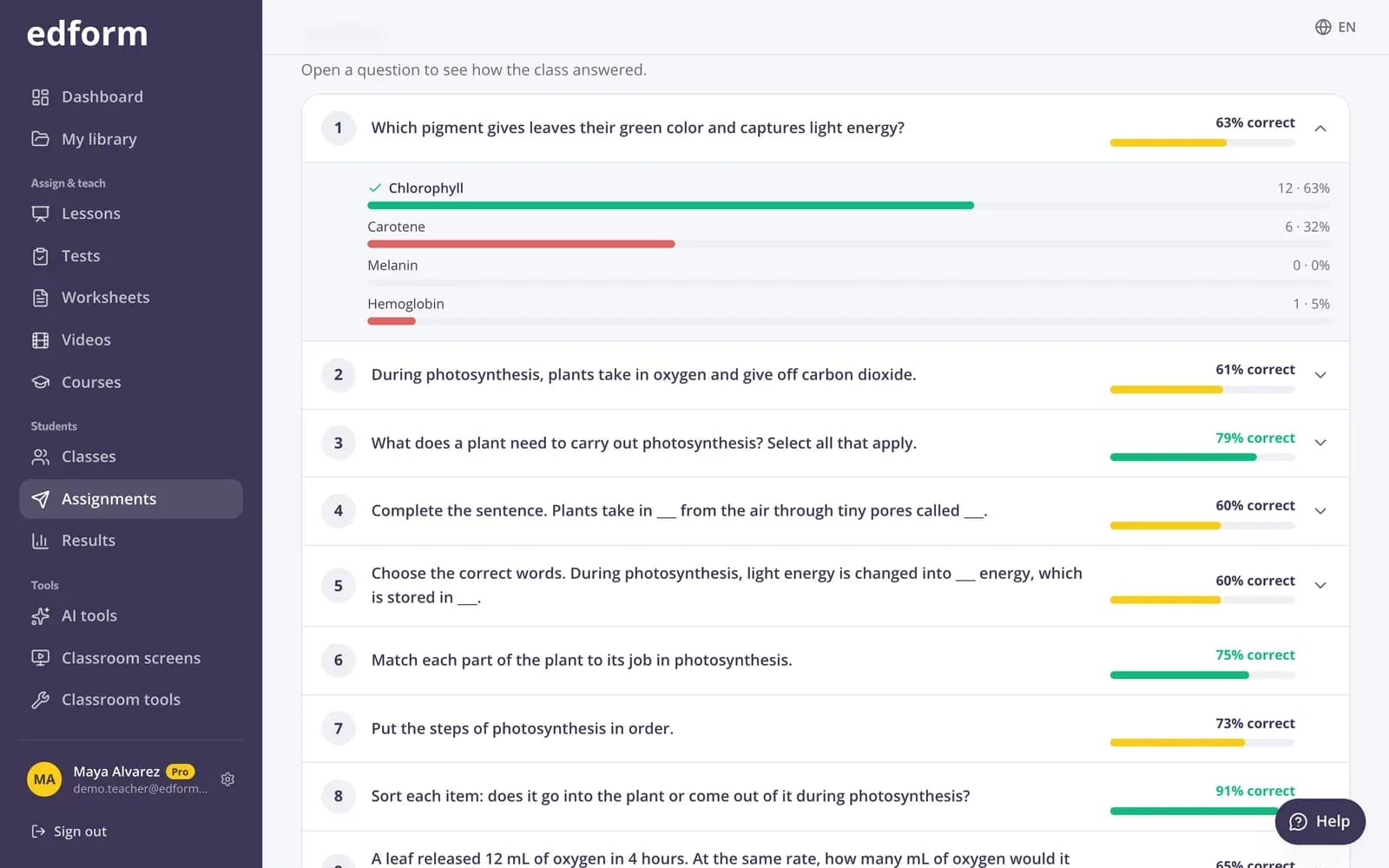
Know exactly what to review
Answer analysis shows the percentage correct and the most common wrong answers for every question, so the last review lesson targets real gaps.
- Hardest questions first
- Most common wrong answers
- Each student's answers
Everything for exam review
Timed practice tests
A time limit, shuffled questions and one attempt, just like exam day.
Fix-your-mistakes retakes
On a new try, correct answers are kept and students only redo the rest.
Flashcards and pairs
Self-study modes made from the same questions.
Review games
Live races, team games and 27 game modes for review lessons.
Printable practice tests
Print the test with an answer key for paper practice.
AI review questions
Questions from a topic, your notes, a file or a photo of a textbook page.
Teachers use Edform for
- 01
End-of-unit review
A practice quiz, a retake and a review game in the week before the test.
- 02
Mock exams
A timed, shuffled test with results released after the deadline.
- 03
Spaced review
Mixed questions on earlier topics as weekly homework.
- 04
Last-minute revision
Flashcards and a pairs race students can open on their phones.
Explore more
- Online examsTimed tests with shuffled questions and one attempt
- FlashcardsTurn any quiz into flashcards for class review
- Printable quizzesPrint any quiz with a matching answer key
- QuizA multiple-choice test on any topic, text, file or video, with an answer key.
- Game-based learningGames built from your questions that still count
- High schoolTimed tests, rubric grading and focused practice for grades 9–12
Step-by-step guides
- Create a quizMake a test with any mix of question types, preview it and use it with your class.
- Assign homeworkGive a test as homework with a code, link or QR code and set the deadline.
- Printables and flashcardsPrint worksheets and puzzles, and revise with flashcards and pairs.
- Homework reportsSee every student's score, each answer and how the class did on each question.
Frequently asked questions
How do retakes work?
Allow more than one attempt and turn on “Fix your mistakes”. On a new try, correct answers are kept and students only redo the questions they got wrong.
Can students study on their own?
Yes. Any quiz can be opened as flashcards or a pairs race, and you can allow unlimited attempts with feedback after each question.
Can I make a practice test that feels like the real exam?
Yes. Set a time limit, shuffle questions and options, allow one attempt and show results only after the deadline. Students can flag questions and check a summary before handing in.
Can AI write review questions from my notes?
Yes. The AI quiz tool writes questions from a topic, pasted text, a file or a photo. Save the result as an activity to edit it and give it to your class.
Can I print a practice test?
Yes. Print it as a worksheet with a matching answer key, or as a crossword, word search or cards.
Which test prep strategies work best?
Short, repeated practice beats one long cram session. Use low-stakes quizzes and flashcards so students recall answers from memory, mix in questions on earlier topics every week, and finish with a timed practice test in the exam format. The AI mnemonic tool writes memory tricks for facts students keep forgetting.
How can I help students with test anxiety?
Make the format familiar and the stakes low. Start with untimed practice and feedback after each question, then give a timed practice test that looks like exam day. On the day, the test day classroom screen shows the rules, a big clock and the time left.
Can I give extra time to students who need it?
Yes. From the homework report, give one student +25%, +50% or +100% extra time, another attempt or a later deadline. You can also turn on read-aloud so questions and answers are read to students.
Is it free?
Yes. Every feature is free for teachers.
Start your exam review today
Free for teachers. One set of questions, every way to practise.
- Free for teachers
- No credit card
- Works on any device