


Question types
13 question types in one quiz
Go beyond multiple choice. Mix matching, ordering, fill in the gaps, number answers and open answers in the same quiz — Edform checks the closed ones for you and gives partial credit.
- 10 types graded automatically
- Partial credit per gap, pair and row
- Free for teachers
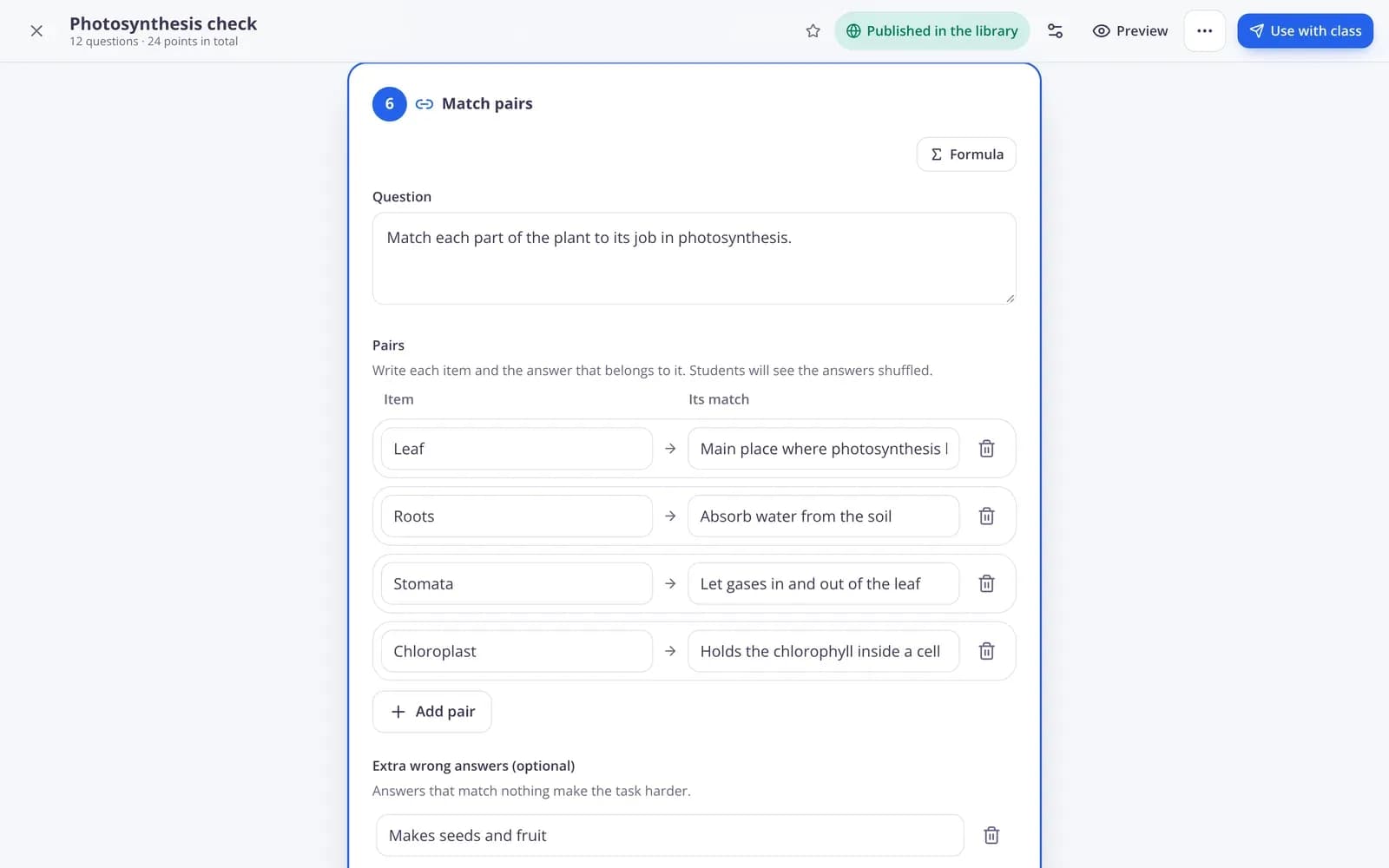
What question types does Edform have?
Edform has 13 quiz question types that work everywhere you use questions: one correct answer (with a true or false version), several correct answers, short answer, number answer, fill in the gaps, choose from a list in the text, true or false table, put in order, match pairs, sort into groups, open answer, poll and word cloud. Ten of them are graded automatically, with partial credit when a question has several parts. Open answers wait for your grade. Polls and word clouds collect opinions without a score. Every type works in quizzes, worksheets, lessons, live games and printouts.
Edform at a glance
- Price
- Free for teachers: Basic is free forever, with no credit card, and includes every feature.
- AI tools
- AI teacher tools with 5 AI points a month on Basic and 300 a month on Pro.
- Students
- Students join with a code. They need no email address and no account.
- Grading
- Quizzes and worksheets are graded automatically, with results per student and per question.
- Devices
- Runs in the browser on laptops, tablets, phones and interactive boards. Nothing to install.
- Languages
- Available in 32 languages.
- Works with
- Google Classroom, Microsoft Teams, ClassLink and learning platforms that support LTI 1.3.
- Library
- A free library of ready-made quizzes, worksheets and lessons that teachers can copy and edit.
How to add questions to a quiz
- 1
Pick a question type
Open a test and press Add a question. Each type has a one-line description, so you know what students will do before you choose.
- 2
Type the question and the answer
Tick the right option, list other spellings that should count, or allow a small difference for numbers. Add points, a hint and an explanation if you like.
- 3
Preview and use it
Try the quiz as a student in Preview, then give it as homework, play it as a game or print it.
Try it yourself
No sign-up needed — try it as a student
This is the real Edform player. Answer the questions and see how they're checked.
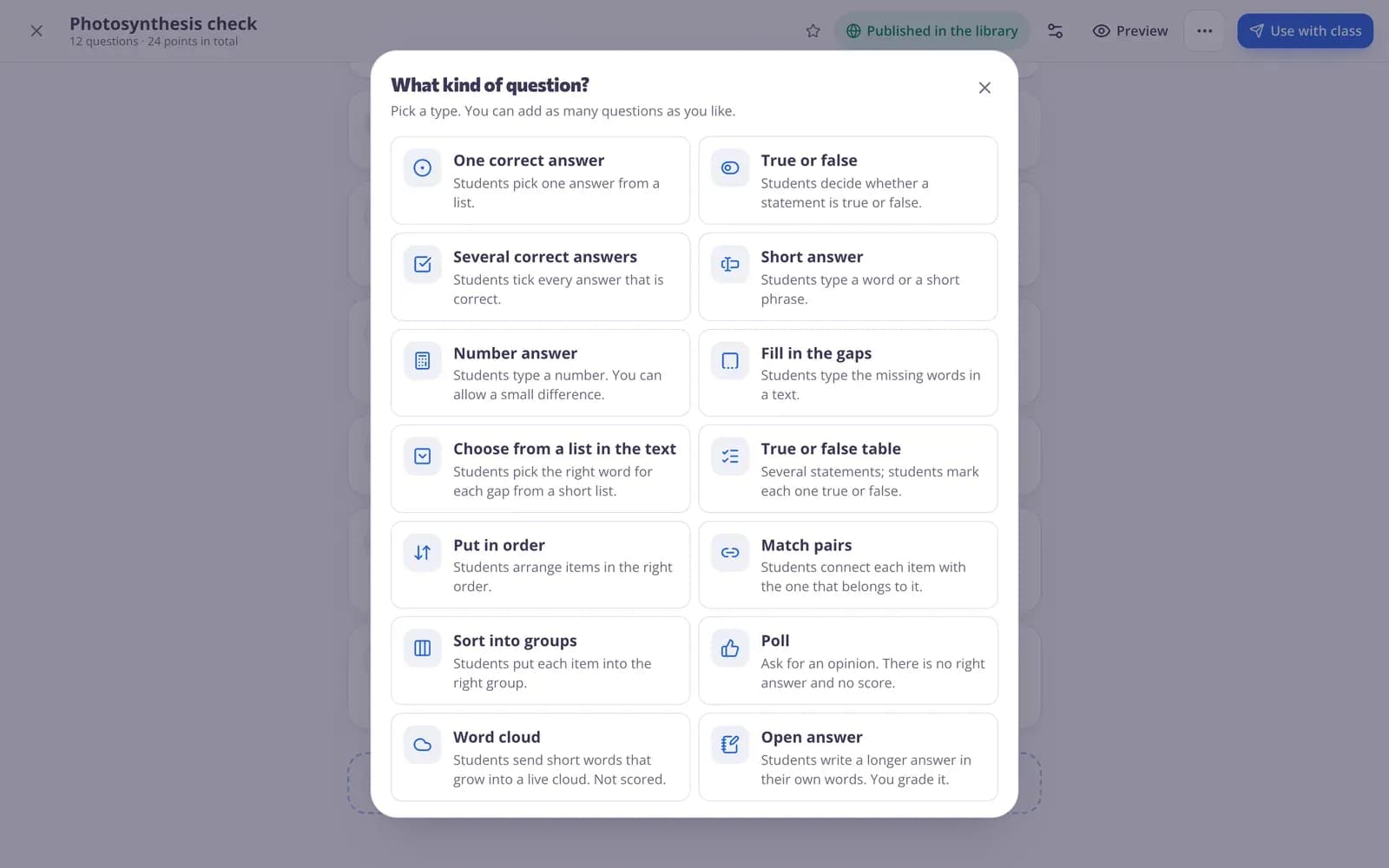
Pick from 13 ways to ask
The question picker explains every type in plain words. Choose a different type for each question and mix them freely in the same quiz.
- Choice, true or false and several correct answers
- Gaps, lists inside the text and number answers
- Ordering, matching and sorting into groups
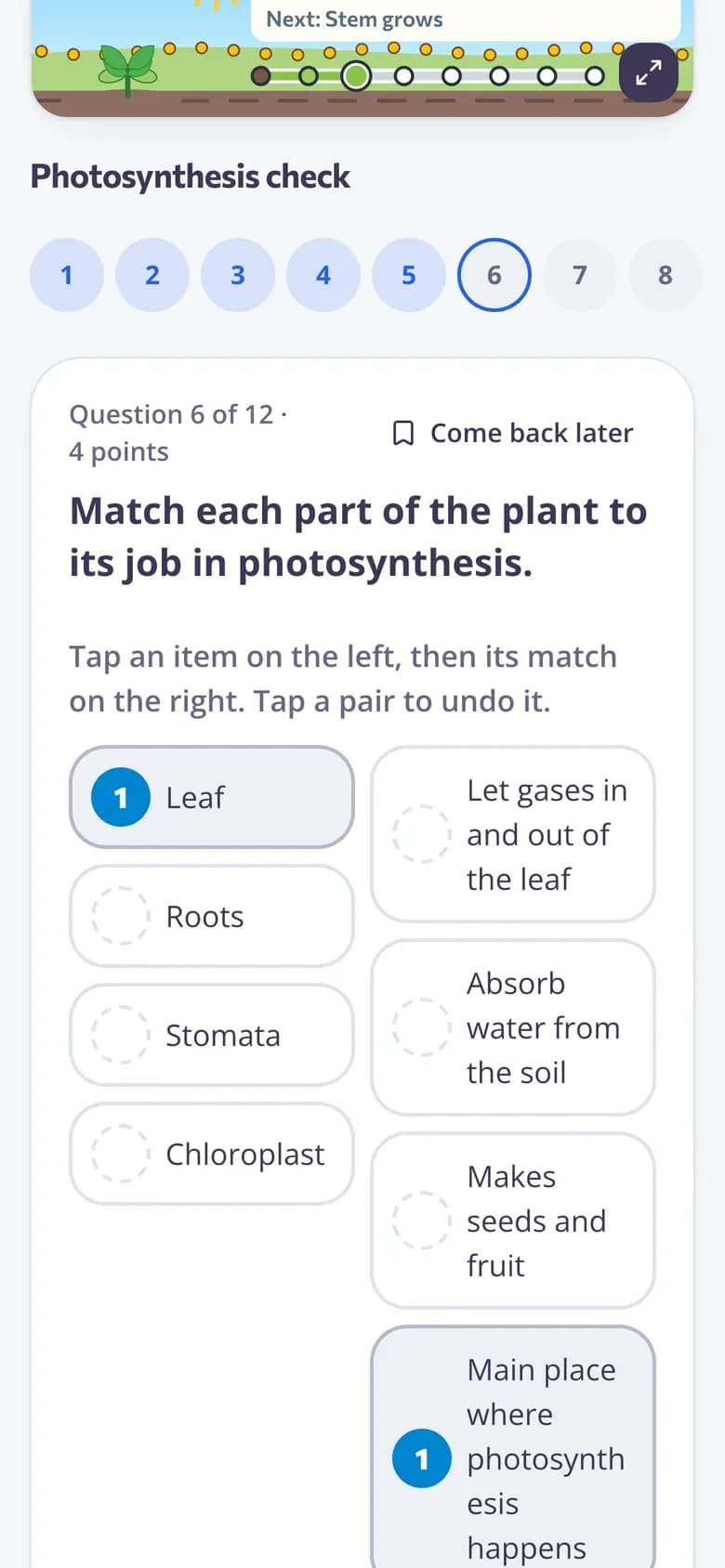
Easy to answer on any device
Each type has its own student screen with big, clear controls: put items in order, connect pairs, sort cards into groups or pick a word inside the text. Answers save as students go.
- One question per screen
- Works on phones, tablets and laptops
- Questions read aloud if you turn it on
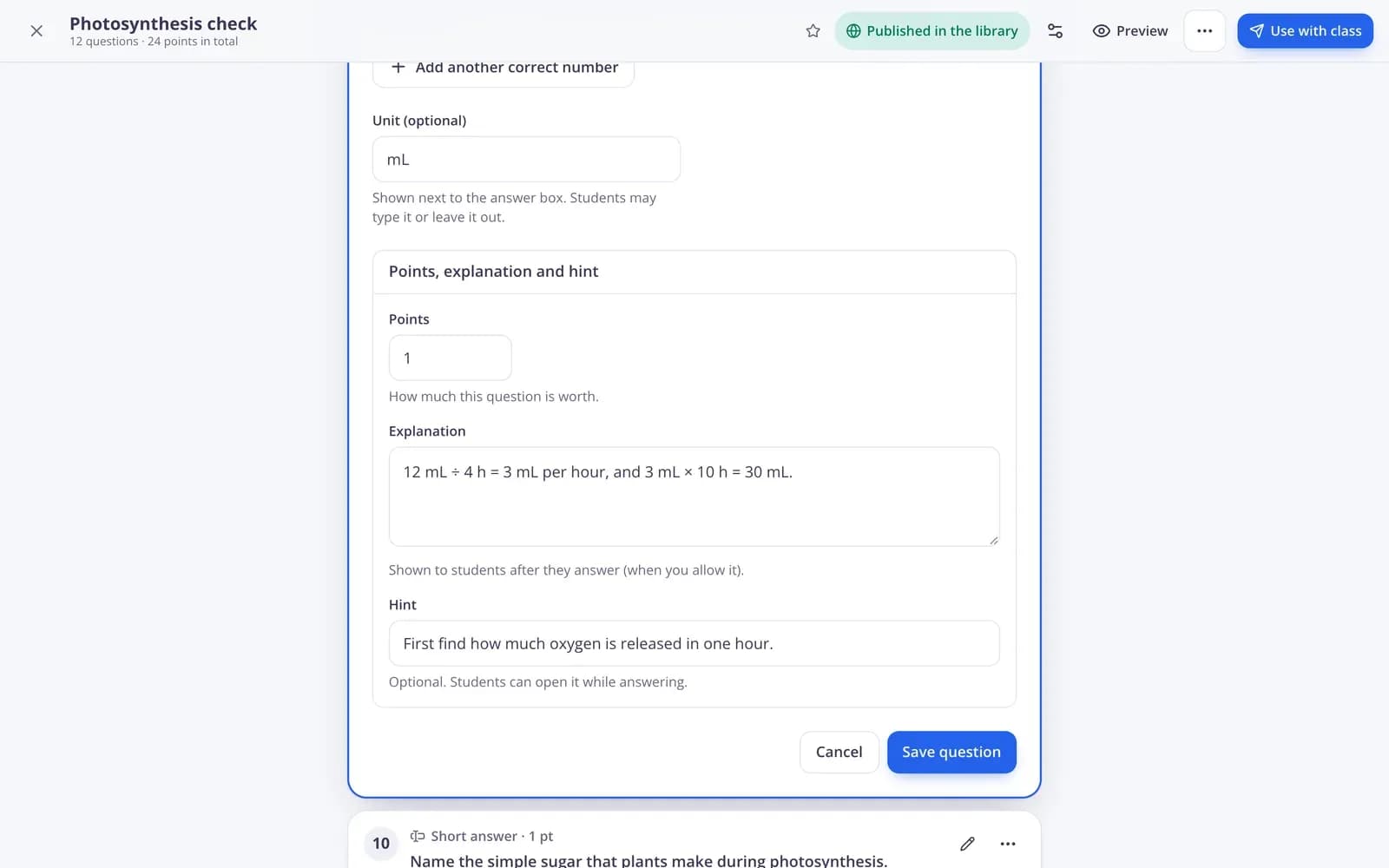
Marking rules you control
Set the points for each question, accept several spellings, and let 2.5, 2,5 and 5/2 count the same. For multiple answers and ordering, choose partial points or all or nothing.
- Points, hint and explanation per question
- Other accepted answers
- Partial points or all or nothing
What makes the question types teacher-friendly
Closed questions grade themselves
Ten types are checked the moment students answer, so you only read the open answers.
Partial credit
Two gaps right out of three earns two thirds of the points — per gap, pair, row and item.
Forgiving where it should be
Capital letters, extra spaces and a full stop at the end don't cost points unless you want them to. Accents still count.
Number answers
Students can type whole numbers, decimals with a dot or a comma, or fractions. Add an allowed difference and a unit.
Open answers with a checklist
Students write in their own words with an optional word limit; you grade with a checklist of criteria and feedback.
Polls and word clouds
Ask for opinions with no right answer and no score, and show the class what everyone thinks.
Teachers use them for
- 01
Language lessons
Fill in the gaps and lists inside the text for grammar, match pairs for vocabulary.
- 02
Maths
Number answers that accept fractions and decimals, with an allowed difference for measurements.
- 03
Science and history
Put steps or events in order and sort examples into the right groups.
- 04
Discussion
Open a topic with a poll or a word cloud and close it with an open answer.
Explore more
- Quiz makerAuto-graded quizzes, tests and homework
- Auto-gradingClosed answers checked the moment students hand in
- Rubric gradingGrade open answers with a checklist and feedback
- Live polls & word cloudsStudents answer on their devices, results on your screen
- PDF to interactive worksheetUpload a PDF, add answer boxes, it marks itself
- QuizA multiple-choice test on any topic, text, file or video, with an answer key.
- Fill in the blank generatorPaste a text and get a printable fill-in-the-blank worksheet with a word bank and an answer key.
- Sentence scramble generatorType sentences and get a printable worksheet where students put the mixed-up words in order.
Frequently asked questions
How many question types does Edform have?
13: one correct answer (with a true or false version), several correct answers, short answer, number answer, fill in the gaps, choose from a list in the text, true or false table, put in order, match pairs, sort into groups, open answer, poll and word cloud.
Can I mix question types in one quiz?
Yes. A quiz can hold any mix of types, and the whole quiz still works as homework, in a live game, in the game modes and on paper.
Which question type should I use?
Pick the type that matches what you want to check. Facts: one correct answer or true or false. Spelling and vocabulary: short answer or fill in the gaps. Steps and timelines: put in order. Terms and definitions: match pairs. Classifying: sort into groups. Reasoning: an open answer with a checklist. Opinions: a poll or a word cloud.
Which question types are graded automatically?
Every type with a right answer — ten of them. Open answers are graded by you, and polls and word clouds have no right answer and no score.
Can students get partial credit?
Yes. Gaps, pairs, rows of a true or false table, items to sort and items to order each earn their share of the points. You can switch multiple answers and ordering to all or nothing.
Can AI write the questions for me?
Yes. The AI quiz generator drafts questions from a topic, a text, a file or a video — including ordering, matching, gaps and sorting — and you save them as a quiz to edit.
Do the question types work in worksheets too?
Yes. On an uploaded worksheet you draw boxes to write, type a number, choose, tick, drag and drop, join with lines or write a long answer, and any other type sits on the page as a question button.
Write a quiz with any mix of questions
Free for teachers. Edform grades the closed questions, so you only read the open ones.
- Free for teachers
- No credit card
- Works on any device