


Substitute teacher
Substitute teacher plans that keep your class on track
Leave a clear plan, a screen with the day's routine and work that grades itself, so the substitute can teach and you can see what students did when you're back.
- AI sub plans in minutes
- Work that grades itself while you're out
- Free for teachers
What are substitute teacher resources?
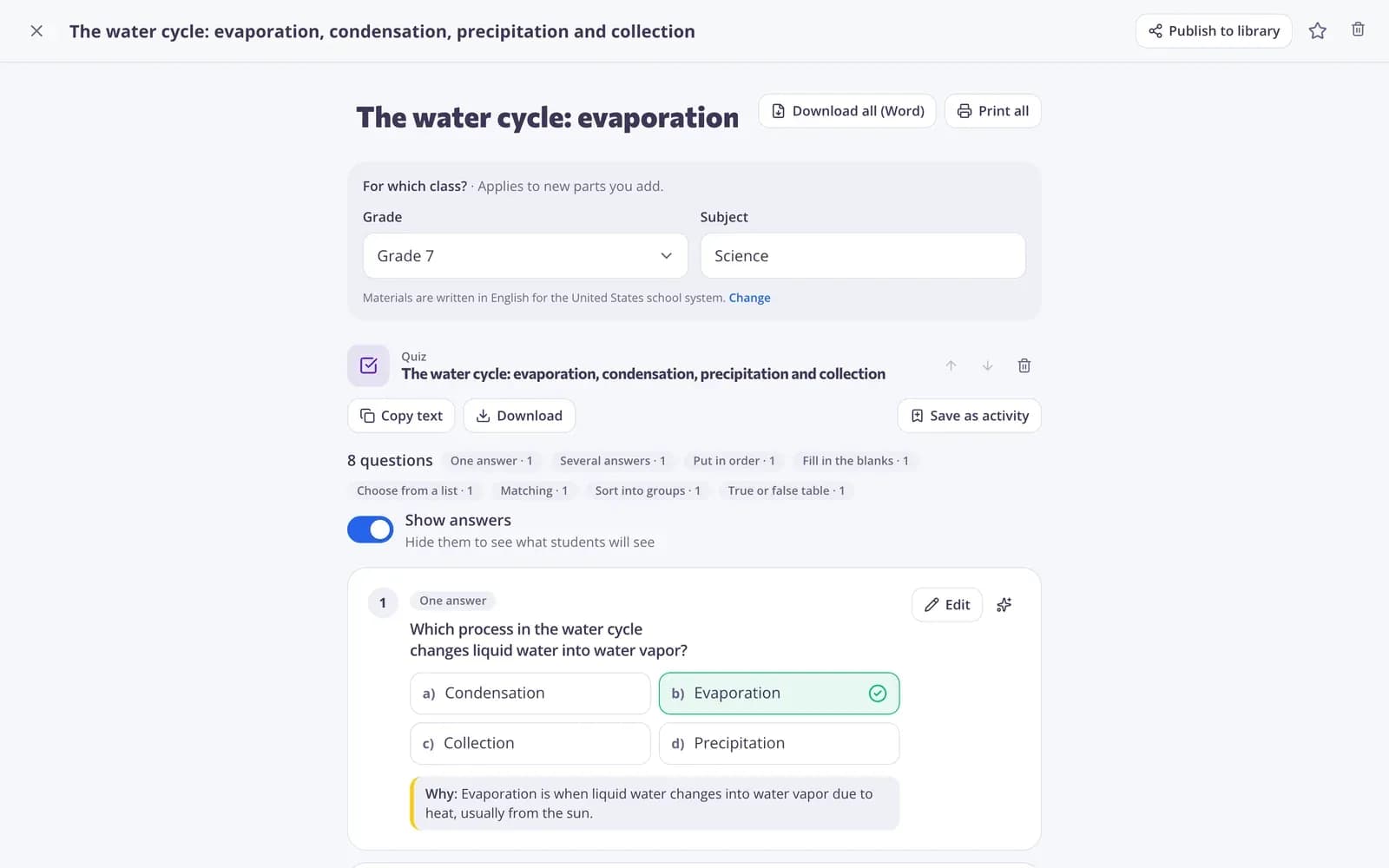
Substitute teacher plans and resources give a cover teacher what they need to run your class smoothly: a clear plan, familiar routines and work students can do without you. Edform helps you prepare them in minutes. The AI sub plan tool writes an easy-to-follow plan with routines, tasks and an answer key. Share a classroom screen set with the day's agenda and timers by link. Give quizzes, worksheets or video lessons as homework with a deadline, so the work is graded when you return. Simple tools like the timer and name picker need no account.
Edform at a glance
- Price
- Free for teachers: Basic is free forever, with no credit card, and includes every feature.
- AI tools
- AI teacher tools with 5 AI points a month on Basic and 300 a month on Pro.
- Students
- Students join with a code. They need no email address and no account.
- Grading
- Quizzes and worksheets are graded automatically, with results per student and per question.
- Devices
- Runs in the browser on laptops, tablets, phones and interactive boards. Nothing to install.
- Languages
- Available in 32 languages.
- Works with
- Google Classroom, Microsoft Teams, ClassLink and learning platforms that support LTI 1.3.
- Library
- A free library of ready-made quizzes, worksheets and lessons that teachers can copy and edit.
How to prepare for a substitute with Edform
- 1
Write the plan
Tell the AI sub plan tool your grade, subject and what the class is working on, then edit and print the plan.
- 2
Prepare the work
Give a quiz, worksheet or video lesson as homework with today's deadline, and put the code in the plan.
- 3
Check it when you're back
Open the report to see who finished, what they got right and which answers need grading.
Try it yourself
Run your room from the board
These are the real classroom widgets. Click around — nothing is saved.
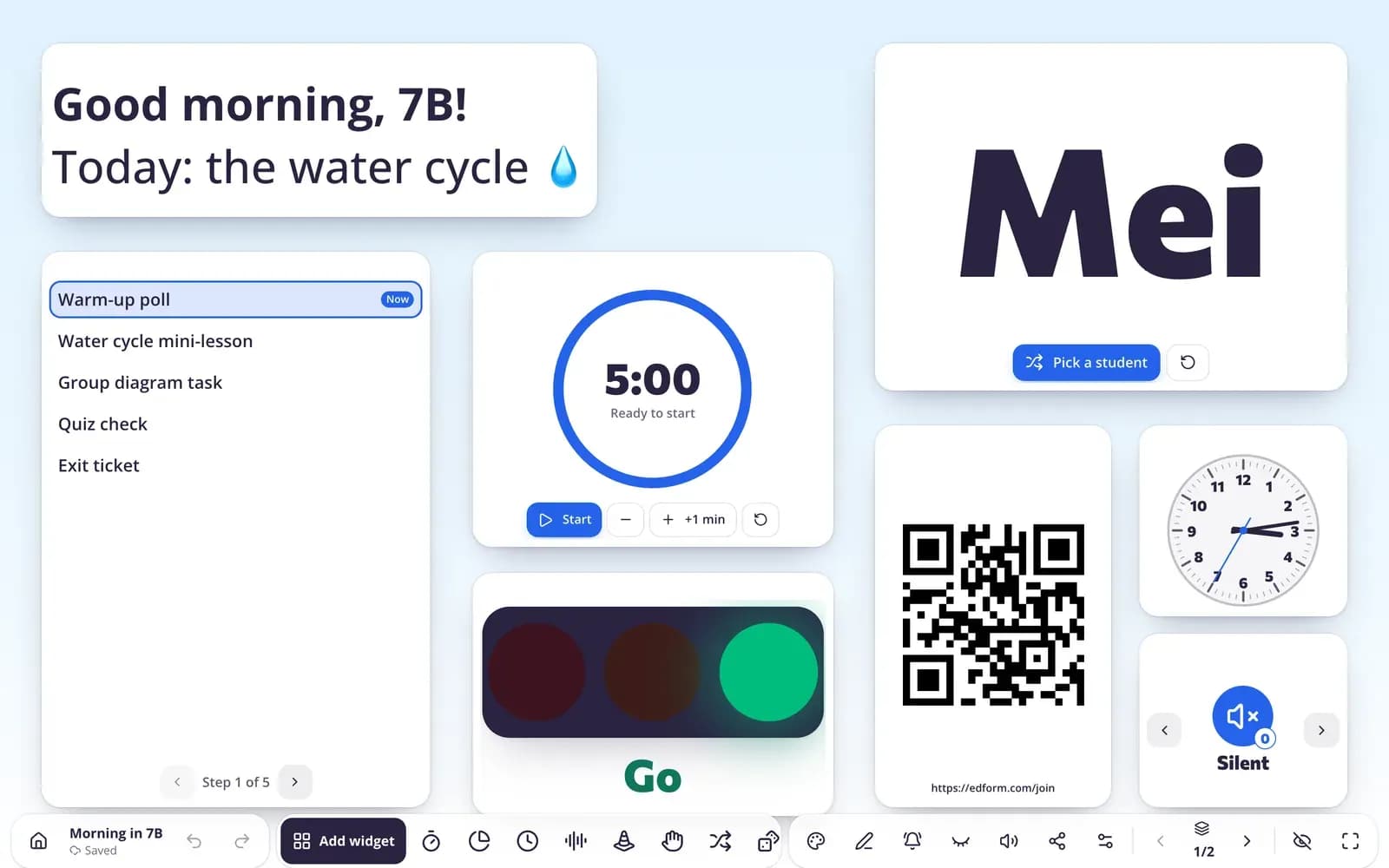
A screen the substitute can open
Share a screen set by link so a colleague can open it and use a copy, or start from the substitute-day templates with the agenda, timers and instructions.
- Share by link; names stay private
- Substitute-day templates
- Timer and name picker on the board
Work with clear rules
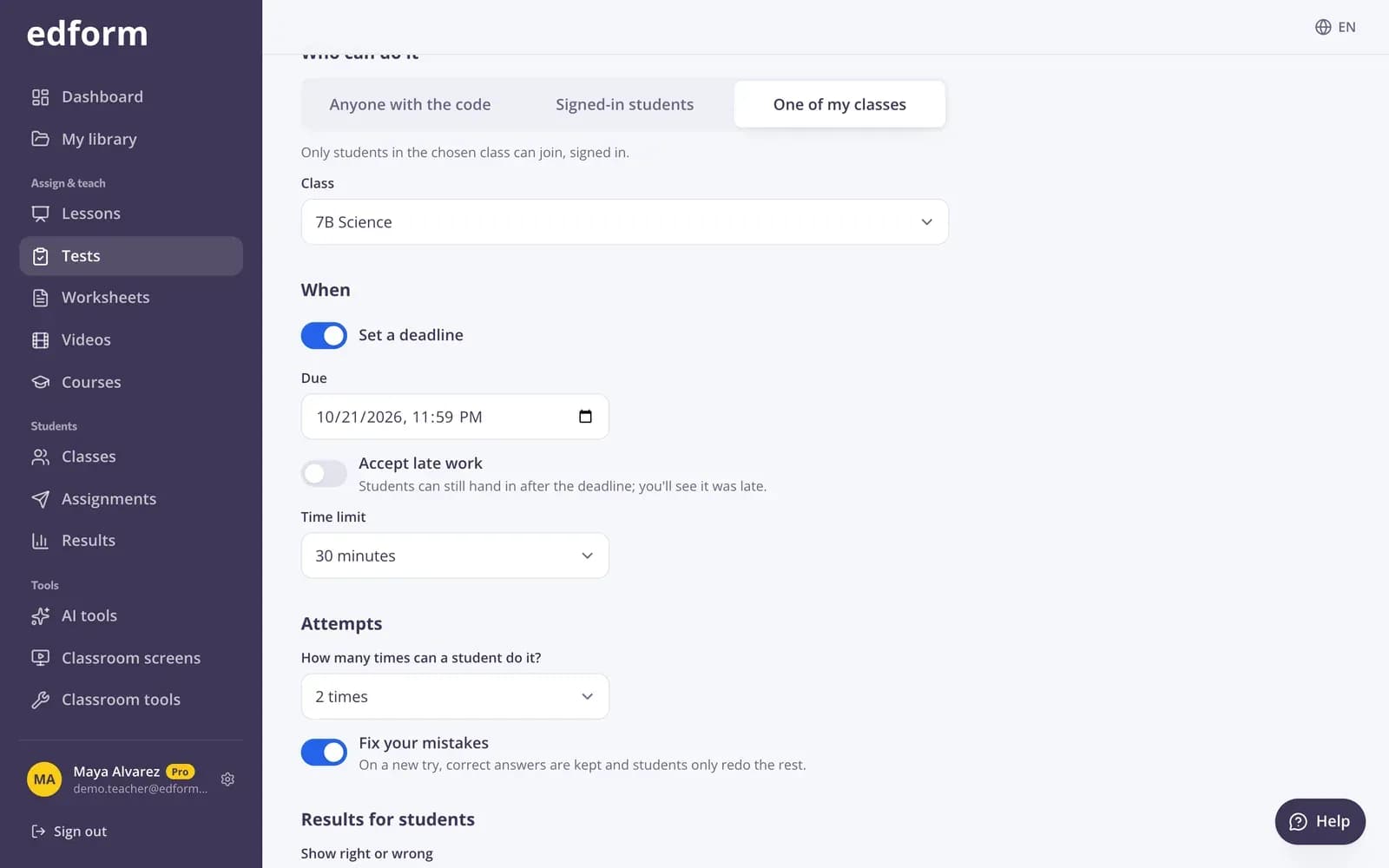
Set a deadline, attempts and when students see the answers. Students join with a code, so the substitute only needs to put it on the board.
- Deadline and late work
- Graded automatically
- Results waiting for you
Everything for a smooth sub day
AI sub plans
Routines, tasks and an answer key in an easy-to-follow plan.
Classroom screens
The agenda, timers and instructions ready on the projector.
Share by link
Colleagues open your screen set and use a copy; student names stay private unless you share them.
Homework with a deadline
Self-graded work students do in class or at home.
Tools without an account
The timer, name picker and noise meter open in any browser.
Results when you're back
Scores and answers for every student, and open answers waiting to be graded.
Teachers use Edform for
- 01
Planned absences
A plan, a screen and a quiz ready days before a training or trip.
- 02
Sudden sick days
Keep an emergency sub plan in your materials and send the code in the morning.
- 03
Covering a colleague's class
Open their shared screen and run the activities they planned.
- 04
Independent work days
Video lessons and worksheets students can do on their own.
Explore more
- Substitute planEasy-to-follow plans for a cover teacher, with routines, tasks and an answer key.
- Substitute day screenA board that runs the day for a sub
- Classroom timerA big countdown timer and stopwatch for the projector, with a sound when time is up.
- Online homeworkGive homework with a code and a deadline
- Classroom managementNoise meter, timers and routines on the board
- No-device classroomGames, lessons and printables with one projector
Frequently asked questions
What should a sub plan include?
The schedule, routines and rules, where materials are, the tasks with clear instructions and timings, an answer key, and what to do if students finish early. The AI sub plan tool builds all of this from your notes.
Does the substitute need an Edform account?
Not for the classroom tools like the timer and name picker. To open a screen set you shared by link, they need a free teacher account. Students join homework with the code.
Can students do the work if the substitute doesn't know Edform?
Yes. Put the code in your plan. Students go to the join page, type the code and their name, and the work grades itself.
Can I prepare an emergency sub plan in advance?
Yes. Every AI result is saved in your materials, so you can write a general plan now, keep a quiz ready and send the code when you need it.
Will I see what students did?
Yes. The report shows who finished, every answer and the score, and open answers wait for you to grade them.
How do I put together a sub binder?
Print the AI sub plan, your seating chart and name tent cards, and add a printed worksheet with its answer key as a backup if the technology fails. Put the link to your shared screen set and the activity codes on the first page.
How can a substitute keep the class calm?
Leave the routine on the board: the day plan, a timer, work symbols and the noise meter. The substitute-day classroom screen templates come ready for every age group, from Pre-K to high school.
Is it free?
Yes. Every feature is free for teachers.
Get your sub plan ready
Free for teachers. Plan, screen and self-graded work in one place.
- Free for teachers
- No credit card
- Works on any device