


For schools
One teaching platform for your whole school
Teachers get quizzes, games, lessons, AI and classroom tools in one place. You invite them by email, manage seats from one page and reach families with digital flyers.
- School plan from 5 teachers, seats you can move
- Google sign-in or usernames without email
- Every teacher can start free today
What is Edform for schools?
Edform is a learning platform for schools that adds a school plan to its free teaching tools. A school buys seats for five or more teachers, invites them by email and manages everyone from one page: give a seat, take it back and pass it to a new colleague. Teachers keep using the same tools for quizzes, worksheets, games, lessons, video and AI. Students sign in with Google, Microsoft or a username from their teacher, and the school can run a flyer board that emails families news for their child's grade.
Edform at a glance
- Price
- Free for teachers: Basic is free forever, with no credit card, and includes every feature.
- AI tools
- AI teacher tools with 5 AI points a month on Basic and 300 a month on Pro.
- Students
- Students join with a code. They need no email address and no account.
- Grading
- Quizzes and worksheets are graded automatically, with results per student and per question.
- Devices
- Runs in the browser on laptops, tablets, phones and interactive boards. Nothing to install.
- Languages
- Available in 32 languages.
- Works with
- Google Classroom, Microsoft Teams, ClassLink and learning platforms that support LTI 1.3.
- Library
- A free library of ready-made quizzes, worksheets and lessons that teachers can copy and edit.
How to set up Edform for your school
- 1
Create your school
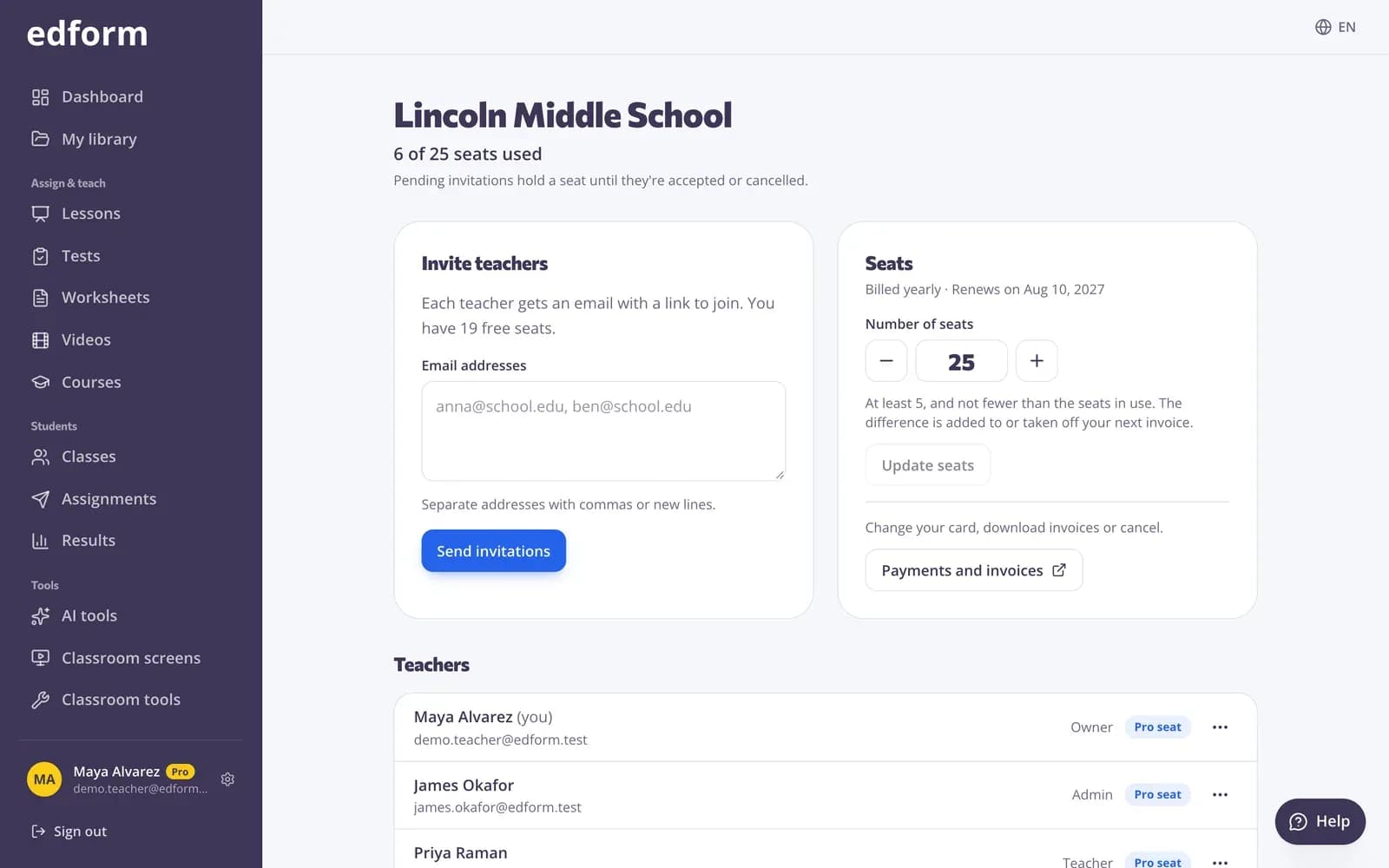
Choose the number of teachers (from 5), pay monthly or yearly, and your school page opens with you as the owner.
- 2
Invite your teachers
Paste a list of email addresses. Each teacher gets a link that works for 30 days and reserves a seat until they join.
- 3
Teach, and reach families
Teachers create classes and activities straight away. Set up a flyer board so families get school news by email.
Try it yourself
No sign-up needed — try it as a student
This is the real Edform player. Answer the questions and see how they're checked.
Invite your staff in one go
Paste the email addresses of your teachers and send the invites. You see who has joined and who is still pending, and you can copy an invite link or cancel an invite at any time.
- Invite many teachers at once
- Each invite reserves a seat for 30 days
- Owners and admins manage the school
Digital flyers for families
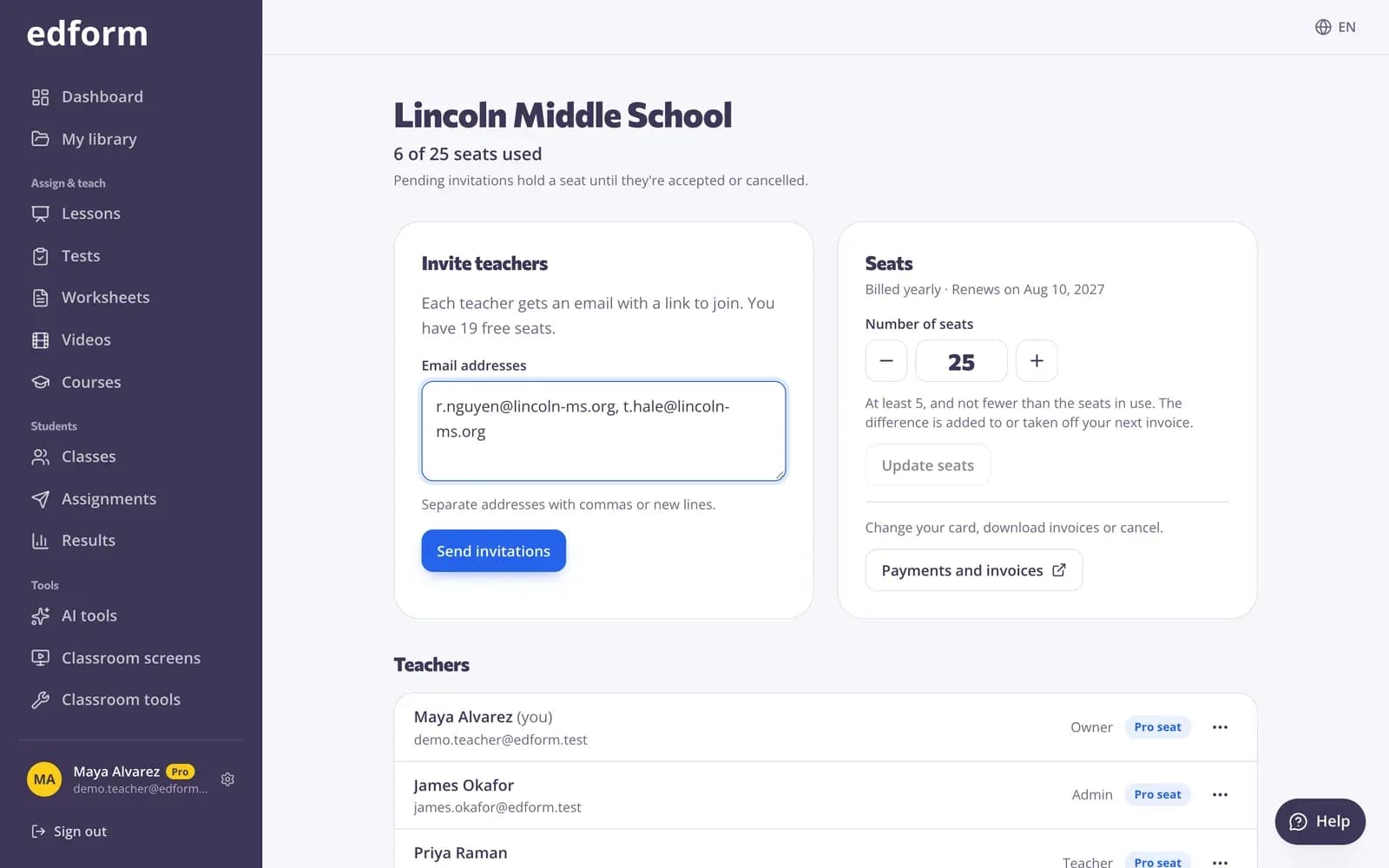
Give your school a flyer board. Staff post flyers straight away, community groups wait for your approval, and families get new flyers by email for the grades they chose.
- Review queue for community flyers
- Emails by grade on the start date
- Views and clicks for every flyer
Classes and rosters without the busywork
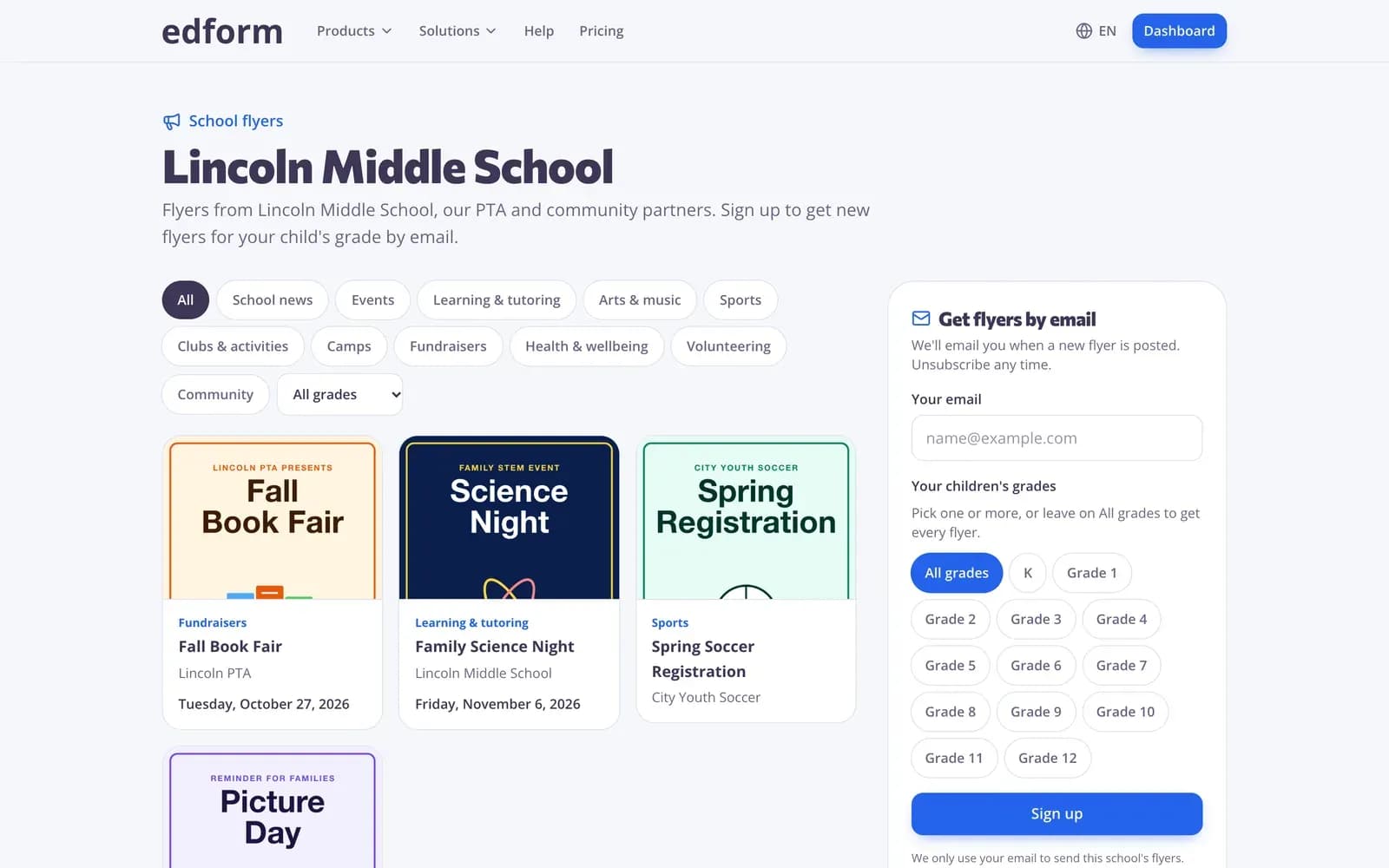
Teachers paste a list of names or upload a CSV file. Students without an email address get a username and password their teacher can print.
- Paste names to build a class
- CSV import and export
- Teachers reset student passwords themselves
What schools get
Seats you can move
Give a seat to a teacher, take it back when they leave and give it to someone else. Add seats when you need them.
Invites by email
Invite many teachers at once. Each invite holds a seat until it's accepted or cancelled.
Sign-in your students already use
Google or Microsoft sign-in, or usernames without email.
Class lists in seconds
Teachers paste names or upload a CSV, and export the roster any time.
School flyers
A public flyer board, family sign-up by grade, approvals and a printable poster with a QR code.
Community library
Teachers publish their best activities and copy ready-made ones from other teachers.
Schools use Edform for
- 01
One toolkit for every classroom
Teachers share one platform for quizzes, games, lessons and AI instead of separate tools for each.
- 02
Staff changes
When a teacher leaves, move their seat to the new colleague in a few clicks.
- 03
Family communication
Send event flyers and news to families by grade, with sign-up and unsubscribe handled for you.
- 04
Supporting teachers with AI
Lesson plans, rubrics and parent letters written for your language and school system.
Explore more
- IntegrationsGoogle Classroom, Microsoft Teams, LMS (LTI)
- Google ClassroomImport classes and share homework to Classroom
- Microsoft TeamsSign in with Microsoft, import Teams classes and assign in Teams
- ClassLinkSign in with ClassLink and import classes from your roster
- PricingFree for teachers, plans for schools
- School flyersDigital flyers for families
- Student logins without emailUsernames and passwords for students without email
Step-by-step guides
- School planBuy Pro seats for your school, invite teachers and move seats between them.
- Invite teachersShare your invite link with colleagues and both of you get a week of Pro.
- Student loginsCreate usernames and passwords for students without email and help them sign in.
- Microsoft TeamsSign in with Microsoft, import Teams classes, keep them in sync and assign in Teams.
- ClassLinkSign in with ClassLink, import classes from your school's roster and keep them in sync.
Frequently asked questions
Do teachers need the school plan to use Edform?
No. Every teacher can sign up and use every feature for free. The school plan is for schools that want to pay for their teachers in one place and manage them together.
How do school seats work?
You buy seats for 5 or more teachers, monthly or yearly at the same price per month. You can take a seat back, give it to another teacher or add seats at any time. An invite that hasn't been accepted yet holds a seat.
Which sign-in options can students use?
Google accounts, Microsoft school accounts, an email and password, or a username and password without email that their teacher creates.
Can we import our rosters?
Yes. Teachers import classes from Google Classroom or Microsoft Teams in one click, or paste names or upload a CSV file. Students without email get a username and password straight away.
What are school flyers?
A free flyer board for your school. Staff and community groups post flyers, you approve the community ones, and families who sign up get new flyers by email for their child's grades.
How does Edform protect student data?
Edform has no ads and no tracking cookies, and student data is never used to train AI. Students can't upload files, use AI tools, publish or message anyone, and data is stored in Germany. Our student privacy page explains how we handle FERPA, COPPA and GDPR.
Can teachers use AI without sharing student work?
Yes. AI tools are for teachers only and write drafts from what the teacher types or uploads. Student answers are never sent to an AI service: closed questions are graded by fixed rules, and open answers are graded by the teacher.
Can teachers build full online courses?
Yes. A course puts a teacher's quizzes, worksheets, lessons, videos and texts into units. Give it to a class or share a code, and a progress table shows each student's results block by block.
How do we pay?
By card through a secure checkout, monthly or yearly. Invoices are in your school's name, and you can update the card or download invoices from the billing portal.
Does Edform work with Google Classroom and Microsoft Teams?
Yes. Teachers import their Google Classroom or Microsoft Teams classes, share homework to Classroom or assign it in Teams, and students sign in with their school Google or Microsoft accounts. If your school allows only approved apps to read class rosters, your Google Workspace or Microsoft 365 administrator approves Edform once.
Google Classroom is a trademark of Google LLC. Microsoft and Microsoft Teams are trademarks of the Microsoft group of companies.
Set up Edform for your school
Start with 5 teachers and add more any time. Teachers can also start free on their own today.
- Free for teachers
- No credit card
- Works on any device